

- Build in the crate
- 2.1.5
- Made by the team at
- Xfer
- Menu languages offered
- English
- How you pay for it
- k'ed by Team V.R
- macOS it plays on
- macOS 10.13 or later
- CPU it runs on
- Apple Silicon, Intel 64-bit
Screenshots
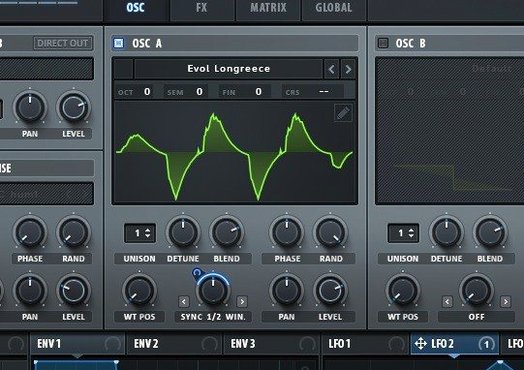
Serum is a wavetable synthesizer plugin for macOS, and Serum 2 takes that concept further with more sound-shaping tools than ever. If you've just installed it, here's where to start.
- Stack an oscillator. Open the OSC tab and set one oscillator to stack up to 16 voices. Layer octaves or detuned copies to make a single note sound huge.
- Try Unison Warp. Turn up the unison voices, then play with the Warp knob to change how those voices spread. It's quick and gives instant movement.
- Switch filter types. Serum 2 has dual filters, so you can control or morph between two types. Start with a classic low-pass and a comb filter, then automate the blend.
- Explore the note-tracking effects. Flangers, phasers, and comb filters can follow the note you play, so the effect shifts with pitch rather than staying static.
- Use the LFOTool-style filters. If you know LFOTool, these filters feel familiar. Set a rhythmic filter pattern and let it drive a pad or bass.
Start with these and you'll quickly feel how Serum 2 blends wavetable, FM, and filter tricks into one plugin. The interface is all English, and it runs on macOS 10.13 or later.
Starting with 4 unison voices instead of 16
Serum 2 is deep, and it's easy to go wrong at first. Here are the usual stumbles.
- Overloading the unison voices. Stacking 16 voices with full unison warp sounds exciting, but it eats headroom fast. Start with 4 or 6 voices and add warp gradually, or the mix turns muddy before you've added anything else.
- Ignoring the wavetable position. Many newcomers leave the WT Pos knob at zero and never move it. Serum 2's whole point is morphing through wavetables, so automate or modulate that position. A static wavetable is a waste.
- Using dual filters without a plan. Dual filters let you switch or morph between two filter types. Beginners often set both to the same thing, which does nothing useful. Pick two distinct types, like a low-pass and a band-reject, and blend them with an envelope or LFO.
- Forgetting to check the sample-rate reduction. That filter that does sample-rate reduction can wreck a clean patch if left on by accident. It's a creative tool, not a default. Check your filter section if a patch sounds grainy for no reason.
- Skipping the note-tracking effects. The flanger, phaser and comb filters can track your played note, but the default mode is static. Switch them to note-tracking mode right away, or you miss the pitch-shifting character that makes Serum 2 stand out.
Three Mac wavetable apps compared to Serum
Serum 2 vs. Vital
Vital is another wavetable synth with a similar layout, and it's free. Serum 2's advantage is the unison stacking and the dual filter routing. Vital has a cleaner interface for beginners, but Serum 2's modulation system is more flexible once you learn it. Vital's note-tracking effects are limited compared to Serum 2's flanger and comb filters that follow pitch accurately. For sound designers who want to build complex, layered patches, Serum 2 wins on depth.
Serum 2 vs. Pigments
Arturia Pigments is a hybrid synth combining wavetable, analog, FM and granular engines. Pigments has a broader sound palette out of the box, but Serum 2 focuses entirely on wavetables and their modulation. If you want a dedicated wavetable workstation with deep unison control and filter morphing, Serum 2 is more direct. Pigments is better for genre-hopping; Serum 2 is better for honing a single wavetable patch until it transforms.
Serum 2 vs. Massive
Native Instruments Massive is a wavetable classic, but it's older. Serum 2 offers real-time wavetable editing and importing, which Massive doesn't. Massive's unison voices are simpler (two oscillators with detune), while Serum 2 lets you stack 16 voices with individual warp and position control. Massive still sounds great for bass music, but Serum 2 gives you more control over the raw material. For anyone who wants to build wavetables from scratch, Serum 2 is the better tool.
Scenario: a techno producer's first session
Let's say you're a techno producer building a kick-and-bass loop. Open Serum 2 on a MIDI track and start with a single oscillator, a basic saw wavetable. That gives a thick, rolling bass without extra processing.
Now add a note-tracking flanger from the effects section. Play a low C and hold it. The flanger shifts with the pitch, so when you play a higher note, the effect stays musical. Automate the wavetable position with a slow LFO so the bass evolves across the bar. Set the dual filter to morph between a low-pass and a comb filter, controlled by velocity, so harder hits sound brighter and more percussive.
Within ten minutes you have a bass patch that moves, breathes, and responds to performance. No layering in the DAW, no extra plugins. That's where Serum 2 shines for electronic producers who want one patch to do the work of three.
Saving first patches and importing a drum loop as wavetable
- Save your first five patches as presets. Even simple ones. You'll want to come back to them once you understand more.
- Import a drum loop into the wavetable. Serum 2 lets you drop in audio files. Use a short kick or hat sample, morph it, and see what happens. It's the fastest way to understand wavetable editing.
- Map the mod matrix early. Open the modulation section and assign one LFO to filter cutoff and another to wavetable position. Keep it simple at first, but get comfortable routing in Serum 2.
- Use the included VR.nfo file. It has notes on the patched build and any quirks for macOS. Read it once so you know what's changed.
- Don't chase perfection. Serum 2 rewards exploration. Spend the first session making weird, broken sounds. You can clean them up later.
Serum 2.1.5 runs on macOS 10.13 and later, both ARM and Intel Macs. If you grabbed it from a torrent, apply the patch as instructed and check the VR.nfo for any macOS-specific notes. The demo version cuts out after 15 minutes, so the full patch is essential for real work.
- macOS 10.13 or later
- Intel or Apple Silicon
- Interface language: English
Kit check at a glance
| System | macOS 10.13 or later |
| Chip | Apple Silicon, Intel 64-bit |
| Download | 1.2 GB |
| Older pressings | 7 in the crate |



Chat from the booth
Sign in or grab a free account to leave a comment.
Nobody has said a word in the booth yet. If you played a set with this build, tell the next person how it went.