

- Build in the crate
- 1.0.9
- Made by the team at
- Slate Digital
- Menu languages offered
- English
- How you pay for it
- k'ed by GUISEPPE
- macOS it plays on
- macOS 11 or later
- CPU it runs on
- Apple Silicon
Screenshots
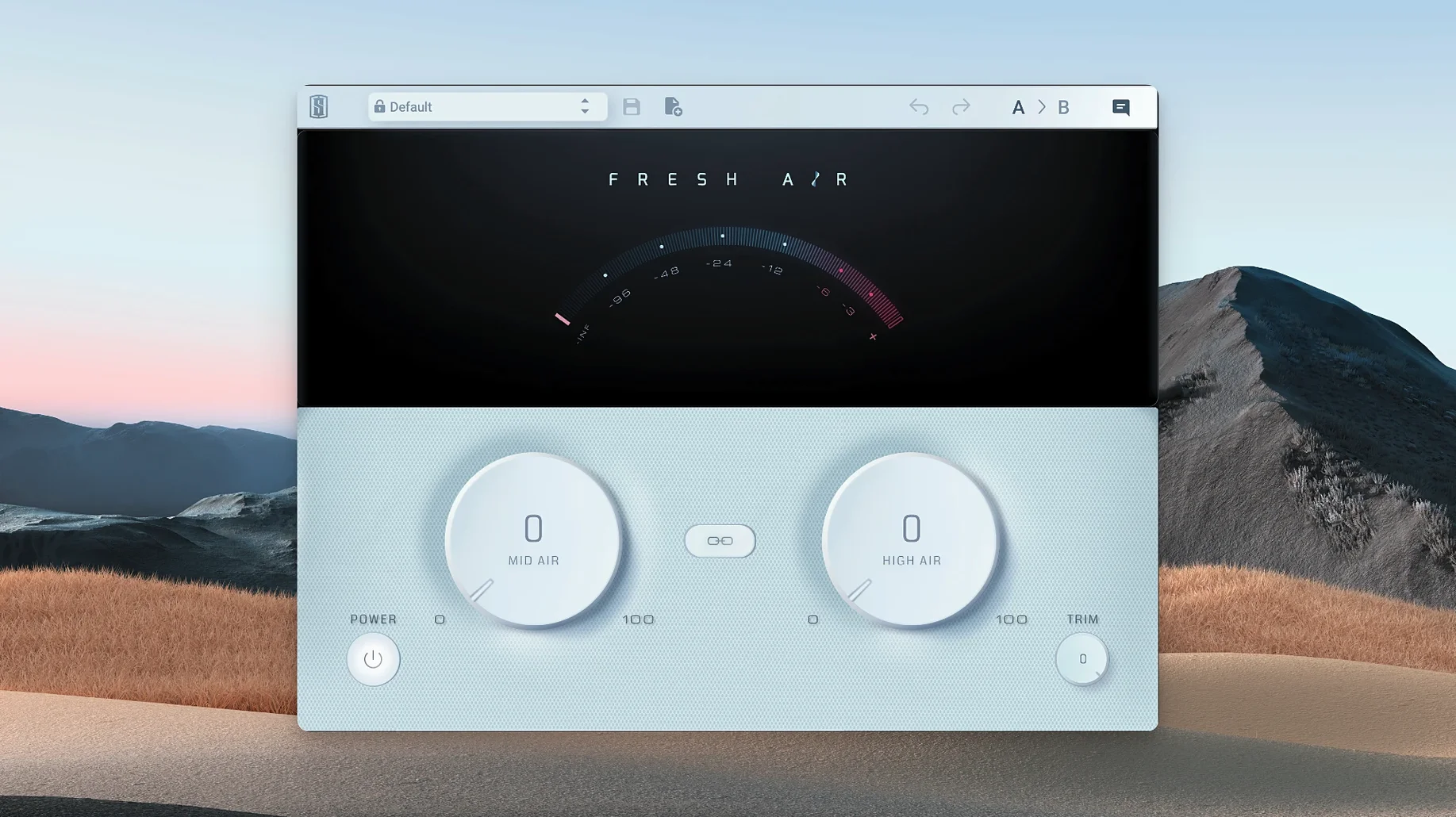
Version 1.0.9 of Slate Digital Fresh Air keeps things tidy: no new features, just a solid, stable build of the dynamic high-frequency processor. It is a plugin that deals exclusively with the top end of your mix.
Adds presence to vocals without piercing harshness
- Vocals that need presence without piercing harshness
- Drums and keys that want a touch more shine
- Master bus duties where subtle air is the goal
Two controls based on vintage exciters with dynamic processing
- Two controls only: Mid Air for upper-mids, High Air for the top
- Based on vintage exciter circuits plus modern dynamic processing
- Apple Silicon Macs on macOS 11 or later, English interface
Overuse and misunderstanding each knob cause most problems
Because Fresh Air is a one-job plugin, the problems people hit are usually about overuse or misunderstanding what each knob actually does. Here are the ones I hear about most.
Too much sibilance after applying High Air
If vocals or cymbals start sounding harsh, you are probably pushing High Air too hard on its own. The dynamic processing inside Fresh Air is meant to keep things smooth, but it still responds to your input level. Try backing off the High Air knob and adding a little Mid Air instead. The upper-mid presence often makes the top end feel brighter without the extra sizzle. You can also drop the Trim control to compensate if the output level jumped up.
Muddy mix after adding Mid Air
Mid Air boosts upper-mid frequencies, which is exactly what you want for clarity. But if your mix already has a lot going on in that range, it can sound congested rather than open. The fix is usually to dial the Mid Air back and check the Link button. With Link engaged, both bands move together, which keeps the balance between presence and shine closer to what your ears expect.
Confirm DAW restart and plugin folder scan on Apple Silicon
Fresh Air uses the standard installation procedure, so the usual suspects apply. Make sure you restarted your DAW after installing. If it still does not show up, check that your DAW is scanning the right plugin folders. On Apple Silicon Macs running macOS 11 or later, the plugin should install in the native locations for AU, VST or AAX, depending on your host. A rescan of plugins in your DAW settings usually fixes it.
Activation hiccups
Fresh Air can be activated with iLok Cloud, an iLok dongle, or machine activation. If you get an authorisation error, check that your iLok software is up to date and that you are signed into the correct iLok account. Machine activation is the simplest if you do not use iLok elsewhere.
Maintenance release improves macOS 11 and Apple Silicon stability
Version 1.0.9 is a maintenance release. No new controls, no redesigned interface, no extra features. The change is behind the scenes: compatibility and stability updates for macOS 11 and Apple Silicon. If you were running an earlier build on an M-series Mac, this version should behave more predictably. For Intel Mac users, there is nothing new to see, but the plugin remains the same in everyday use.
Start with Trim set to -2 dB or -3 dB
Fresh Air ships with both knobs at their default position. That default is not necessarily a good starting point for every track. Here is what I would set before touching anything else.
- Trim to -2 dB or -3 dB. The plugin can push output level up quickly, especially with both bands active. Dropping the Trim first stops you from fooling yourself into thinking the track sounds better when it is just louder.
- Decide if you want Link on or off from the start. Link ties Mid Air and High Air together, so turning one knob moves the other proportionally. If you are new to the plugin, starting with Link engaged gives you a safer range. If you know exactly what frequencies need work, leave it off.
- Start with Mid Air before High Air. The upper-mid band adds presence that makes the high frequencies feel more extended. Getting the Mid Air right first often means you need less High Air.
Suits engineers with dense mixes who want top-end air
Fresh Air is narrow by design, so it suits people who already have a clear mix and just want to open up the top end without reaching for an EQ or a multiband compressor.
- Mixing engineers working on dense arrangements. When a track has a lot of instruments, the high frequencies can get buried. Fresh Air adds air without the phase issues that some EQs introduce.
- Vocal producers and vocal processing users. Vocals are the most common candidate. A small amount of High Air can make a lead vocal sit on top of the mix without sounding brittle.
- Master bus processing users. On the mix bus, Fresh Air works as a subtle glue for the top end. A tiny nudge on both bands can give the whole mix a polished sheen.
- Producers working with electronic music. Synths, hi-hats and percussion often benefit from the extra shine. The dynamic processing keeps it from becoming fatiguing over a full track.
- Anyone on Apple Silicon Macs. Version 1.0.9 runs natively on M-series chips, so no Rosetta overhead. If you are on an Intel Mac, it works too, but the architecture is ARM-native.
Link button keeps Mid Air and High Air tonal relationship consistent
Fresh Air is minimal, so there are not many hidden features. A couple of things are worth knowing.
- The Link button is not just a ganged fader. It keeps the tonal relationship between Mid Air and High Air consistent as you adjust. If you find a sweet spot with Link off and then engage it, the plugin recalculates the balance so you can tweak both together without losing the character.
- Trim works after the processing, not before. That means you can push the air bands harder for effect and then pull the output down with Trim to match the original level. Useful for parallel-style blending on a single track.
- No latency to worry about. Because it is a dynamic processor, not a linear-phase EQ, Fresh Air adds negligible latency. Fine for tracking or live use if your DAW handles plugin delay compensation.
If you are after a fresh air mac torrent or a slate digital torrent, version 1.0.9 is the one to look for. The fresh air plugin crack mac crowd usually wants the latest stable build, and this is it.
It is a focused tool. If you know exactly where your mix lacks air, this plugin does one thing and does it well.
- macOS 11 or later
- Apple Silicon
Kit check at a glance
| System | macOS 11 or later |
| Chip | Apple Silicon |
| Download | 40 MB |





Chat from the booth
Sign in or grab a free account to leave a comment.
Nobody has said a word in the booth yet. If you played a set with this build, tell the next person how it went.