

- Build in the crate
- 1.0.5
- Made by the team at
- Slate Digital
- Menu languages offered
- English
- How you pay for it
- k'ed by GUISEPPE
- macOS it plays on
- macOS 11 or later
- CPU it runs on
- Apple Silicon
Screenshots
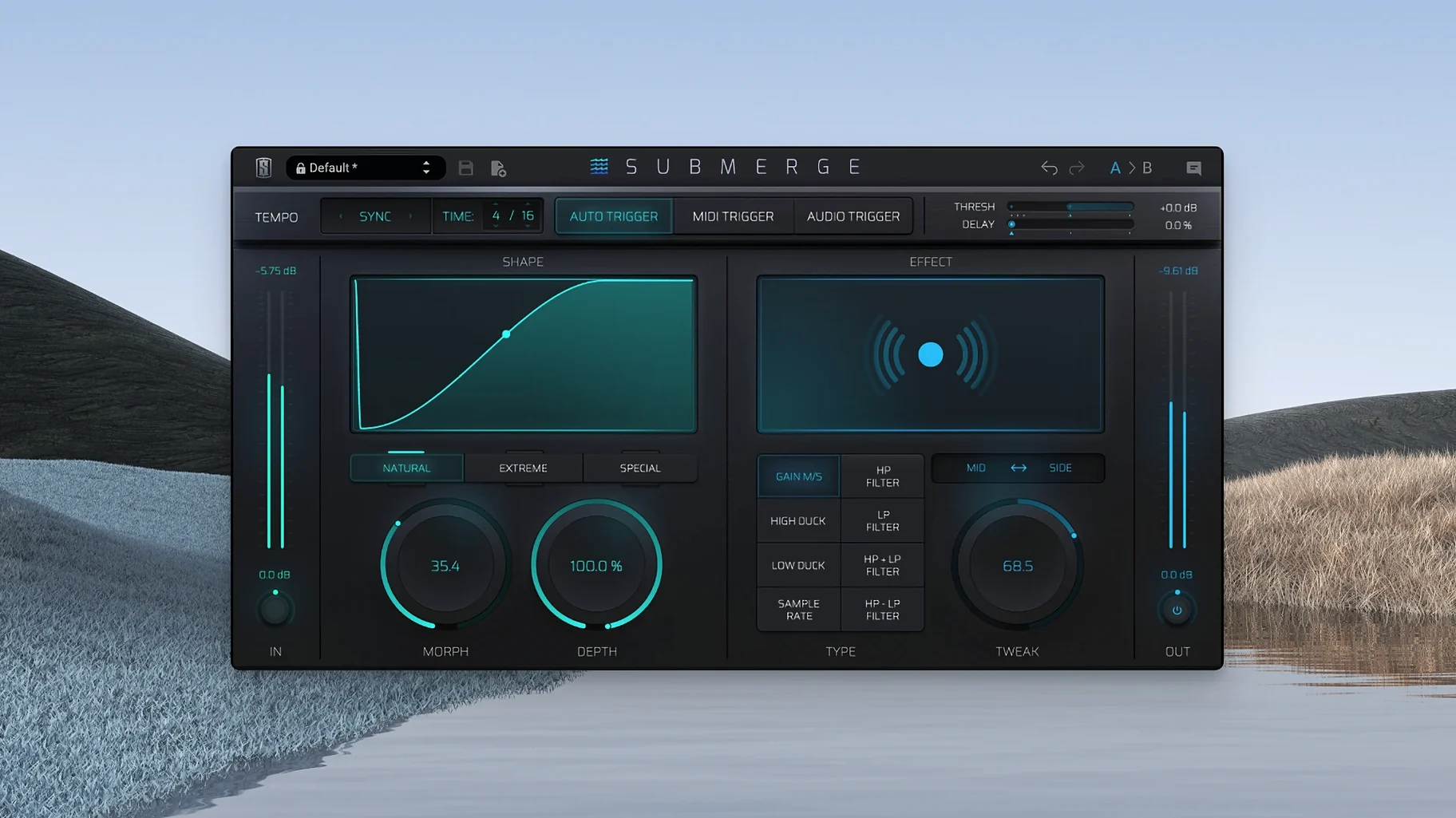
Slate Digital Submerge runs on Apple Silicon Macs with macOS 11 or later, so if you are on an M1 or newer machine, you are good to go. The interface is in English, and the plug-in is built for ARM architecture natively.
Sidechain ducking on bass and pads
- Sidechain ducking on bass lines, pads or vocals to let a kick drum cut through.
- Pumping effects on bus channels — think electronic music or radio stabs.
- Mid/Side processing for stereo-width control triggered by a sidechain signal.
- Creative filtering: the built-in high-pass, low-pass and sample-rate reduction add character beyond simple volume drops.
Three trigger modes and shift-invert curve
- Three trigger modes: auto (detects the input signal), MIDI (reacts to incoming MIDI notes) and audio (listens to an external sidechain source).
- Main controls: Threshold, Speed, Morph, Depth and Tweak.
- Holding Shift inverts the curve — instead of ducking, the signal pushes forward, useful for sidechain gating tricks.
- Works as a standard VST plug-in on the track, bus or master.
A practical workflow for a quick pumping effect
Here is one way to use Submerge on a pad or synth chord that competes with your kick drum.
- Insert Submerge on the instrument track (not the kick).
- Set the trigger mode to audio and route your kick drum as the external sidechain input.
- Choose the natural curve type first — it gives a familiar, musical ducking shape that works for most genres.
- Tweak Speed so the recovery matches your track's tempo — faster for tight four-on-the-floor, slower for a more drawn-out pump.
- If the ducking feels too static, add a little Morph to blend between the curve types and get movement that changes over time.
Once the basic ducking sits right, try enabling one of the built-in effects. A touch of high-pass filtering on the release phase can make the pad feel airier when it comes back in.
Threshold too high causes constant ducking
- Setting the threshold too high. When the threshold is too sensitive, the plug-in ducks constantly, even on quiet parts of the kick. Back it off so only the main hits trigger the effect.
- Ignoring the curve type. Many users stick with the default curve and never try extreme or custom. Extreme works well for hard, pumping EDM drops, while custom lets you draw a shape that fits an irregular groove.
- Forgetting to hold Shift. Inverting the curve turns ducking into pushing — the signal swells instead of drops. This is an easy trick to miss if you only glance at the controls. It is great for making a pad swell in time with a kick rather than duck out of the way.
- Using audio trigger mode without checking the sidechain routing. If the audio input is not set up in your DAW, Submerge does nothing. Double-check your DAW's sidechain routing before assuming the plug-in is broken.
- Overusing Depth. A moderate setting keeps the groove without losing the instrument entirely.
Switch to MIDI trigger for sampler kicks
When you load Submerge for the first time, a few adjustments make it behave more predictably.
- Switch to MIDI trigger mode if your kick is a sampler track rather than an audio channel. MIDI mode responds to note velocity and pitch, which gives you more control over which hits cause ducking and how strong the effect is.
- Set the curve to natural before tweaking anything else. Natural gives the most transparent ducking and lets you hear what Depth and Speed do without extra colouration.
- Enable Mid/Side processing if you work on stereo material. You can duck only the centre while keeping the sides wide, or vice versa. This is especially useful on mix bus chains where you want to preserve stereo width.
- Adjust the Tweak parameter to shape the curve's attack and release characteristics. Beginners often leave Tweak at default, but moving it changes how abrupt the ducking feels — helpful for matching different genres.
If you see a slate digital crack mac, be aware that cracked installers often miss updates and can cause stability issues.
- macOS 11 or later
- Apple Silicon (ARM)
Kit check at a glance
| System | macOS 11 or later |
| Chip | Apple Silicon |
| Download | 38 MB |




Chat from the booth
Sign in or grab a free account to leave a comment.
Nobody has said a word in the booth yet. If you played a set with this build, tell the next person how it went.