
- Build in the crate
- 2026.8.1 fix EDiSO
- Made by the team at
- Pilotmoon Software
- Menu languages offered
- Russian, English, German, Spanish, Italian, Chinese (Simplified), Korean, Dutch, Portuguese, French, Japanese
- How you pay for it
- Included
- macOS it plays on
- macOS 13.5 or later
- CPU it runs on
- Apple Silicon, Intel 64-bit
Screenshots
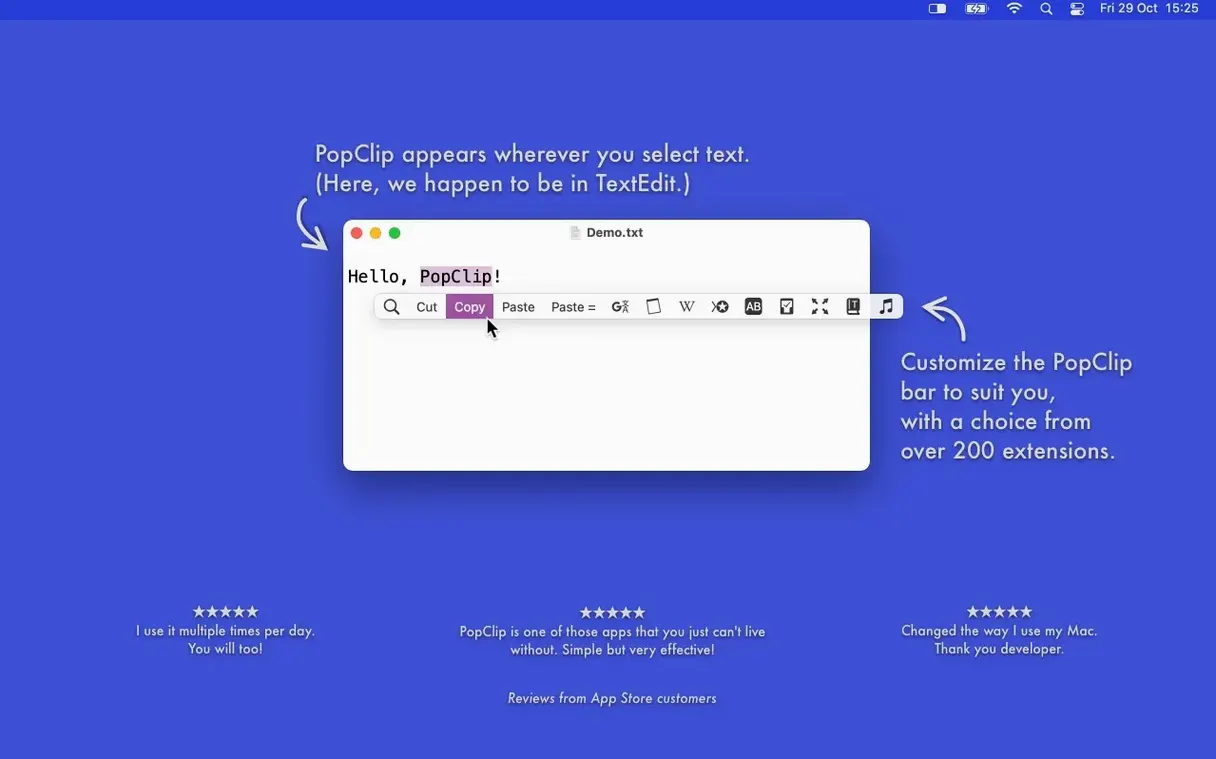
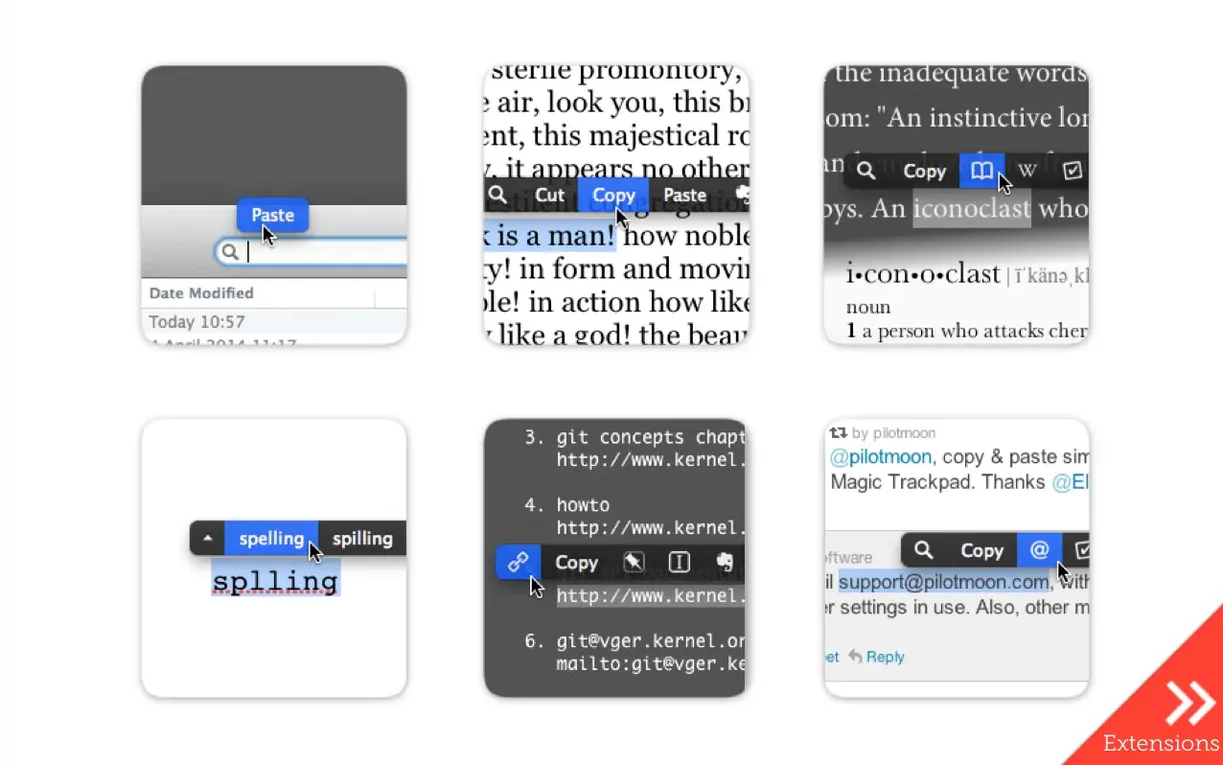
You know that little toolbar that appears when you select text on your iPhone? PopClip brings the same idea to the Mac. Select any text with your mouse, and a row of buttons pops up right there. Copy, paste, search, look up – all without moving your hand to the keyboard.
From selection to answer in five steps
- Select a word or phrase in any Mac app – Safari, Mail, Notes, almost anywhere.
- PopClip appears right below the selection. The buttons change depending on what you selected and which app you're in.
- Click the dictionary icon to look up a single word. The definition pops up instantly.
- For a misspelled word, PopClip shows spelling suggestions. Pick the right one and it replaces the text in place.
- Select a longer phrase and hit the search button. Your default browser opens with web results for that text.
That's the whole loop. No menus, no shortcuts to remember. PopClip works with most Mac apps, and extensions let you send text to Evernote or other tools. It's a small utility that makes text selection feel a lot less fiddly.
Will PopClip slow down my Mac?
Will PopClip slow down my Mac? The app sits in the background and only activates when you select text. It doesn't run any background processes that constantly check what you're doing. The extension system loads on demand, so it stays quiet until you need it.
Does it work with every app? PopClip works with most Mac apps, but not all. Some apps use custom text rendering that doesn't trigger the system's text selection. If an app draws its own text fields instead of using macOS text views, PopClip won't show up. Terminal and Xcode are common examples. For most people, the apps they use daily – browsers, email clients, note apps – work fine.
What happens to the text I select? PopClip doesn't send your selected text anywhere unless you click a button that does. The dictionary lookup happens locally on your Mac. Search buttons open your browser with the text as a query, the same as if you typed it yourself. iCloud sync only shares your extension setup and layout preferences between your own Macs, not the text you select.
Requires macOS 13.5 Ventura or later
PopClip needs macOS 13.5 Ventura or later. It runs on both Apple Silicon and Intel 64-bit machines, so whether you have an M-series chip or an older Intel Mac, it will work. The download is a zip file containing the app itself – no installer, no helper tools, no background daemons. Unzip it, drag it to Applications, and you're done.
The app comes with more than 100 free extensions. Translation, word count, case conversion, paste and style matching – they're all included. You enable and arrange them from PopClip's preferences. The interface is in eleven languages: Russian, English, German, Spanish, Italian, Chinese (Simplified), Korean, Dutch, Portuguese, French, and Japanese. It switches to match your system language automatically.
iCloud sync keeps your extension setup, button layout, and action settings consistent across your Macs. Set it up once on your laptop, and your desktop gets the same arrangement. It's not a backup of the app itself, just your customisations.
PopClip not appearing after installation
PopClip doesn't appear after installation. The most likely cause is that you haven't launched it yet. After dragging the app to Applications, open Launchpad or go to the Applications folder and double-click PopClip. It needs to be running to work. Once launched, it lives in the menu bar. You'll see its icon there.
PopClip shows up but the buttons look wrong. Some apps use non-standard text fields. PopClip still works, but the button row might appear in a different position or look slightly off. Check the app's compatibility in PopClip's preferences – you can enable or disable the app from the list there.
Extensions don't appear. PopClip's extensions are enabled individually. Open PopClip preferences, go to the Extensions tab, and check which ones are turned on. New extensions from the gallery need to be downloaded and enabled before they show up.
PopClip stopped working after a macOS update. Updates can reset some permissions or system settings. Make sure PopClip is still in your Applications folder and that you've launched it since the update. If it still doesn't respond, a restart usually sorts it.
PopClip free download and PopClip crack versions floating around are risky – they can contain malware or break with macOS updates. The standalone zip from a trusted source gives you the real 2025.9 or later release with no surprises. PopClip 2025.9 and newer versions include the latest extension gallery and bug fixes, so it's worth keeping up to date.
- Version 2026.8.1 released on 2026-09-07.
- Maintenance and cleanup release following PopClip 2026.7.
- macOS 13.5 Ventura or later
- Apple Silicon or Intel (x86 64-bit)
Kit check at a glance
| System | macOS 13.5 or later |
| Chip | Apple Silicon, Intel 64-bit |
| Download | 7 MB |
| Older pressings | 6 in the crate |





Chat from the booth
Sign in or grab a free account to leave a comment.
Nobody has said a word in the booth yet. If you played a set with this build, tell the next person how it went.