

- Build in the crate
- 1.0.9
- Made by the team at
- Pulsar Audio
- Menu languages offered
- English
- How you pay for it
- k'ed by GUISEPPE
- macOS it plays on
- macOS 11 or later
- CPU it runs on
- Apple Silicon
Screenshots
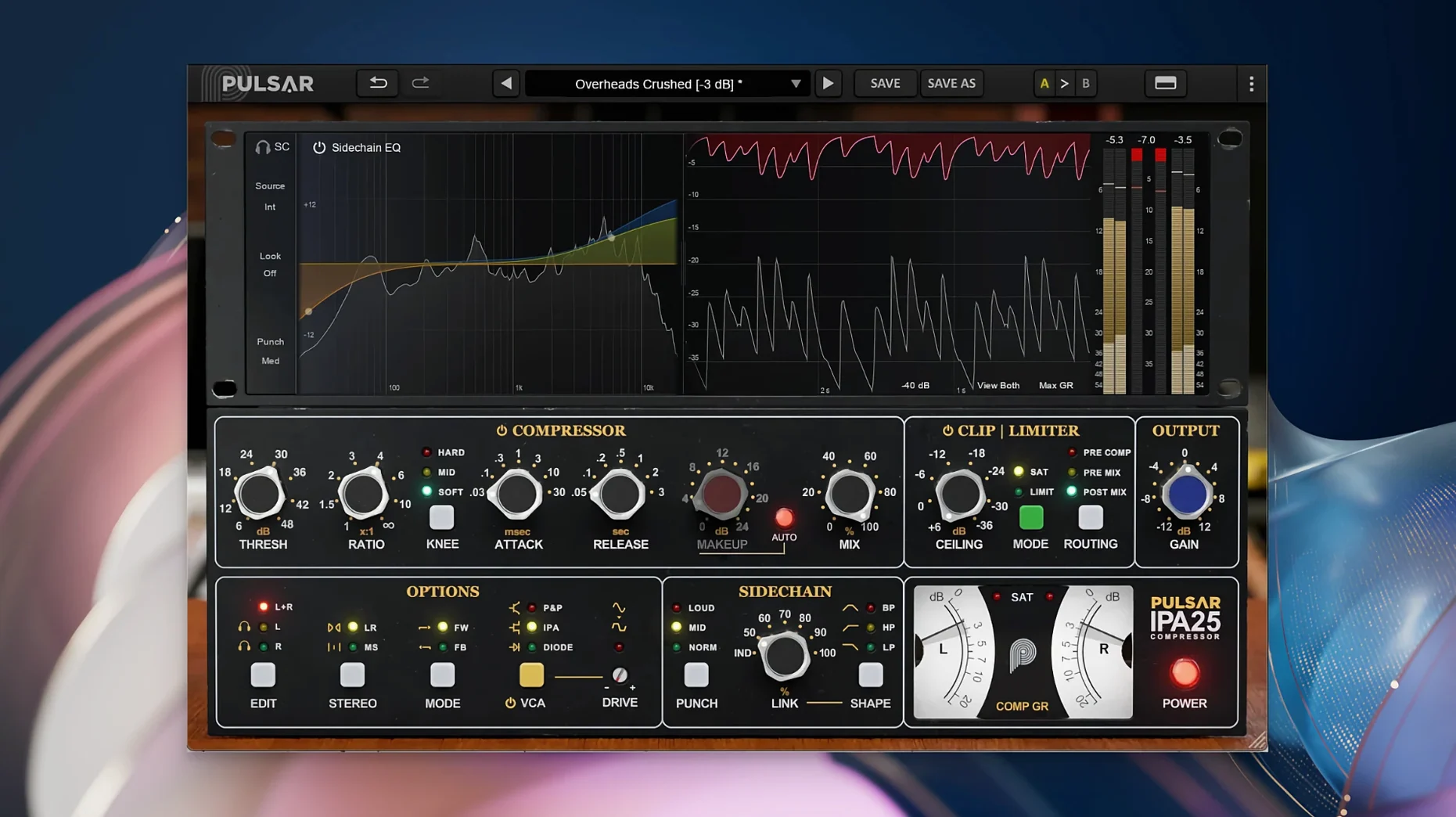
Switch the VCA mode mid-session and the whole character of the compression shifts. IPA, P&P/Mu and Diode — three circuits in one plugin, and each one changes how a track sits in the mix. That is the idea behind the Pulsar Audio IPA: a multi-VCA dynamics processor that pulls from classic hardware behaviour but gives you modern extras like a built-in clipper, limiter and sidechain visual EQ.
Three VCA modes for vocals, drums and buses
The plugin works on individual tracks or buses. On vocals, the IPA mode stays clean and punchy; the P&P/Mu mode adds a thicker, more coloured grab. For drum buses, the Diode mode can push transients harder while the clipper catches peaks before they hit the limiter. It also handles bass lines and full mixes — the Mid/Side processing lets you treat the centre and sides separately, which is useful when you want the low end centred while the stereo information breathes.
Rock, pop and electronic producers get three textures in one plugin
Music producers and sound engineers working in rock, pop or electronic music will find the three VCA modes give them a range of textures without switching plugins. The sidechain EQ helps you duck frequencies precisely, and the clipper plus limiter acts as a safety net. No standalone version — it loads inside a DAW as a 64-bit plugin, and it runs natively on Apple Silicon Macs running macOS 11 or later.
Diode and P&P/Mu modes beyond the Waves API 2500
Next to the Waves API 2500, the IPA gives you three VCA voicings in one window where the Waves stays with a single character. You get the same bus-compression feel but the Diode and P&P/Mu modes cover territory that would normally need a second or third plugin. Against the Softube Bus Processor, which leans into British-console colour, the IPA feels more flexible: the sidechain visual EQ and the Mid/Side matrix let you shape compression by frequency and stereo position, whereas the Softube expects you to handle that in the DAW’s own routing. The Kiive Audio APE is another modern take on the 2500, but it lacks the built-in clipper and limiter that the IPA tucks into the same panel. If you often run a compressor into a limiter on your mix bus, having both inside one plugin saves a slot and keeps the signal flow tidy.
Drum bus gluing with P&P/Mu at 3–4 dB gain reduction
I start with the IPA on a drum bus, set to the P&P/Mu mode. The first pass is light — maybe 3-4 dB of gain reduction, just to glue the kick and snare together. I switch on the visual sidechain EQ and cut a notch around 300 Hz so the compressor reacts less to the boxy midrange of the room mics. The waveform display shows exactly where the sidechain is picking up energy, which beats guessing. Next I bring in the clipper, set a few decibels of ceiling, and let it shave the snare transients before they reach the limiter. The limiter then catches anything the clipper missed. For the final pass I flip to Mid/Side mode, compress the centre harder — that is where the kick and snare live — and leave the side signal nearly untouched. The whole chain stays in one plugin window, which means I can adjust the attack and release on the compressor stage without scrolling between inserts.
VCA modes keep last settings for instant A/B switching
- The three VCA modes keep their last settings when you switch between them, so you can A/B the same threshold and ratio across IPA, P&P/Mu and Diode without re-dialling.
- The sidechain EQ has a listen button — you can solo the sidechain signal to hear exactly what frequency band is triggering the compression.
- Mid/Side processing works on stereo tracks only, but when it is active you see separate gain-reduction meters for the mid and the side channels.
- The clipper and limiter each have their own bypass switch, which is handy when you want to compare the processed signal with the raw compressor alone.
- macOS 11 or later
- Apple Silicon processor
- 64-bit plugin format
- A third-party DAW application
Kit check at a glance
| System | macOS 11 or later |
| Chip | Apple Silicon |
| Download | 75 MB |





Chat from the booth
Sign in or grab a free account to leave a comment.
Nobody has said a word in the booth yet. If you played a set with this build, tell the next person how it went.