
- Build in the crate
- 1.0.0
- Made by the team at
- Neural DSP Technologies
- Menu languages offered
- English
- How you pay for it
- K'ed by FLARE
- macOS it plays on
- macOS 10.15 or later
- CPU it runs on
- Apple Silicon, Intel 64-bit
Screenshots
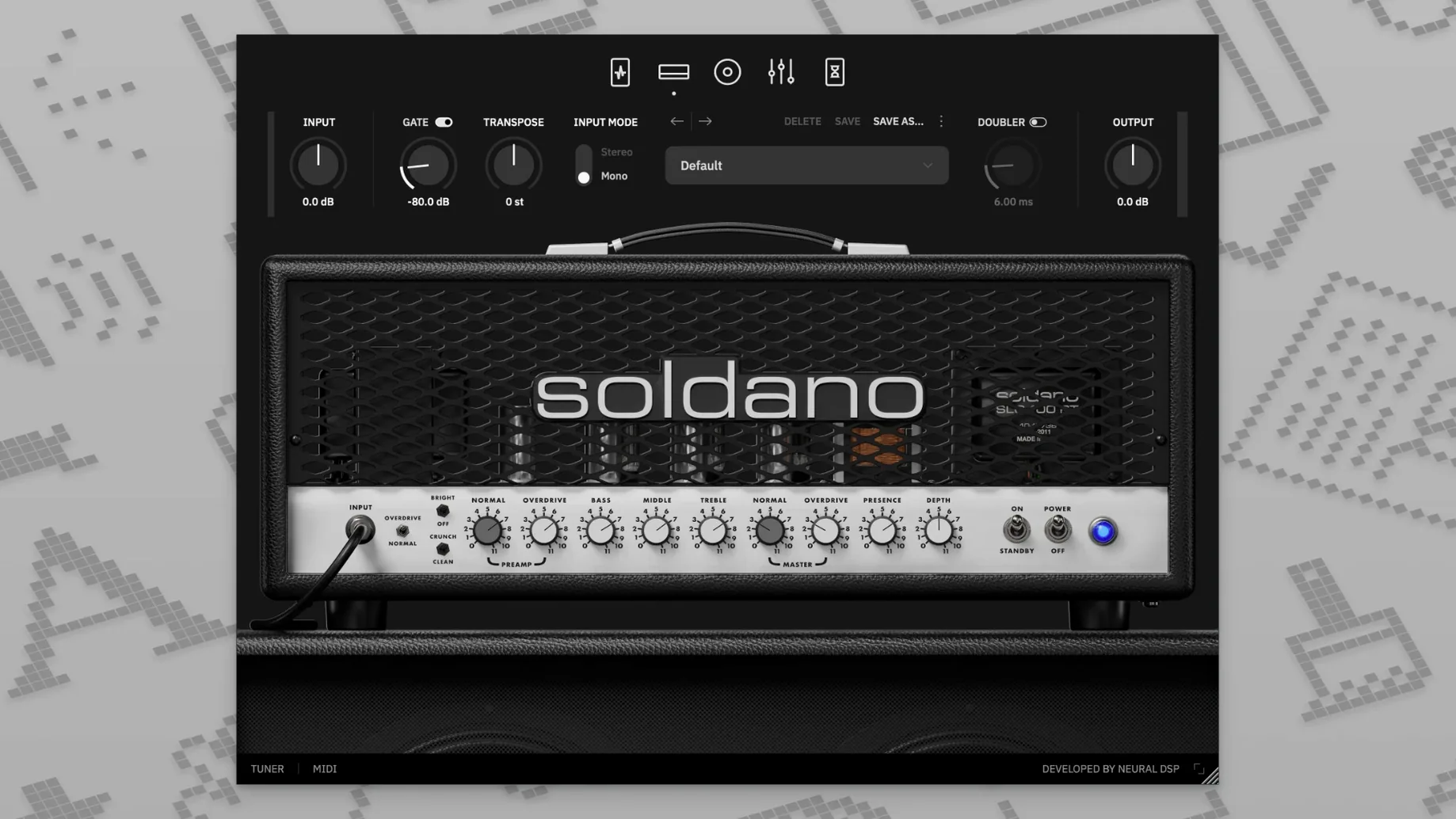
If you already run Neural DSP plugins on a Mac, the Soldano SLO-100 X slots right into that workflow. It is available in 64-bit VST2, VST3, AU, and AAX formats, plus a standalone app, so it works in Logic Pro X 10.5 or higher, Ableton, Pro Tools, and most other hosts. The interface is English, and it runs on macOS 10.15 and later on both Intel and Apple Silicon machines.
Before getting into the tone, it is worth noting how the plugin is packaged. You get the full amplifier simulation as a disk image that follows the standard macOS installation procedure. Once installed, it appears as both a plugin and a standalone application, which is handy for quick practice sessions without opening a DAW.
Sound-wise, the SLO-100 X covers a lot of ground. The amplifier section has Clean, Bright, Crunch, and Overdrive modes, so it is not just a high-gain machine. The preamp section adds a compressor, boost, overdrive, and vintage chorus, and there is a doubling effect for thickening leads. A nine-band equalizer with high-pass and low-pass filters gives you fine control over the final tone, and you can load your own cabinet files if the built-in ones are not enough.
The X version, updated in 2024, revisits the plugin with refreshed modeling technology. If you are chasing that Soldano character, this is a solid way to get it on a Mac without a physical amp.
Switch to Overdrive or Crunch mode first
Once you have the plugin open, a few settings make an immediate difference. Start with the amplifier mode selector. If you are used to the original SLO-100, the Overdrive mode is where the signature high-gain lives, but the Crunch mode is worth a look for classic rock and pushed clean tones. Switch between them while playing a riff to hear how the plugin responds to your guitar's volume knob.
The nine-band equalizer is another place to spend a minute. The high-pass and low-pass filters can tighten up a mix quickly. For rhythm parts, try rolling off some low end with the high-pass filter to leave room for the bass guitar. For lead work, the low-pass filter can tame harsh upper frequencies. The built-in cabinet simulation also rewards a bit of browsing. Hundreds of preset options are included, and you can load your own cabinet files if you have favourite impulses from other sessions.
Do not overlook the preamp section. The compressor and boost can shape the attack of your playing before the signal hits the amplifier. The vintage chorus adds width, and the overdrive can push the front end of the amp into more saturation. These are not afterthoughts — they change how the plugin feels under your fingers.
Works on Intel and Apple Silicon Macs
One common question is whether the plugin works on an Intel Mac. Yes, it does. The X version supports both ARM and x86 64-bit architectures, so it runs natively on Apple Silicon and Intel machines alike. Another question is whether you need a DAW to use it. You do not. The standalone app lets you play through the plugin directly, which is useful for practising or testing sounds without launching Logic or Pro Tools.
People also ask about compatibility with older hosts. The user guide lists Logic Pro X 10.5 or higher for AU and Pro Tools 12 through 2020 for AAX. If you run an older version of a DAW, check that it supports 64-bit plugins, because the Soldano SLO-100 X requires 64-bit host software. VST2 and VST3 formats cover most other modern DAWs.
Some guitarists wonder if they can change tuning without retuning their instrument. The plugin includes a transposition feature for that exact purpose. It shifts your guitar's pitch up or down, so you can play in standard tuning while the plugin outputs a different key. The doubling effect is another feature that is easy to miss but useful for thickening single-note lines.
- X version revisits the plugin with updated modeling technology.
- macOS 10.15 or later
- Intel or Apple Silicon
- 64-bit host software for plugin use
Kit check at a glance
| System | macOS 10.15 or later |
| Chip | Apple Silicon, Intel 64-bit |
| Download | 340 MB |






Chat from the booth
Sign in or grab a free account to leave a comment.
Nobody has said a word in the booth yet. If you played a set with this build, tell the next person how it went.