

- Build in the crate
- 1.0.1
- Made by the team at
- Neural DSP Technologies
- Menu languages offered
- English
- How you pay for it
- K'ed by FLARE
- macOS it plays on
- macOS 10.15 or later
- CPU it runs on
- Apple Silicon, Intel 64-bit
Screenshots
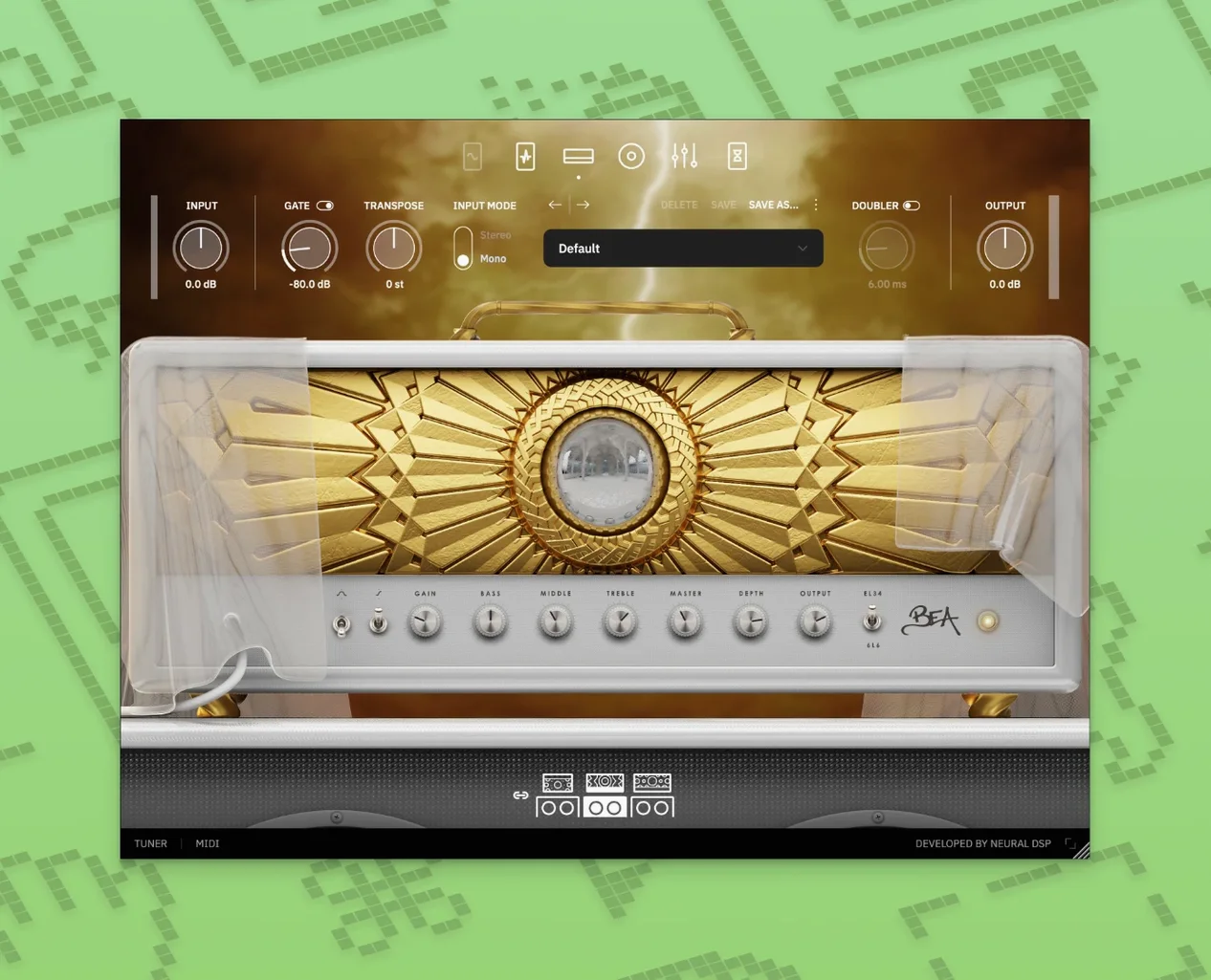
Overlord can trigger up to two oscillators at once, which is the kind of detail that makes Archetype Rabea X feel less like a guitar amp and more like a small instrument. It was built from scratch for modern, synth-heavy guitar tones.
macOS 10.15 or later, Apple Silicon native
The plugin needs macOS 10.15 or later and works on both Apple Silicon and Intel. Native Apple Silicon support means it should sit happily alongside your other AU and VST plugins.
Monosynth, amps, and effects in one window
There is a monosynth, a range of amps and effects, all packed into one Archetype-series window. If you are after guitar sounds that wander into synth territory, this is the one to try.
Bug fixes and quality-of-life improvements
Version 1.0.1 came with a round of quality-of-life improvements and bug fixes. For everyday use, that means fewer small interruptions when you are dialling in a tone or tracking a part. Nothing about the core sound changed — the amps, the Overlord synth, the effects are all still the same — but the plugin behaves a bit more predictably now. If you have been using an earlier build, the update should feel like a small cleanup rather than a redesign.
Overlord monosynth triggers two oscillators at once
Some features do not shout for attention but they make a difference when you are working fast. Here are a few that the manual and specs mention:
- The Overlord monosynth can trigger two oscillators at once. That is not just a spec sheet detail — it gives you layered synth sounds from a guitar signal without routing to a separate instrument.
- The plugin is a 64-bit application. That is standard now, but it means it will load reliably in modern DAWs that have dropped 32-bit support.
- It comes in VST2, VST3, AU, and AAX formats plus a standalone version. You can use it inside Logic, Pro Tools, Cubase, or any other host, and the standalone mode lets you play without opening a DAW at all.
- It works with Quad Cortex and Quad Cortex mini. If you own either hardware unit, the plugin integrates with it for moving presets between studio and stage.
- Native Apple Silicon support. No Rosetta translation layer needed, so the plugin loads as a native process on M-series Macs.
How to install it
- Mount the downloaded disk image.
- Run the standard installation procedure.
The process is straightforward. Once installed, the plugin appears in your DAW's plugin list and the standalone app sits in your Applications folder. No extra steps, no manual file moving.
A practical use for this setup
If you record guitar parts that mix heavy riffing with synth-like pads or leads, Archetype Rabea X lets you handle both from the same plugin window. You can run a distorted amp on one track and use the Overlord synth on another, or blend them in a single performance. The monosynth tracks your playing monophonically, so it works best for single-note lines rather than chords — think bass synth parts, lead melodies, or layered textures underneath your guitar tone.
This plugin sits in the Archetype line alongside other artist models. It is also available separately if you only want this particular set of sounds.
- Version 1.0.1
- macOS 10.15 or later
- Apple Silicon or Intel
Kit check at a glance
| System | macOS 10.15 or later |
| Chip | Apple Silicon, Intel 64-bit |
| Download | 742 MB |





Chat from the booth
Sign in or grab a free account to leave a comment.
Nobody has said a word in the booth yet. If you played a set with this build, tell the next person how it went.