
- Build in the crate
- 1.0.0
- Made by the team at
- Neural DSP Technologies
- Menu languages offered
- English
- How you pay for it
- K'ed by FLARE
- macOS it plays on
- macOS 10.15 or later
- CPU it runs on
- Apple Silicon, Intel 64-bit
Screenshots
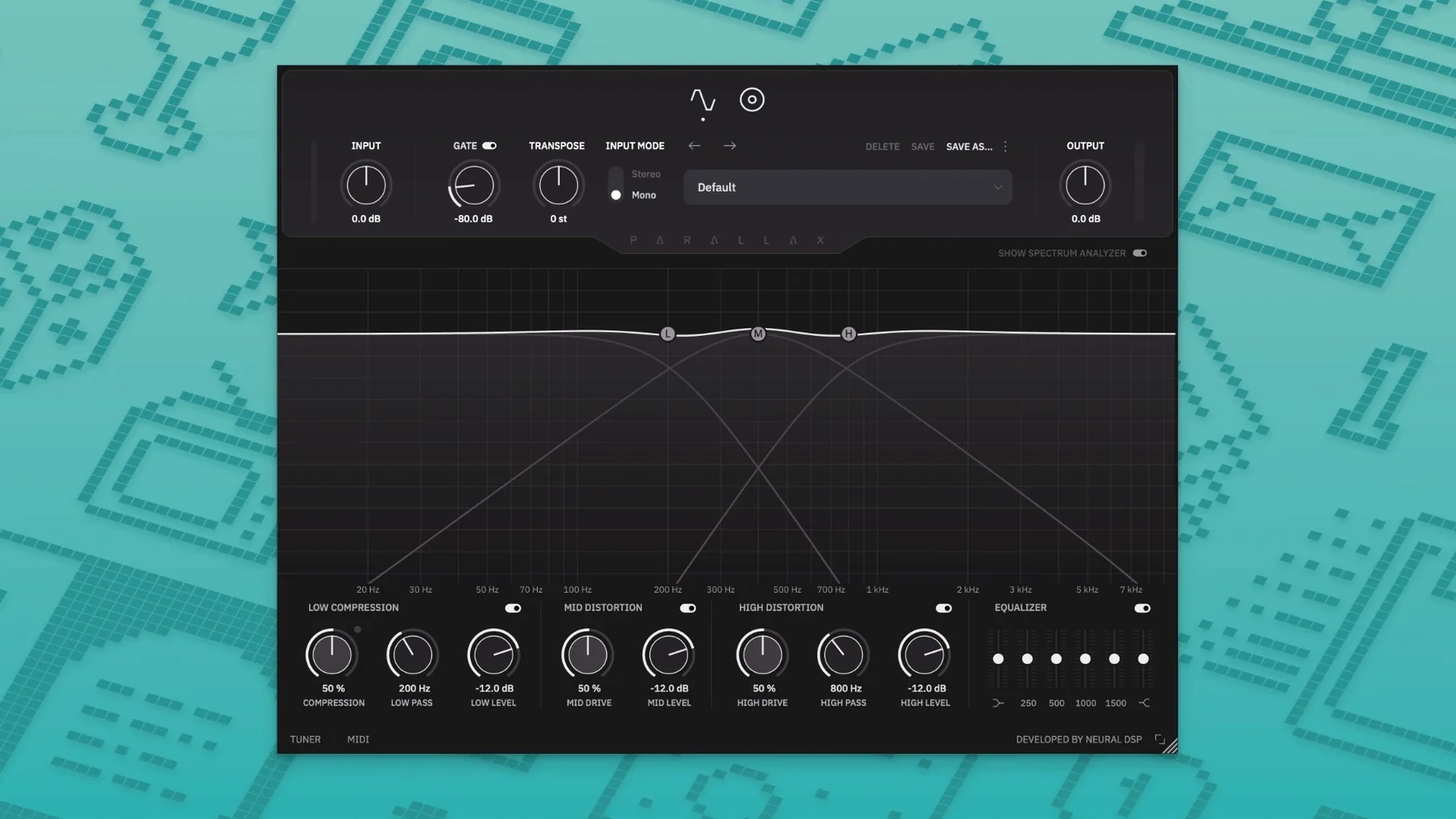
Four signal paths — clean, compressed, saturated, and distorted — run in parallel inside Parallax X. Each band processes low, mid, and high frequencies separately before they mix back together. That makes it a natural fit for bass tracks that need weight without losing definition.
On a bass track
Drop Parallax X on a DI bass track and the parallel engine keeps the original tone intact while the multiband distortion adds grit where it matters. The cabinet emulation with six virtual microphones lets you shape the amp sound without extra plugins. Use the built-in tuner to check tuning before recording.
On a bus or in standalone mode
On a bass bus, the parallel processing can glue multiple takes or layered synths into one cohesive low end. The standalone mode works without a DAW — the metronome, transposition, and redesigned spectrum analyser are all there for practice or sound design. VST2, VST3, AU, and AAX cover most hosts on macOS 11 and up, including Apple Silicon.
Disk-image installer keeps both Parallax versions
The installer is a standard disk image — open it, run the setup, and Parallax X appears as a separate plugin alongside the original Parallax (the installer keeps both). The setup copies your old presets into the new user folder, so nothing from previous sessions is lost.
It runs as 64-bit on both Intel and Apple Silicon Macs, so whether you are on an older Intel machine or an M-series Mac, the plugin shows up in your DAW without extra configuration. The formats cover VST2, VST3, AU, and AAX — no wrapper needed for Pro Tools, Logic, or Live.
The interface has been redesigned for this version. The new spectrum analyser gives a live frequency view of what the parallel bands are doing, which helps when dialling in the low compressor or the multiband distortion sections. You are not guessing where the sub and the mids meet.
Transpose, Live Tuner, and Metronome added
Three additions make the biggest difference for day-to-day work: Transpose, Live Tuner, and Metronome. The transpose lets you shift the input up or down within an octave — useful when the bass part is in an awkward key and you want to play it in a more comfortable position without retuning the instrument.
The live tuner is always available in the plugin window, so you can check tuning mid-session without reaching for a hardware tuner or a separate app. It sits in the interface, ready to go.
In standalone mode, the metronome now includes time signature, accent, and note-length settings. That makes it usable for structured practice — set 4/4 with an accent on one, or go for odd time signatures if you are working on more complex material. The standalone mode itself means you can run Parallax X without opening a DAW at all, which is handy for quick sound checks or late-night tone sculpting.
Home bass recorders get six mics and cab emulation
Bass players recording at home. If you track DI and want amp-like tone without mic'ing a cab, the parallel distortion and cabinet emulation give you a finished sound in one plugin. The six microphones on the cab section let you blend positions, and the low compressor keeps the bottom tight.
Mix engineers working on busy arrangements. When the bass needs to cut through dense guitars or electronic layers, the mid and treble distortion sections add articulation and fuzz without washing out the low end. The graphic EQ gives six bands of final shaping before the output.
Live performers using a laptop rig. Standalone mode with metronome and transpose works for backing tracks or silent practice on stage. The plugin loads as a separate instance, so you can switch between clean and heavy patches without affecting the original Parallax settings you might still use.
Producers who layer bass sounds. Run a clean DI through the parallel path, add a distorted copy on the mid band, and blend them inside the plugin. The separate processing for low, mid, and high means you can treat each register differently — sub stays round, mids get grit, highs get sizzle.
- Adds Transpose, Live Tuner, and Metronome features
- Adds new factory presets and a revamped interface
- Adds a redesigned Spectrum Analyzer
- macOS 11 or later
- 64-bit system
- Architecture: Intel or Apple Silicon
Kit check at a glance
| System | macOS 10.15 or later |
| Chip | Apple Silicon, Intel 64-bit |
| Download | 179 MB |





Chat from the booth
Sign in or grab a free account to leave a comment.
Nobody has said a word in the booth yet. If you played a set with this build, tell the next person how it went.