
- Build in the crate
- 1.0.2
- Made by the team at
- Tone Empire
- Menu languages offered
- English
- How you pay for it
- K'ed by MORiA
- macOS it plays on
- macOS 10.14 or later
- CPU it runs on
- Apple Silicon, Intel 64-bit
Screenshots
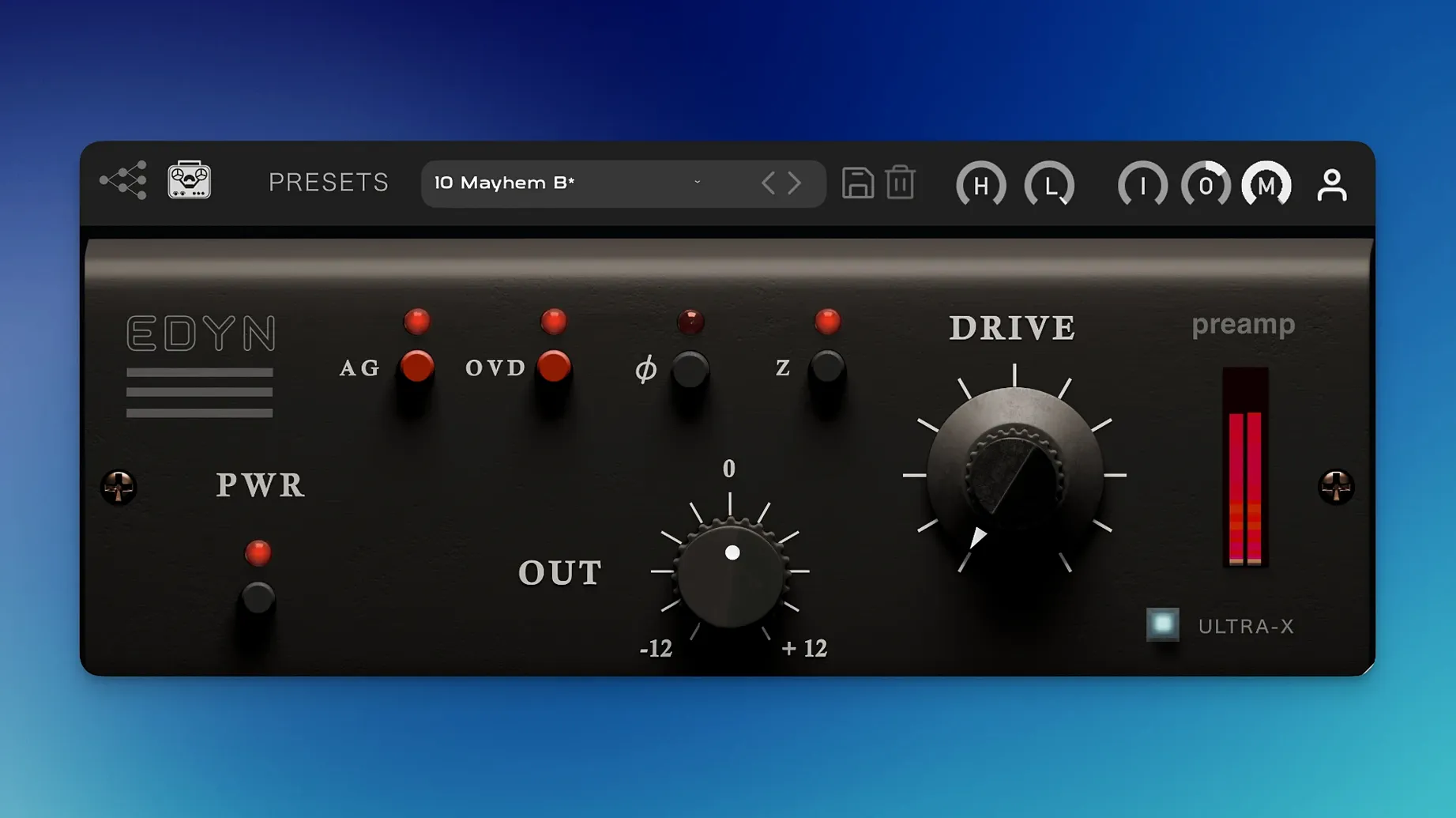
Tone Empire EDYN is a preamp plugin that emulates the sound of a vintage American console, specifically the Electrodyne 1204 from the 1960s and 1970s. It exists to add character, density and warmth to whatever you run through it.
Gets analog weight on individual tracks
EDYN earns its place on individual tracks when you want a bit of analog weight before the rest of the chain. Vocals, drums and bass all take well to that console-style push. The Input and Output level controls let you drive the preamp harder or back off, while the high-pass and low-pass filters shape what gets through. Because it is an emulation rather than a re-creation of a specific hardware unit, you can treat it as a tone shaper rather than a faithful recreation.
Buses and parallel work
On buses, EDYN works as a glue that pulls a group together without smearing detail. The Mix control is the key here: it enables parallel processing inside the plugin, so you can blend the processed signal with the dry one. Automatic gain compensation keeps levels honest as you sweep the controls. That makes it easy to set up a drum bus or a full mix bus with the preamp adding weight in parallel, then adjust the blend until it sits right.
Not a hardware preamp replacement
People often ask if EDYN replaces a hardware preamp or if it is just another saturation plugin. It is not a replacement for a real preamp, and it does not try to be. What it does is give you the tonal character of a specific console circuit — the bright midrange, the fast transient snap, the low-end heft — inside your DAW. You get that sound without the noise floor or the cable patching.
Another common question is whether the plugin works on stereo tracks or only mono. EDYN handles both, so you can drop it on a stereo drum overhead pair or a synth bus without messing about with dual instances. The Mix control works the same in either mode.
Some users wonder about the input impedance switch at 50 ohms versus 200 ohms. It changes how the preamp interacts with the source signal. Lower impedance loads the source more, which can tighten the low end and change the transient behaviour. Higher impedance keeps things more open. It is worth flicking between the two on the same track to hear the difference — it is subtle but useful when you are dialling in a specific tone.
Best with moderate Drive input
The most common slip is overdriving the input too hard right away. EDYN has a Drive module for saturation, and it is tempting to crank it to get that console crunch. But the plugin sounds best when you find the sweet spot where the Drive adds density without squashing the transients. Backing off the Input level and using the Output to compensate often gives a more usable sound.
Another mistake is ignoring the high-pass and low-pass filters. They are not just cleanup tools. Used together with the Drive, they change how the saturation behaves because less低频 content reaches the drive stage. A gentle high-pass before the Drive can keep the low end tight while the mids get the console colour.
Beginners also forget to try the OVD overdrive mode. It is a different flavour from the standard Drive — more aggressive, more present. Switching between the two on a snare or a vocal can completely change the energy of the track. And the phase inversion button gets overlooked entirely, which is a shame because flipping phase can help when you are blending the processed signal with the dry one on parallel tracks.
Suits rock, indie, and soul mixing
Mixing engineers who work on rock, indie, soul or anything that wants a vintage console character will find EDYN useful right away. It adds weight to vocals that feel thin, it gives drums a punch that modern sample libraries often lack, and it warms up digital synths without making them muddy. Producers who print their mixes through a bus chain also get good mileage from it — the automatic gain compensation and Mix control make it fast to set up and leave running.
Mac users on Apple Silicon machines benefit from the 1.0.2 performance optimisations. The plugin runs natively, so you do not lose efficiency on an M-series chip. That matters when you are running multiple instances across a full session. Users on Intel Macs still get the same sound; the CPU load reduction in this version helps there too.
People who work in Logic Pro on macOS Sequoia should find the AU validation fixes reassuring — no more failed validation scans or crashes when stacking instances. Pro Tools users get the automation fixes, so writing and reading parameter changes on the preamp controls works as expected. In short, anyone who wants a console-style preamp character without leaving the box will find EDYN a practical addition to their plugin folder.
- Bug fixes for offline rendering on the master output.
- AU validation fixes in Logic Pro on macOS Sequoia.
- Crash fixes for multiple instances in Logic Pro.
- Parameter automation fixes in Pro Tools.
- Apple Silicon performance optimization and reduced CPU load.
- Improved support for high-resolution displays with a scalable interface.
- macOS 10.14 or later
- Intel or Apple Silicon
- Interface language: English
Kit check at a glance
| System | macOS 10.14 or later |
| Chip | Apple Silicon, Intel 64-bit |
| Download | 198 MB |



Chat from the booth
Sign in or grab a free account to leave a comment.
Nobody has said a word in the booth yet. If you played a set with this build, tell the next person how it went.