
- Build in the crate
- 1.0.1 [GUISEPPE]
- Made by the team at
- Supertone
- Menu languages offered
- English
- How you pay for it
- K'ed by MORiA
- macOS it plays on
- macOS 10.13 or later
- CPU it runs on
- Apple Silicon, Intel 64-bit
Screenshots
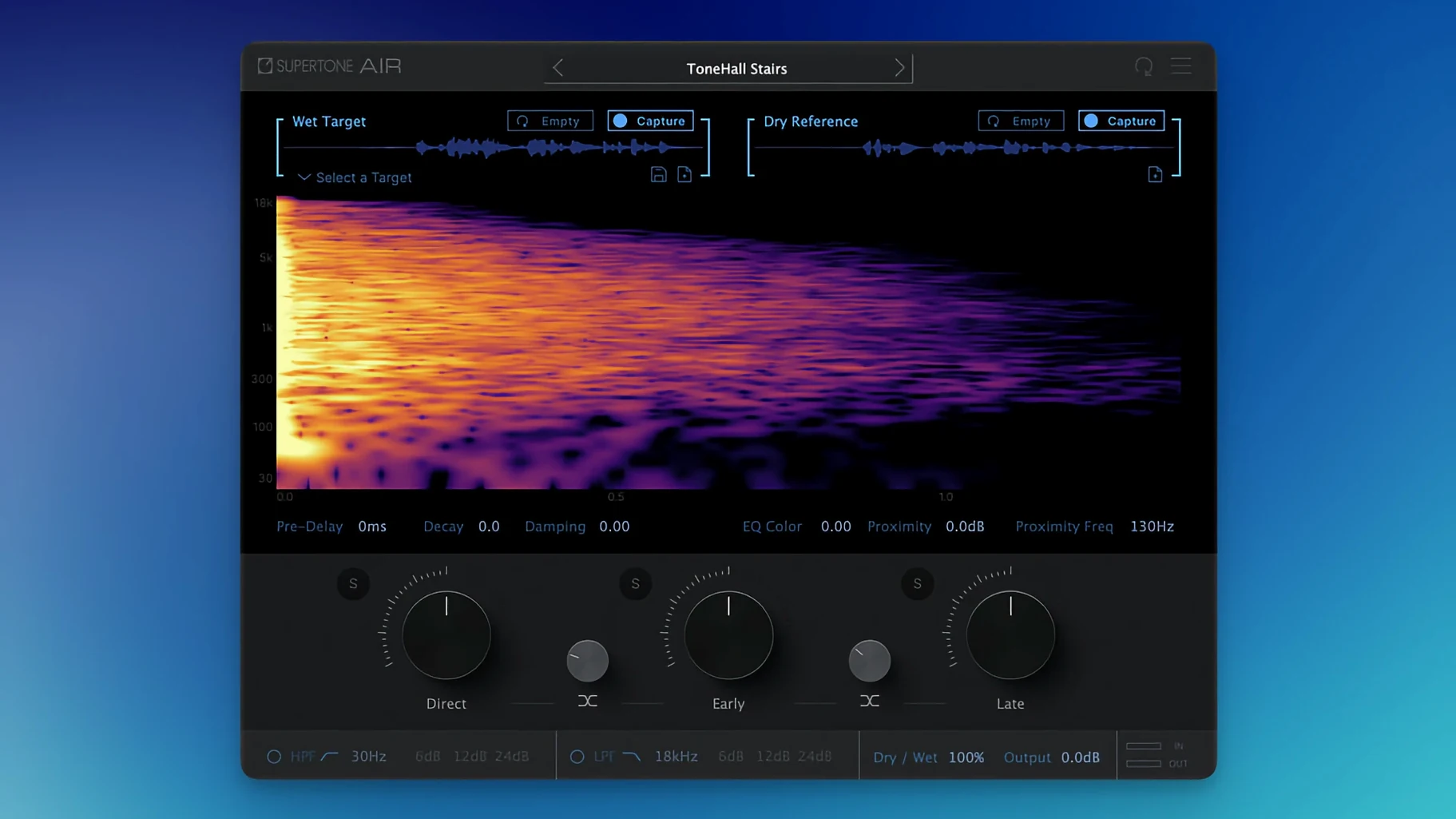
Supertone Air works with 44.1 kHz, 48 kHz, and 96 kHz sample rates on macOS 10.13 and later, native on both Apple Silicon and Intel. That makes it a direct fit for most modern Macs without extra translation layers.
Host and format first
Air runs as a standard VST plugin, so it slots into any DAW that supports the format. No standalone app — just load it on a dialogue track and go.
Match the room
It captures a space’s reverb and EQ using neural network Acoustic Scene Transfer, then applies that character to your dialogue. You can export captured spaces as WAV files and import or export Air profiles for reuse across sessions.
Shape the reflections
Separate controls for direct, early, and late reflections let you tune the match. Reverb decay, damping, and proximity round out the sound without leaving the plugin.
First days with Supertone Air
Once it's installed and activated, the first thing to do is feed it a reference clip. Grab a few seconds of production dialogue — a line with clear room tone, maybe some background ambience. Load Air on a track in your DAW, point it at that clip, and let it learn the space. The neural network does the heavy lifting; you just listen.
Start with the direct reflection control turned up a little more than you think you need. ADR often sounds too dry because the booth kills everything. Air can add back that missing life, but it's easy to undershoot at first. Run a short test phrase, then toggle the plugin bypass to hear the difference. If the match sounds hollow, nudge the early reflections up. If it feels too distant, trim the late reflections back.
Export a couple of Air profiles from your first real session. Label them by room — "Living room small," "Office corridor," "Car interior." Next time you need that same space, you load the profile instead of hunting for a reference clip. It saves minutes per cue.
Pro Tools users should run Air through AudioSuite for offline processing. That way you batch-process whole sections without taxing the session's real-time performance. Commit the processed audio, check it against the original, and tweak only the bits that still feel off.
Dialogue ADR and mono source matching
Can I use it on music or just dialogue? The plugin is built for dialogue — ADR specifically — but the reverb and EQ matching works on any mono source. Voiceover, podcast vocals, even a single instrument recorded in a dead room can benefit. The neural network doesn't care what the source is; it matches the acoustic profile you give it.
Do I need a specific DAW? No. Air is available as VST3, AU, and AAX, so it fits Logic Pro, Ableton Live, Cubase, Studio One, Pro Tools, and most others. The AudioSuite optimisation is Pro Tools only, but every other DAW can run it as a standard insert.
Does it work with stereo tracks? The plugin itself processes mono, which is standard for dialogue. If you're working on a stereo track with a centre-panned voice, route it to a mono aux or use the DAW's channel mode to sum to mono before Air.
Will it slow down my session? Air is designed for offline processing in Pro Tools, meaning it renders the effect rather than streaming it live. In other DAWs it runs as a regular plugin, so you might want to freeze or bounce tracks once you're happy with the match. That's normal for any convolution-based tool.
Lighter processing than iZotope Dialogue Match
iZotope Dialogue Match is the most direct comparison. It also uses machine learning to match reverb and EQ, and it runs on Mac. Dialogue Match is heavier on the processing side — it can analyse longer clips and offers more detailed EQ curves. But Air's controls are simpler: direct, early, late reflections plus decay and damping. If you want to dial in a match fast without digging into spectral graphs, Air feels quicker. Dialogue Match also requires iZotope's Product Portal for installation, which some users find clunky.
Accentize dxRevive is more of a dialogue repair tool — it does noise reduction, de-essing, and spectral cleaning alongside reverb matching. Air focuses purely on the space, leaving the cleanup to other plugins. If your ADR is already clean and you only need the room to match, Air saves you from loading a multi-purpose tool that does things you don't need. dxRevive also costs more and has a steeper learning curve for its advanced modules.
Waves IR1 is an older convolution reverb. It can match spaces if you have an impulse response of the target room, but that means capturing an IR on location — extra gear, extra time. Air generates its match from the dialogue itself, no separate recording step. For post-production editors who don't always have access to the original set, that's the practical difference.
Each of these tools has its place. Air sits between them: faster than IR1 for ad-hoc matching, simpler than Dialogue Match, and more specialised than dxRevive. If you search for this version, you'll find it ready to run on Apple Silicon without Rosetta.
- Plugin file name changed from Air to Supertone Air.
- Fixed an installation issue affecting users who had Sound Particles Air installed.
- macOS 10.13 or later
- Apple Silicon or Intel processor
- 44.1 kHz, 48 kHz, or 96 kHz sample rate
Kit check at a glance
| System | macOS 10.13 or later |
| Chip | Apple Silicon, Intel 64-bit |
| Download | 408 MB |



Chat from the booth
Sign in or grab a free account to leave a comment.
Nobody has said a word in the booth yet. If you played a set with this build, tell the next person how it went.