

- Build in the crate
- 1.3.1
- Made by the team at
- uJAM Instruments
- Menu languages offered
- English
- How you pay for it
- K'ed by MORiA
- macOS it plays on
- macOS 10.14 or later
- CPU it runs on
- Apple Silicon, Intel 64-bit
Screenshots
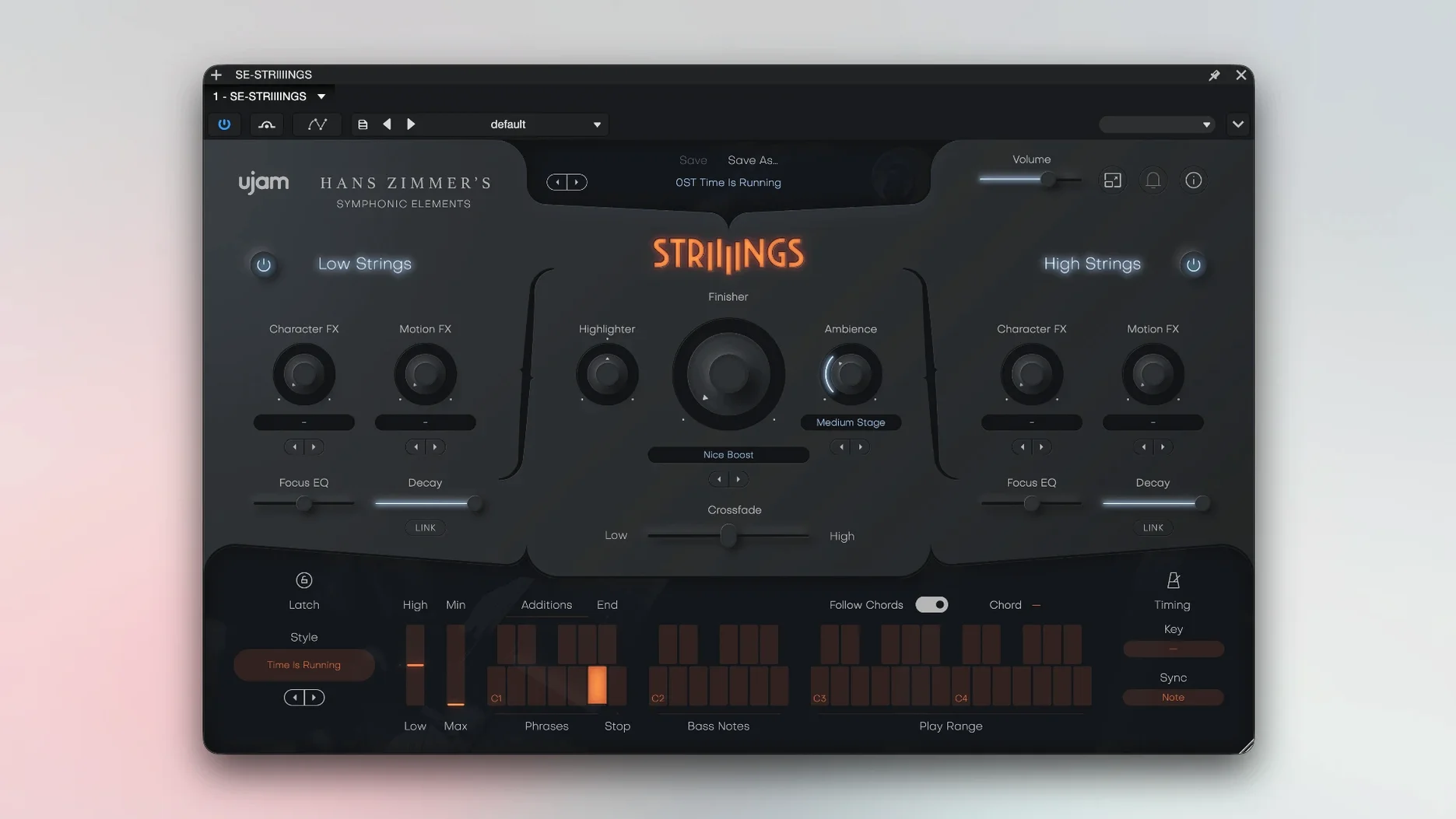
If you already work with UJAM's virtual drummers or bassists, STRIIIINGS feels familiar from the start. It's the first in the Symphonic Elements series, and it's built on recordings from Hans Zimmer's string library. That pedigree shows in the sound.
The instrument splits the orchestra into two layers: Low Strings covers basses and celli, High Strings handles violins and violas. You can adjust each section independently, which is handy when you want the low end to rumble without the highs getting in the way. It's a modern take on string-ensemble textures, not a traditional sample player.
There's a sound-design element baked in, plus more than 200 presets from sound designers. With 60 styles to choose from, you can go from a subtle pad to a full cinematic hit without touching a fader. The controls are straightforward: pick a style, tweak the layers, and you're moving.
For a mix, STRIIIINGS adds weight and movement. It's not about realistic legato runs; it's about instant, polished string energy that sits right in a track. That makes it a solid tool for film cues, pop productions, or anything needing a big, expressive section.
Once STRIIIINGS is loaded in your DAW, the way it interacts with other plug-ins and macOS features is worth a look. Since it uses the standard VST, AU, or AAX format, you can route its output through your usual reverb, compression, or saturation chain. A lot of producers send the Low Strings bus through a subtle distortion or a subharmonic synth to make the basses and celli cut through a dense mix. High Strings benefit from a short, bright reverb to keep them defined without washing out.
On the macOS side, the plug-in works with the system's Audio Units hosting, so you can preview it in Quick Look or GarageBand before committing to a full session. If you use Logic Pro, the AU version gives you direct access to the instrument's parameters in the Smart Controls pane, letting you map the Crossfade or layer volumes to hardware knobs or the Mac's Touch Bar without extra MIDI mapping. For Ableton Live users, the VST3 version responds to the DAW's macro controls, which is handy for live tweaking during a performance.
People new to UJAM instruments often wonder about a few things before installing. One common question is whether the plug-in works alongside other sample libraries in the same project. Yes — it loads like any other virtual instrument, so you can stack it with Kontakt or Spitfire libraries. Just be mindful of the 4 GB RAM requirement; if your template already has several large libraries, you might need to freeze tracks or use a lighter reverb to keep the session responsive.
Another frequent point is the activation. The package includes installation and activation instructions, and you'll need to open the plug-in twice the first time you launch it. That second opening is what registers it properly in your DAW. It's a one-time step, not a recurring process.
Some users ask about the lack of a standalone app. STRIIIINGS runs only as a plug-in inside a host DAW, so you can't open it by itself. That's standard for UJAM's line, and it keeps the instrument tightly integrated with your arrangement.
If you're setting it up for the first time, a few settings make an immediate difference. Start with the Crossfade control — it blends the Low and High Strings layers. Moving it fully one way gives you only the low end, which works for dark, brooding cues. Centering it gives a balanced ensemble. For most pop and trailer work, a slight bias toward the High Strings keeps the part audible in a dense mix.
The individual layer volumes are worth adjusting early on. If the Low Strings feel too boomy for your room or headphones, pull them back by a few decibels rather than EQ'ing after the fact. The presets are designed to sound good out of the box, but they're built for general use, not your specific track. A small tweak to the layer balance often saves you from corrective processing later.
Finally, spend a few minutes scrolling through the 60 styles with a simple chord progression playing. Each style changes the articulation, rhythm, and intensity. You might find a pattern that suggests a new direction for the song, which is exactly what composers and producers look for when they want instant inspiration. UJAM Symphonic Elements STRIIIINGS delivers cinematic string textures ideal for composers and producers seeking instant orchestral inspiration.
- macOS 10.14 or later
- Intel or Apple Silicon
- 64-bit software only
- 4 GB RAM
- Interface language: English
Kit check at a glance
| System | macOS 10.14 or later |
| Chip | Apple Silicon, Intel 64-bit |
| Download | 4.4 GB |
| Older pressings | 2 in the crate |



Chat from the booth
Sign in or grab a free account to leave a comment.
Nobody has said a word in the booth yet. If you played a set with this build, tell the next person how it went.