
- Build in the crate
- 1.0.0
- Made by the team at
- Plugin Alliance, Karanyi Sounds
- Menu languages offered
- English
- How you pay for it
- K'ed by BUBBiX
- macOS it plays on
- macOS 12 or later
- CPU it runs on
- Apple Silicon, Intel 64-bit
Screenshots
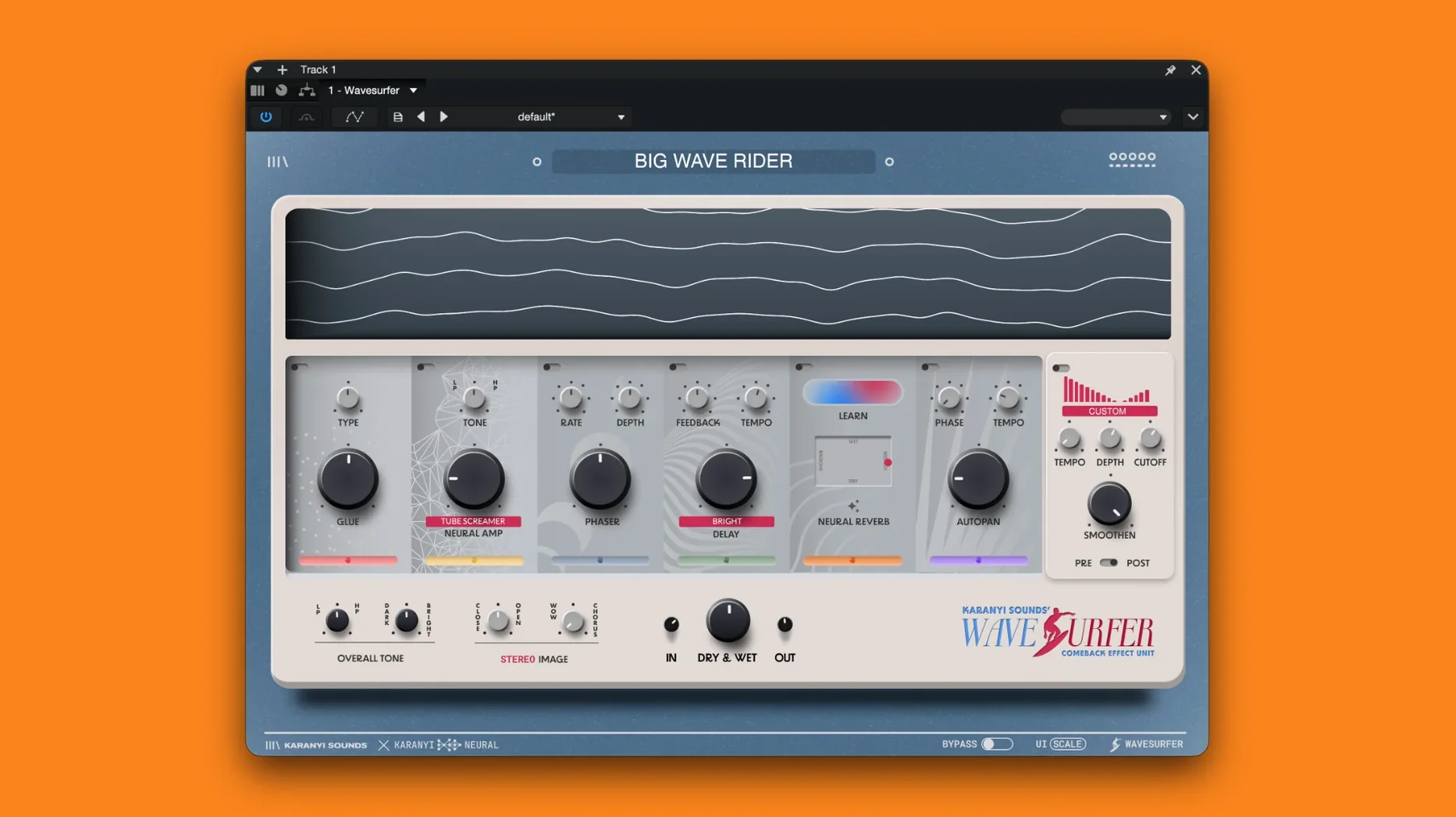
Picture a vocal bus that needs width and a hint of tape warmth, or a synth pad that could use some movement. Wavesurfer fits there. It is a modular multi-effects plugin with a drag-and-drop interface, so you chain modules in any order that makes sense for the job.
| Detail | Info |
|---|---|
| Version | 1.0.0 |
| Type | Modular multi-effects |
| Master effects | Combo Filter, Tonal EQ, Stereo Imager, Stereo WOW/Chorus |
| Modules | Delay, Neural Amp, Autopan, Phaser, Glue, Neural Reverb, Filter Pulse |
| macOS | 12 or later |
| Architecture | Intel and Apple Silicon |
The seven swappable modules cover the usual suspects, but the Neural Amp and Neural Reverb stand out. They use neural modeling to emulate classic tape machines, guitar amps, and spaces, which adds character without loading a separate plugin. On a track or a bus, Wavesurfer handles everything from subtle glue to full-on texture shifts.
Distinct modular approach versus Output Movement
Wavesurfer lives in a space shared by a few other modular effect chains, but its approach is distinct. Output Movement is a popular choice for adding motion to sounds, with built-in filter, reverb, and delay that modulate over time. Where Movement focuses on rhythmic movement and sidechain-style pumping, Wavesurfer leans more into vintage character and neural processing. The Neural Amp and Neural Reverb modules give it a flavour closer to hardware emulation than Movement's cleaner, more modern palette.
Eventide Blackhole is another plugin people reach for when they want big, evolving reverb textures. But Blackhole is a single-purpose reverb, not a modular chain. Wavesurfer can give you a similar sense of space through its Neural Reverb, then add phaser, delay, or filter pulse in the same instance. For sound design sessions where you want to build a chain from scratch, that flexibility saves routing multiple plugins in your DAW.
iZotope Trash focuses on distortion and filtering, with a modular approach to saturation. Wavesurfer overlaps in the distortion area via the Neural Amp, but adds the full suite of modulation and spatial effects. If you need a dedicated distortion box, Trash goes deeper there. If you want a single plugin that can do warmth, width, movement, and space in one go, Wavesurfer is the more rounded option.
None of these are direct replacements. Wavesurfer sits somewhere between a creative multi-effects unit and a character processor, with the neural modules giving it a unique angle that the others don't match.
Seven modules and four master effects from the start
Being the initial release, Wavesurfer 1.0.0 sets the foundation. For everyday use, that means you get the full set of seven modules and four master effects from the start. The drag-and-drop workflow is there out of the box, so you can reorder modules without breaking your chain. The Filter Pulse module with its 16-step sequencer is particularly useful for adding rhythmic filter sweeps to pads or basslines, which is a feature that makes it more than just a static effects rack.
Since this is version one, the plugin feels like a complete product rather than a work in progress. The neural processing in the reverb and amp sections is active from the get-go, so you are not waiting for future updates to get the signature features. For Mac users who jumped in early, the main consideration is that the plugin requires macOS 12 or later and works on both Intel and Apple Silicon, so it fits current and recent Macs without issues.
Ideal for shaping synths, vocals, and drum buses
Music producers working on electronic, pop, or experimental genres will find Wavesurfer useful for shaping synths, vocals, and drum buses. The combination of neural warmth and modular flexibility means you can create a chain that adds tape-style saturation, stereo width, and a touch of reverb in one plugin, which keeps your session tidy.
Mix engineers who need character processing on individual tracks or aux sends will appreciate the master effects section. The Tonal EQ and Stereo Imager let you fine-tune the output without adding extra plugins, and the Combo Filter can tame harsh frequencies before they hit the reverb or delay. On a vocal bus, the Neural Amp can add presence and grit, while the Neural Reverb blends the signal naturally into the mix.
Sound designers will get the most mileage from the modular layout and the Filter Pulse sequencer. Building complex, evolving textures by chaining Autopan, Phaser, and Neural Reverb in different orders leads to results that are hard to replicate with standard effect stacks. The drag-and-drop interface makes experimentation fast, which is key when you are cycling through ideas.
For Mac users with older Intel machines, the dual architecture support means you can run Wavesurfer on a 2020 Intel MacBook Pro or a newer M-series Mac without worrying about compatibility. The neural modules may be more demanding, but the plugin is designed to work within the same session as your other effects.
If you are already familiar with Karanyi Sounds' other plugins, Wavesurfer expands the toolkit in a modular direction. Karanyi Sounds Wavesurfer for Mac torrent creates evolving textures, suiting sound designers who blend organic and synthetic tones.
- Initial release of Wavesurfer.
- macOS 12 or later
- Intel or Apple Silicon
Kit check at a glance
| System | macOS 12 or later |
| Chip | Apple Silicon, Intel 64-bit |
| Download | 141 MB |
| Older pressings | 2 in the crate |



Chat from the booth
Sign in or grab a free account to leave a comment.
Nobody has said a word in the booth yet. If you played a set with this build, tell the next person how it went.