

- Build in the crate
- 1.0.4
- Made by the team at
- KeySolutions Sounds
- Menu languages offered
- English
- How you pay for it
- K'ed by MORiA
- macOS it plays on
- macOS 11 or later
- CPU it runs on
- Apple Silicon, Intel 64-bit
Screenshots
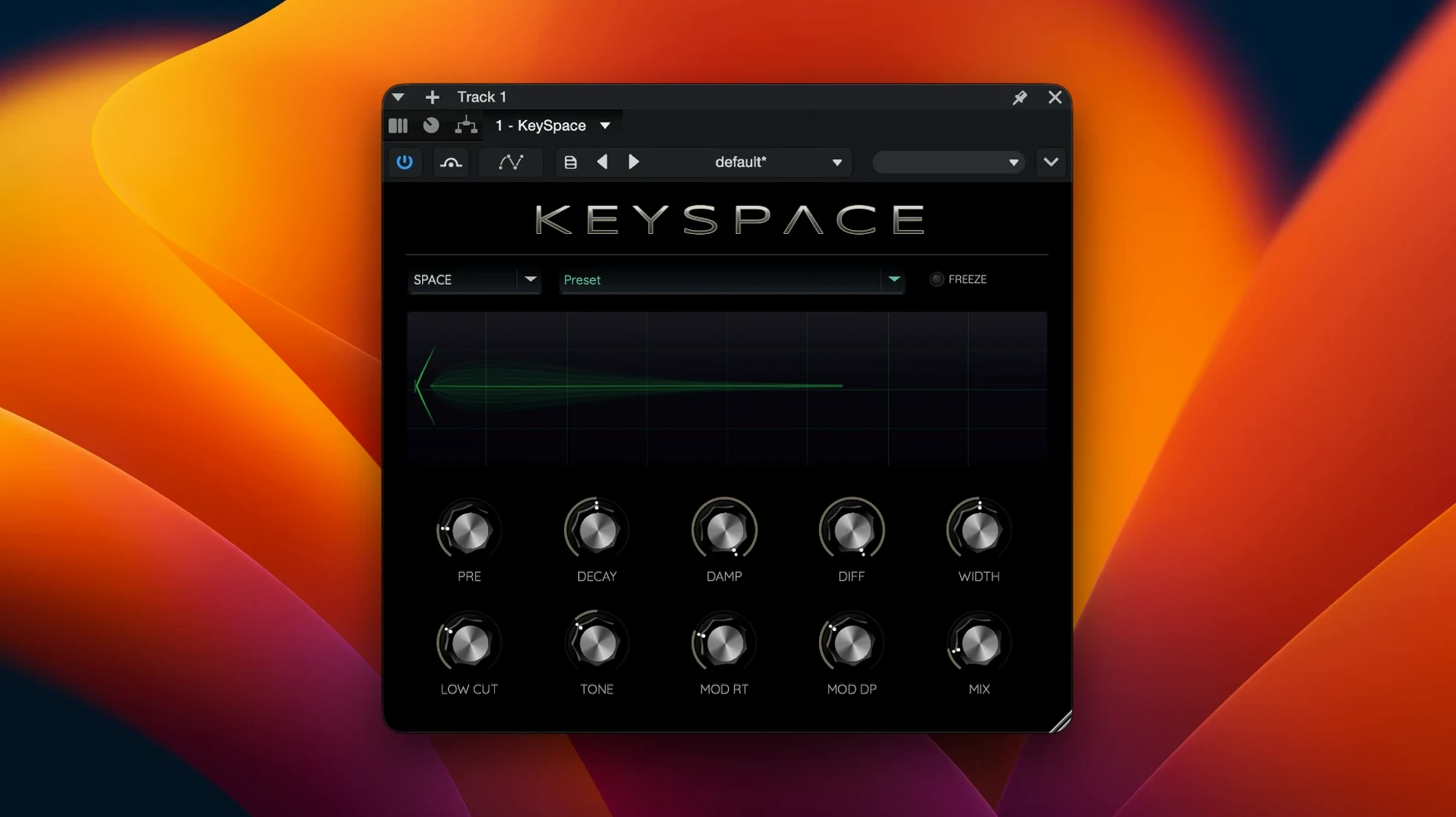
Version 1.0.4 of KeySpace is out now. Nothing flashy changed, but the modulated reverb keeps doing what it does best: giving tracks and buses a sense of space without smothering them.
KeySpace sits naturally on a send or a return bus. Send a vocal there, set the mix low, and it adds depth while keeping the dry signal intact. Guitars work well too, especially with the Room algorithm for a tighter feel. The Hall mode opens things up for pads or strings.
Good for:
- Vocal buses that need width without losing clarity
- Guitar tracks, from clean to heavily processed
- Ambient pads and synth lines, where Space mode creates large, evolving textures
- Working inside the Traveler hybrid synthesizer or as a standalone plugin
Keep in mind:
- Three algorithms: Room, Hall, and Space
- Part of the Time & Space line
- Requires macOS 11 or later, works on both Intel and Apple Silicon
- Interface is in English
More focused than ValhallaRoom's many modes
KeySpace sits in a particular spot among modulated reverbs on Mac. Against ValhallaDSP ValhallaRoom, KeySpace feels more focused — ValhallaRoom gives you many modes and modulation options, but KeySpace keeps it to three algorithms with a clear purpose. The Space mode in particular is something ValhallaRoom doesn’t directly offer: it builds large ambient textures while keeping the source audible, which is useful for producers who want atmosphere without losing the instrument.
Compared to Audio Damage Eos 2, KeySpace is less about classic hall sounds and more about modulation and width. Eos 2 has a distinctive character for vocals and drums, but KeySpace adds subtle pitch variation and stereo spread that works well on pads and sustained notes. If you already own Eos 2, KeySpace gives you a different flavour — more modern, more textural.
Next to Eventide Blackhole, KeySpace is less extreme. Blackhole is designed for massive, otherworldly spaces that can swallow a mix. KeySpace’s Space algorithm does something similar but with more restraint, making it easier to blend into a session without needing heavy EQ or sidechain. For sound designers, both are useful; for mixing engineers, KeySpace might be the more practical choice for everyday use.
Works inside the Traveler synth or as a standalone plugin
Does it work inside the Traveler synth?
Yes. KeySpace is part of the Time & Space line and runs inside the Traveler hybrid synthesizer. You can also use it as a standalone plugin in your DAW. Both setups work the same way — the same algorithms, the same modulation.
Will it run on my Intel Mac?
It works on both Intel and Apple Silicon Macs, as long as you’re on macOS 11 or later. The installer includes the right binary for your architecture, so no extra steps are needed.
Do I need a separate reverb before it?
Not at all. KeySpace is a full reverb plugin, not a modulation add-on. You can use it on its own, on a send or directly on a track. The modulation is built into the reverb tail, so you don’t need extra effects to get movement.
Is it good for live use?
If you’re running a laptop-based setup with a DAW or host that supports plugins, yes. The three algorithms cover different stage sizes — Room for smaller venues, Hall for larger spaces, Space for ambient intros or transitions. Just keep the mix moderate to avoid washout.
- macOS 11 or later
- Intel or Apple Silicon
Kit check at a glance
| System | macOS 11 or later |
| Chip | Apple Silicon, Intel 64-bit |
| Download | 26 MB |
| Older pressings | 1 in the crate |



Chat from the booth
Sign in or grab a free account to leave a comment.
Nobody has said a word in the booth yet. If you played a set with this build, tell the next person how it went.