
- Build in the crate
- 1.4.7
- Made by the team at
- KORG
- Menu languages offered
- English
- How you pay for it
- K'ed by MORiA
- macOS it plays on
- macOS 11 or later
- CPU it runs on
- Apple Silicon, Intel 64-bit
Screenshots
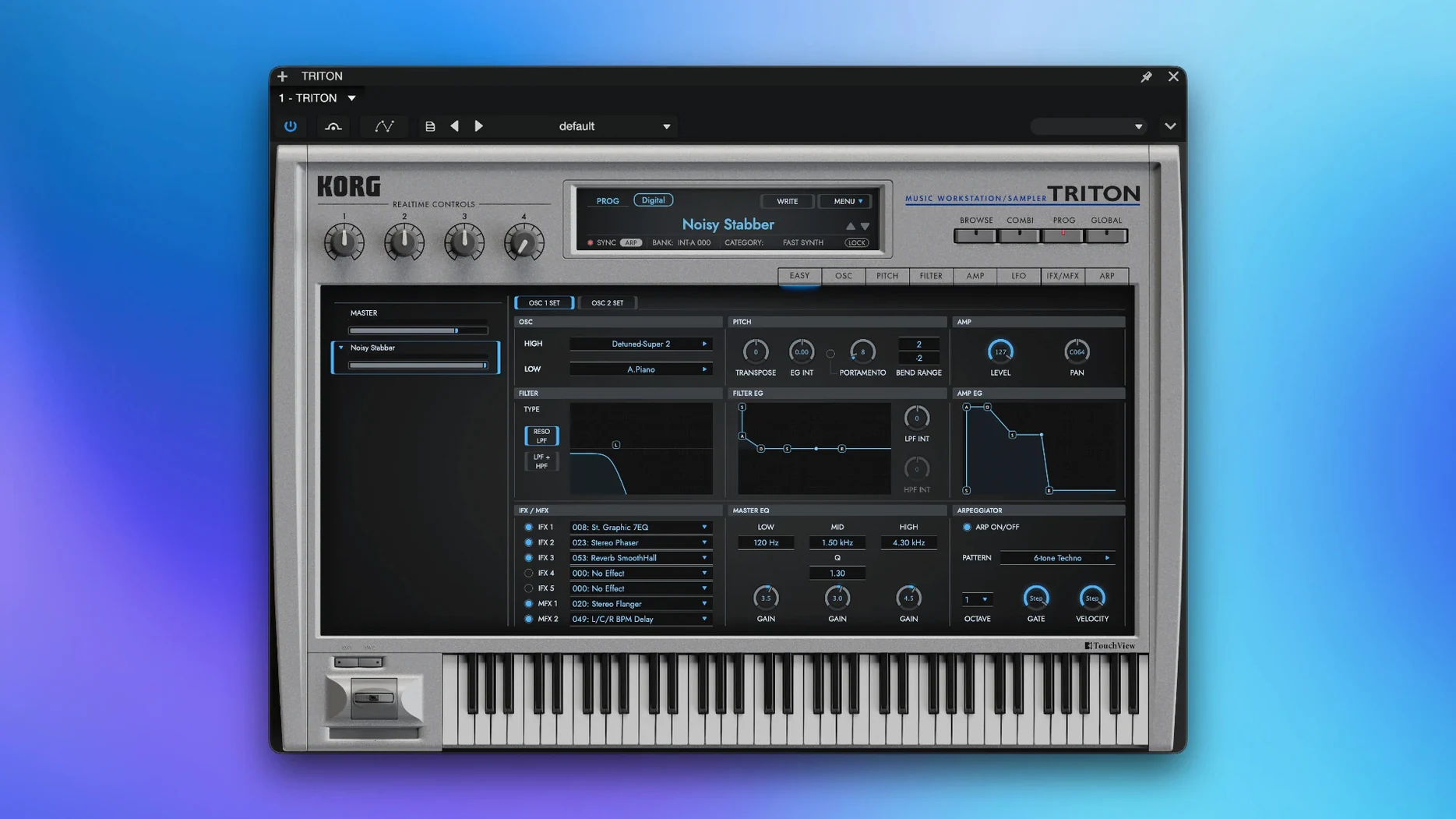
KORG Triton is a software recreation of the TRITON workstation synthesizer, bringing that classic hardware sound into your Mac.
Here’s where it sits in a session:
- Load it on a track – insert it as a VST instrument on a MIDI track and start with a single program.
- Build a combination – use combination mode to layer up to eight sound parts, perfect for pads or stacked leads.
- Shape the sound – pick from two filter types and tweak the PCM samples, captured at 48 kHz for detail.
- Route to buses – send the output to a bus for group processing, then add reverb or delay via the two master effects.
- Use it standalone – when you’re just sketching ideas, run it without a DAW.
It runs on both ARM and x86 64-bit Macs, so it’s happy on Apple Silicon and Intel. The interface is English, and it covers both the TRITON and TRITON Extreme models.
Works as a VST instrument in any DAW
KORG Triton works as a VST instrument inside any DAW that supports the format — Logic Pro, Ableton Live, Cubase, Reaper, whatever you use. Load it on a MIDI track, pick a program or combination, and play. The eight-part multi-timbre combis mean you can route each part to a separate DAW channel if your host allows multi-output VSTs. That’s handy when you want different effects or EQ on individual layers.
Standalone mode is useful on its own. You can run it without a DAW and play directly from a MIDI keyboard. Audio comes through your Mac’s built-in output or an interface. It’s a quick way to browse sounds or practise without opening a full project.
On macOS, Audio Units aren’t listed as a supported format — only VST and standalone. If your DAW prefers AU, you might need to wrap it or use a plugin host that loads VST. Check your DAW’s compatibility before committing to a workflow.
It also sits inside the KORG Collection suite alongside other KORG software instruments. If you have the full collection, you can use them side by side in the same session, layering a Triton pad with a M1 lead or an ARP 2600 bassline. Each instrument runs as its own plugin instance, so you’re not limited to one at a time.
macOS features like Audio MIDI Setup let you route MIDI between apps. You could run Triton standalone, send MIDI from another program via virtual MIDI ports, and capture the audio into a DAW through a loopback tool. It’s not a typical setup, but it works for live layering or sketching without a full DAW template.
Native Apple Silicon support improves responsiveness
Version 1.4.7 is the current release. It adds native Apple Silicon support, which means it runs as a universal binary on M-series Macs without Rosetta translation. For anyone on an M1 or later, that’s a noticeable improvement in responsiveness when browsing patches or switching combis.
Beyond the ARM support, the update keeps compatibility with Intel Macs running macOS 11 or later. So if you’re on an older Mac, you’re not left out — the same installer works for both architectures.
KORG also refreshed the included sound library with version 1.4.7. The more than 4,000 sounds cover both the TRITON and TRITON Extreme palettes, so you get the classic presets and some newer additions. PCM samples are still at 48 kHz, matching the original hardware’s fidelity.
Installation is straightforward. Run the installer, follow the included activation instructions, and you’re done. The package from MORiA is pre-activated, so no extra steps beyond copying the files and authorising the plugin in your DAW.
Setup issues that hide the plugin from your DAW
Most issues come from setup rather than the plugin itself. Here are the ones I hear about most:
- Plugin not showing in DAW – Make sure you scanned the correct VST folder. On macOS, VST plugins usually go in
/Library/Audio/Plug-Ins/VSTor your user folder. Restart your DAW after copying the file, then rescan plugins from the DAW’s preferences. - No sound from combinations – Each part in a combination has its own MIDI channel and output routing. If a part isn’t playing, check that its MIDI channel matches your track’s output. Also verify the part’s volume isn’t set to zero and that its output isn’t muted.
- Standalone mode won’t open – This can happen if the activation files aren’t in the right place. Re-run the installer and follow the included instructions carefully. On Apple Silicon Macs, make sure you’re not running the Intel version by accident — check the app’s info in Finder.
- High CPU usage with multiple instances – Each instance of KORG Triton loads its own sound engine. If you’re running several instances, try using one instance with a multi-timbral combination and route each part to separate MIDI tracks. That uses less CPU than loading separate plugins.
- Sound library missing after update – The PCM data and presets are stored in a specific folder. If you updated from an older version, the new installer might not migrate your custom sounds. Back up any user patches before updating, then copy them back into the new library folder.
If you run into something else, check that your macOS is 11 or later and that you’re using the correct architecture version for your Mac. Most problems are simple config issues, not bugs in the plugin itself.
- macOS 11 or later
- Supports both ARM and x86 64-bit architectures
Kit check at a glance
| System | macOS 11 or later |
| Chip | Apple Silicon, Intel 64-bit |
| Download | 586 MB |
| Older pressings | 1 in the crate |




Chat from the booth
Sign in or grab a free account to leave a comment.
Nobody has said a word in the booth yet. If you played a set with this build, tell the next person how it went.