

- Build in the crate
- 3.1.2
- Made by the team at
- Toontrack
- Menu languages offered
- English
- How you pay for it
- k'ed by Team V.R
- macOS it plays on
- macOS 10.15 or later
- CPU it runs on
- Apple Silicon, Intel 64-bit
Screenshots
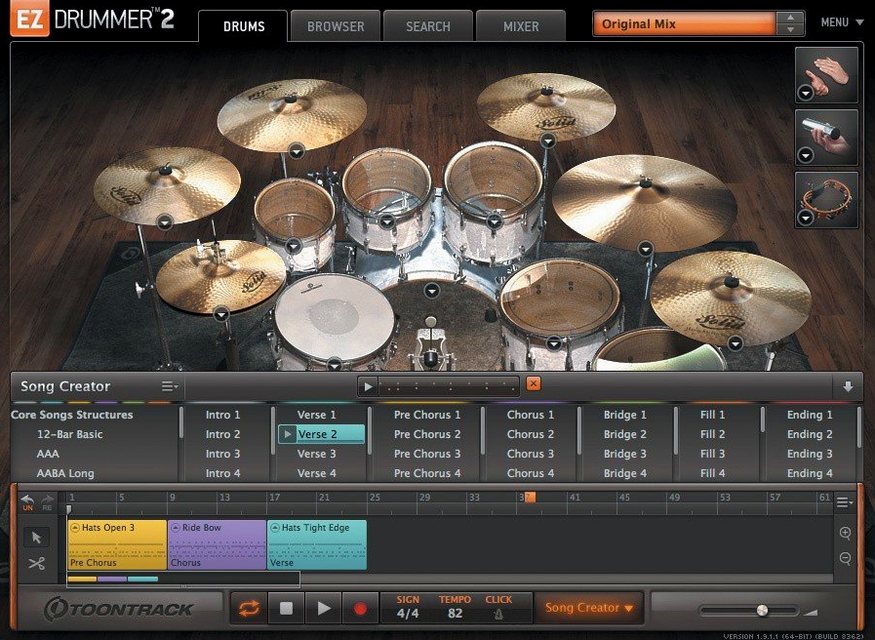
EZdrummer 3.1.2 is out, and while the headline is the new macOS Tahoe-style icons for the standalone and project files, there's more under the hood. The update also brings internal improvements for Infinity Grid EZX and fixes song-track CC recording plus mixer Solo/Mute recall states. If you've been fighting with hi-hat pedal recordings on the song track, that's sorted now.
What does Tap2Find actually do?
Tap2Find lets you tap a rhythm with your mouse or keyboard, and EZdrummer searches its library for matching grooves. It's a quick way to get a drum part that fits the feel in your head, without scrolling through hundreds of presets.
How does the Grid Editor help with writing from scratch?
The built-in Grid Editor is a full pattern sequencer. You can place notes for kick, snare, hats, and percussion directly on a grid, which gives you total control when you want something that isn't in the library.
What's the Song Creator for?
Song Creator takes an idea — even just a section — and builds a full arrangement with verses, choruses, and fills. It's a songwriter's shortcut to a complete demo track, and it works without leaving the program.
Can I tweak grooves in real time?
Edit Play Style changes the feel of a base groove on the fly. You can adjust swing, ghost notes, and accents while the track plays, which is handy for shaping a part until it sits right in the mix.
Runs on Intel and Apple Silicon Macs
EZdrummer 3.1.2 runs on macOS 10.15 or later, and it works on both Intel and Apple Silicon Macs. That means whether you're on an older MacBook Pro or a newer M2 Air, the software will install and run. The installer comes as a standard disk image — mount it and run the setup, same as any other Mac audio software. No special drivers or extra hoops.
The kit library, MIDI grooves and all the internal processing happen inside the program's own engine, so you don't need a separate audio interface just to browse or audition sounds. If you do use an interface, it'll work as you'd expect. The update to version 3.1.2 also brings the standalone app icon and project file icon in line with macOS Tahoe style, so they look native on current macOS versions. For anyone who keeps a tidy dock or browses project folders visually, that's a small but welcome detail.
Building a verse-chorus arrangement from a guitar sketch
Say you're a songwriter who works with an acoustic guitar or a simple piano part. You've recorded a verse and a chorus, but the drums are just placeholder loops from a sample pack. Open EZdrummer, load one of the seven included kits, and start by tapping the verse rhythm into Tap2Find. The program pulls up matching grooves. Preview a few, drag one to the song track. Then find a busier pattern for the chorus. Use Edit Play Style to add a bit more swing to the verse groove and tighten up the chorus accents. Once the two sections feel right, Song Creator can expand them into a full arrangement with a bridge, a breakdown or an intro. You never touch a MIDI controller or a mouse-drawn velocity line if you don't want to. The whole thing stays inside EZdrummer, and you can drag the finished drum track to your DAW when you're ready.
Updated icons and fixes for daily work
The most visible change is the icon set. The standalone and project icons now match the macOS Tahoe style, so they don't look like they belong to a ten-year-old app. But the fixes matter more for daily work. Before this update, recording hi-hat pedal and other continuous controller (CC) data on the song track could fail — the pedal just wouldn't register properly. That's fixed. Also, if you toggled Solo on one channel and then Mute on another, the opposite recall state could be cleared. That's also fixed. So if you mix inside the program or use the song track to record live drum takes, this version behaves more predictably. The internal improvements for Infinity Grid EZX mean that expansion pack loads and grid behaviour are better under the hood, even if you don't see it in the interface.
Workflow: building a drum pattern from scratch with the Grid Editor
Sometimes the groove library doesn't have exactly what you hear. Here's a full workflow for writing your own pattern.
- Start by selecting a kit from the seven included. Pick one that matches the mood — a tight rock kit or a looser vintage set.
- Open the Grid Editor. You'll see a row for kick, snare, hi-hat, toms and percussion. Set your time signature and grid resolution (say, 16th notes for a pop beat).
- Place notes for a basic kick pattern on beats 1 and 3. Add a snare on beats 2 and 4. Enter hi-hat on eighth notes. Play it back to hear the foundation.
- Adjust velocities from the grid. Drag a note's velocity up for an accent or down for a ghost note. Do this for the hi-hat to create a pulse that breathes, not just a machine-gun pattern.
- Add fills. Copy a bar, paste it at the end of an eight-bar section, and replace some kick and snare hits with toms or crash cymbal notes. Keep it simple — a fill that leads into the next section is more useful than a busy one.
- Save your pattern as a custom groove. Next time you need a similar feel, it'll be in your library.
- If you want to build a full song, drag your custom groove into the song track, then use the Song Creator to arrange it into verses and choruses. You can also cut, copy and paste groove parts directly on the song track to rearrange sections without rewriting notes.
The Grid Editor is there for when you need something original, and it works alongside the library and the Bandmate idea generator. You're never stuck with only presets.
- Standalone and project icons updated to macOS Tahoe style.
- Internal improvements for Infinity Grid EZX.
- Fixed song-track CC recording and mixer Solo/Mute recall states.
- macOS 10.15 or later
- Intel or Apple Silicon
Kit check at a glance
| System | macOS 10.15 or later |
| Chip | Apple Silicon, Intel 64-bit |
| Download | 786 MB |
| Older pressings | 5 in the crate |




Chat from the booth
Sign in or grab a free account to leave a comment.
Nobody has said a word in the booth yet. If you played a set with this build, tell the next person how it went.