
- Build in the crate
- 2.5.26
- Made by the team at
- Devious Machines
- Menu languages offered
- English
- How you pay for it
- K'ed by MORiA
- macOS it plays on
- OS X 10.11 or later
- CPU it runs on
- Apple Silicon, Intel 64-bit
Screenshots
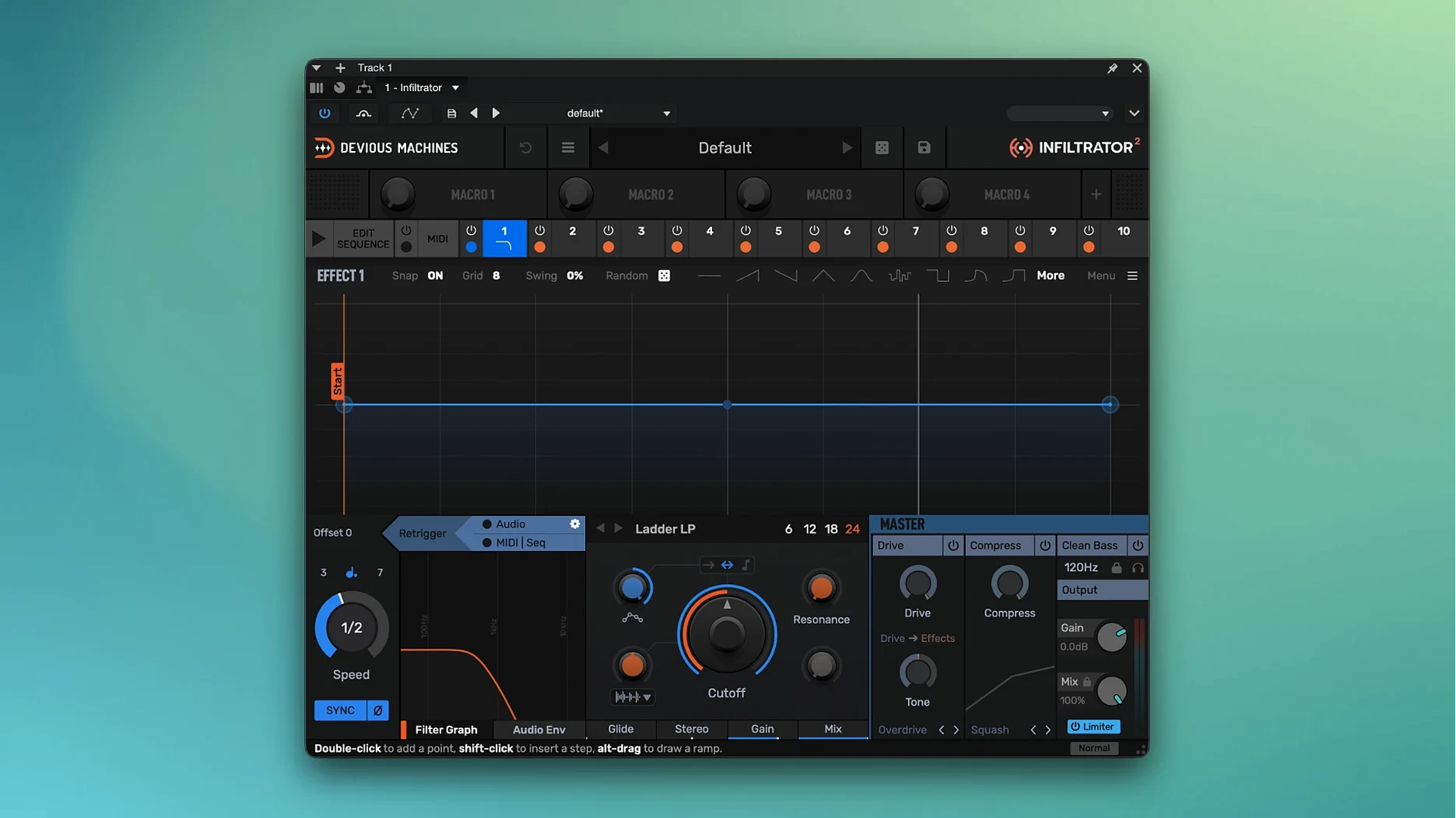
Infiltrator 2 runs on both Apple Silicon and Intel Macs, needing nothing more than OS X 10.11 or later. That covers everything from an old MacBook to the newest M-series machine. Once it’s in your session, it earns its place on tracks, buses, and even the master — wherever you want movement without building a hundred automations.
- Stack up to ten effects at once, then sequence them so different parts of the chain hit at different times.
- Use the envelope-controlled filter to shape the sound dynamically — great for risers, drops, and vocal chops.
- Modulate parameters with the built-in LFOs and step sequencers; version 2 doubles the modulation options.
- Drop it on a drum bus to add rhythmic filtering that follows your track’s tempo.
- Load it on a synth pad and let the presets do the heavy lifting — there are twice as many as before.
Version 2.5 adds an output limiter and custom beat divisions, so you can keep levels tidy and sync effects to odd time signatures. It’s a Swiss army knife for sound design, and it works alongside any project that used the original version.
Infiltrator 2.5 has a few details that aren’t obvious at first glance, but they save time once you notice them. The demo mode is one. It runs for 14 days without a license, and if you just want to test a preset on a mix, that’s enough. The only catch is that it drops in a few seconds of white noise now and then — so don’t panic, just know it’s the demo doing its thing. The full license quiets that down.
The installer includes both installation and activation instructions inside the package. That means you don’t need to hunt for a separate PDF or a forum thread. Unzip, read the text file, and you’re done. For a plugin with this many modulation options, it’s a relief not to troubleshoot the setup.
Another small thing: version 2.5.26 is a free update if you already have Infiltrator 2. So if you got it a while ago and haven’t checked for new builds, the output limiter and custom beat divisions are waiting in the download section. No extra cost, just the newer build.
Stacking all ten effects at once causes phasey mud
The most common slip is stacking too many effects at once. Ten effects sound impressive, and they are, but throwing all ten on a single track without listening to each layer usually ends in a muddy, phasey mess. Start with three or four, listen, then add more. The same goes for the LFOs and step sequencers — doubling the modulation options in version 2 means you can tweak everything, but beginners often modulate every parameter at once. That kills the clarity. Pick one or two targets per modulation source.
Another mistake: forgetting the envelope-controlled filter is dynamic. Some people load Infiltrator, pick a filter preset, and wonder why nothing moves. The filter needs an input signal to trigger its envelope. A silent track or a pad with no attack won’t give you the sweep you expect. Feed it something transient — a kick, a pluck, a vocal stab — and the filter comes alive.
Beginners also miss the custom beat divisions in version 2.5. Tempo-synced effects are great, but if your track uses an odd time signature like 7/8 or 5/4, the standard divisions won’t line up. The custom beat divisions fix that. It’s not an obvious menu item, so people skip it. Then they wonder why the LFO feels off.
Load presets on vocals, drums, bass, and full mix first
First, run through the demo mode for the full 14 days. Spend the first session just loading presets on different sources — vocals, drums, bass, a full mix. The doubled preset count means you’ll find one that fits your track fast. Write down which ones you like, because the demo noise can be distracting when you’re A/Bing.
Second, start with the output limiter engaged. Version 2.5 added it for a reason: Infiltrator can push levels hard, especially with stacked effects and modulation. Turn the limiter on early, then dial in your sound. It saves you from clipping your master bus and wondering where the distortion came from.
Third, check the release notes on the downloads page. The notes for the individual plugin builds sometimes mention specific fixes or workflow tips. It’s worth a quick read before you start a big session. And if you’re using an Intel Mac, the installer covers both ARM and x86, so you don’t need to pick a separate download.
Finally, save a project with Infiltrator 2.5 before you go deep into sound design. That way, if you want to revert to the original version for a quick comparison, the project stays compatible. The product page confirms full backward compatibility, so it’s safe, but saving a snapshot gives you peace of mind.
- New output limiter added in version 2.5.
- Custom beat divisions for tempo-based effects added in version 2.5.
- Version 2.5.26 is the current Mac download build.
- macOS 10.11 or later
- Apple Silicon or Intel
- VST, VST3, AU, or AAX host
Kit check at a glance
| System | OS X 10.11 or later |
| Chip | Apple Silicon, Intel 64-bit |
| Download | 46 MB |
| Older pressings | 3 in the crate |





Chat from the booth
Sign in or grab a free account to leave a comment.
Nobody has said a word in the booth yet. If you played a set with this build, tell the next person how it went.