
- Build in the crate
- 2.4.0
- Made by the team at
- iZotope
- Menu languages offered
- English
- How you pay for it
- DRM-free
Screenshots
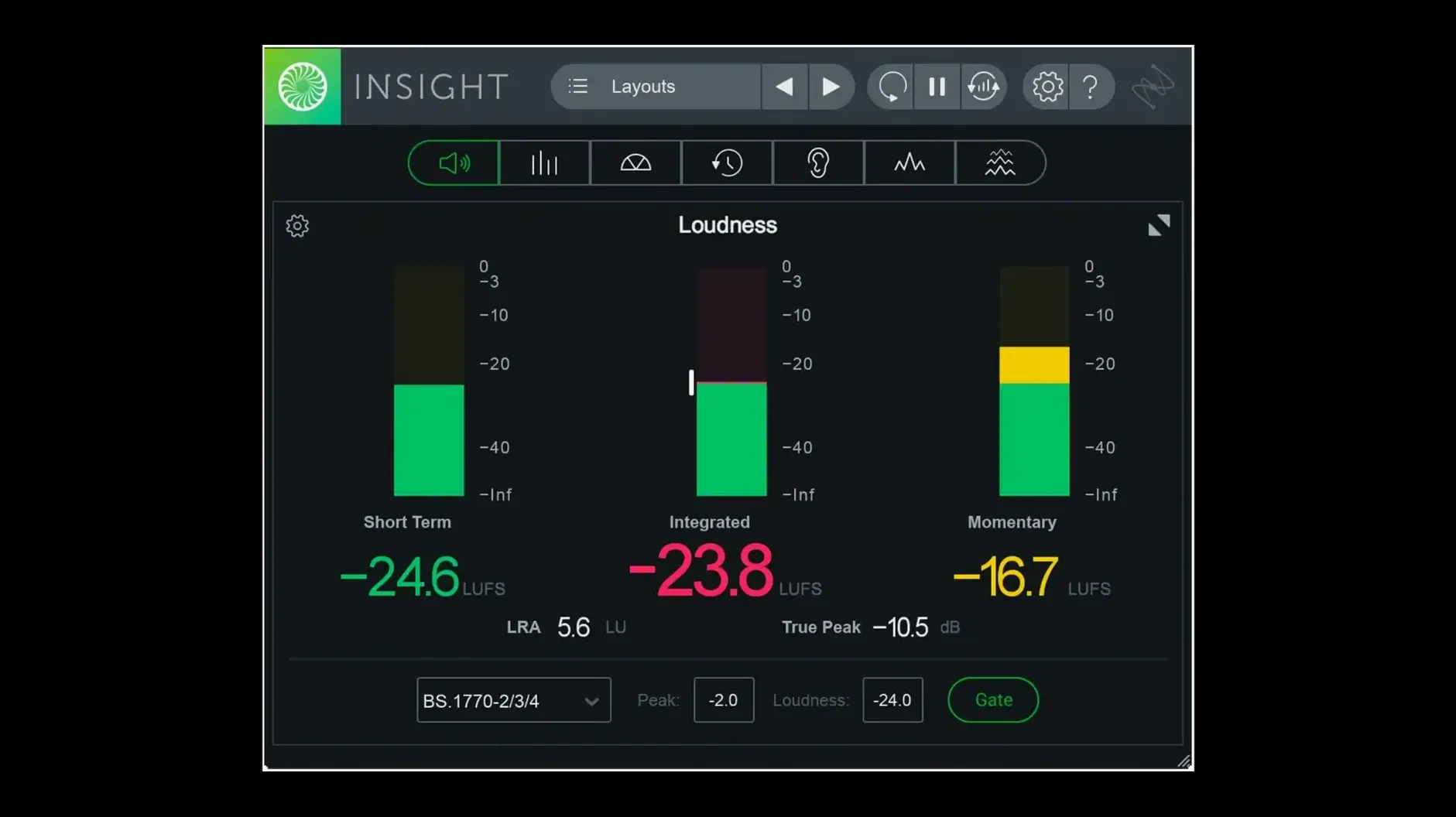
You drop Insight 2 on a master bus to check loudness before export. On a vocal bus you watch the spectrogram for sibilance. On individual tracks you verify stereo width and phase. It is a metering and analysis plug-in that sits wherever you need visual proof of what your ears hear.
What each meter does
True Peak and Loudness Meters — measure peak levels and integrated loudness against current broadcast standards. Colour signals flag problems before they reach the listener.
Loudness History Graph — shows how loudness builds over time. Good for spotting sections that drift out of spec.
Stereo Vectorscope and Surround Scope — visualise stereo image and surround panning. Quick check for phase cancellation.
2D/3D Spectrogram and Spectrum Analyzer — frequency content over time or at a snapshot. Use them to find resonances or verify EQ moves.
Configurable Meters — resize and arrange them to fit your session. Route audio from any track, bus or aux.
On individual tracks, buses, or master bus
Use it on individual tracks for detailed analysis, on buses for summed signals, or on the master bus for final loudness verification. Deep analysis with scalable metrics means one instance can show you what you need without cluttering the session.
Scenario: A post-production dialogue editor
You have a scene with background noise, a voiceover and a music bed that all need to sit at the right level for broadcast. You insert Insight 2 on the dialogue bus and watch the Loudness History Graph to see if the voice stays within the target range across the whole scene. The Spectrogram reveals a low-frequency rumble from the air conditioning that you missed during playback. The Vectorscope catches a phase issue where the voice and music share too much centre information. One plug-in, a few visual checks, and you know exactly where to cut before the mix goes to QC.
Mixing and mastering engineers verify delivery specs
- Mixing engineers — use the True Peak and Loudness Meters to verify that a mix meets delivery specs without guesswork.
- Mastering engineers — rely on the Spectrum Analyzer and Loudness History Graph to catch imbalances across an album or EP.
- Post-production editors — the Surround Scope and multichannel support up to 7.1.2 make it useful for film and TV work.
- Podcast and radio producers — set loudness targets once and check every episode against the same standard.
- Sound designers — use the Spectrogram to visualise frequency build-up in complex layers.
If you work with audio that needs to pass a loudness spec, or if you want to see what your ears might be missing, Insight 2 gives you the data without getting in the way.
Start with factory presets on a vocal track
- Start with the factory presets. The preset manager now has factory and custom tabs, so you can browse what is there before building your own.
- Put Insight 2 on a single vocal or dialogue track first. Watch the Spectrogram and Vectorscope while you play the track. Get a feel for how the visuals change with different content.
- Route the plug-in from a bus instead of a track. Route a drum bus or a group of background vocals to see how summed signals look compared to individual tracks.
- Resize the meters. Drag the edges of the plug-in window to make the meters bigger or smaller. Find a size that works for your screen without hiding other plug-ins.
- Use the colour signals. When a True Peak or Loudness meter turns a warning colour, stop and listen. That visual flag often catches a problem you might have missed after a long session.
- Test with a mix you already know well. Compare the readings against what you expected. This builds confidence in what the meters are telling you.
- Native arm64 AAX support for Pro Tools 2023.3+ on Apple Silicon Macs
- Native arm64 install support for Apple Silicon Macs
- Factory and custom preset tabs added to the preset manager
- macOS Big Sur or later
- Intel or Apple Silicon
- Interface language: English




Chat from the booth
Sign in or grab a free account to leave a comment.
Nobody has said a word in the booth yet. If you played a set with this build, tell the next person how it went.