

- Build in the crate
- 1.0.0
- Made by the team at
- Cymatics
- Menu languages offered
- English
- How you pay for it
- K'ed by GTA
- macOS it plays on
- macOS 10.14 or later
- CPU it runs on
- Apple Silicon, Intel 64-bit
Screenshots
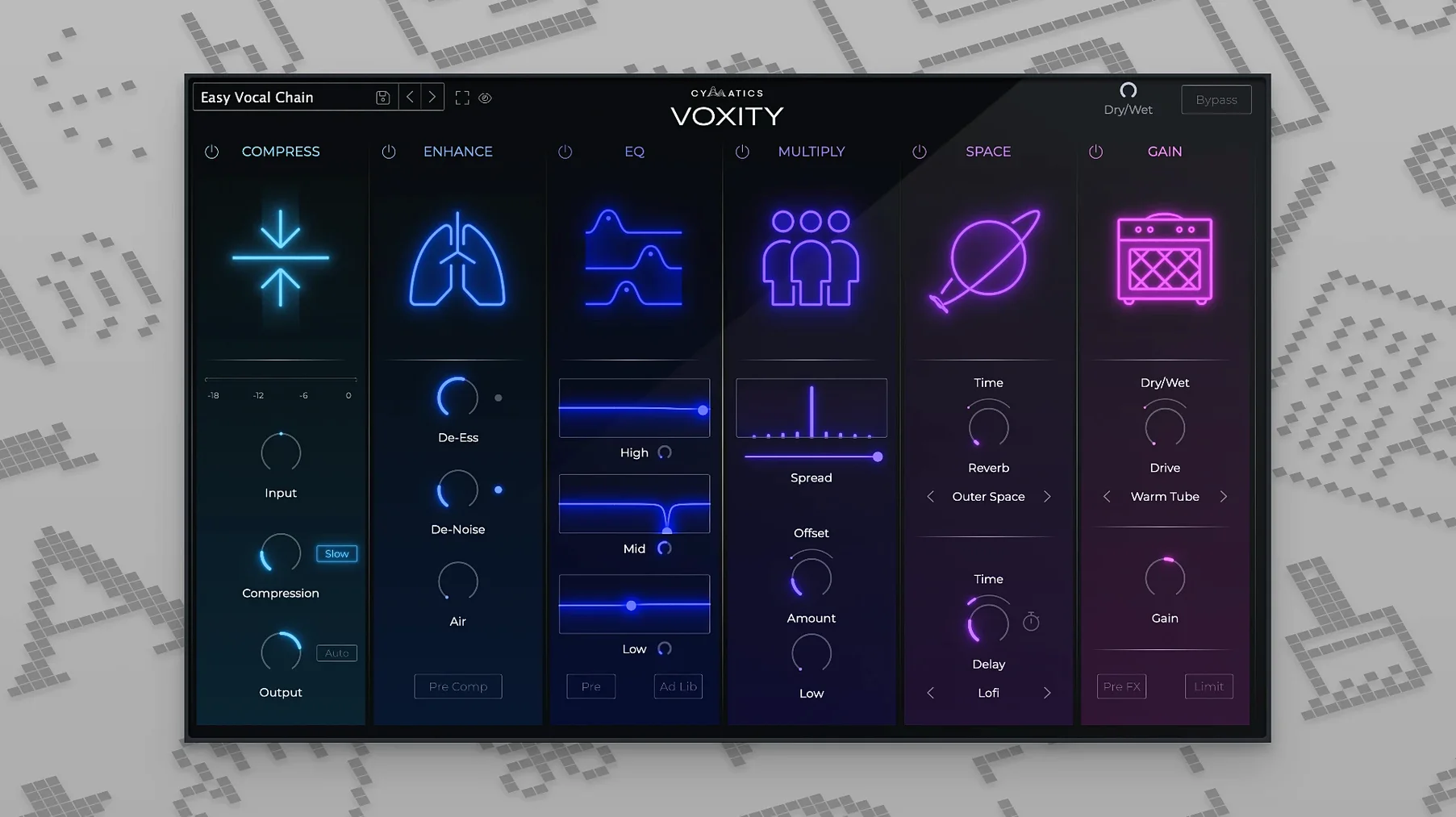
Voxity runs on any Mac from macOS 10.14 onward, and it supports both Intel and Apple Silicon in 64-bit. So whether you're on an older MacBook or the latest M2, it should slot right in. The interface is in English, and installation is just a standard disk image.
Polishes raw vocals into studio-ready takes
- Turning raw vocal takes into polished, studio-ready tracks quickly
- Reducing harsh frequencies and cleaning up breathing noise
- Adding echo and reverb for depth
- Widening the stereo image to make vocals sit bigger in a mix
A vocal mixing plugin, not a full channel strip
- It's a vocal mixing plugin – not a full channel strip
- English only, no other interface languages
- Requires a 64-bit host
Working with a vocal take from start to finish
Say you've just recorded a verse in Logic Pro or Ableton Live and the raw take has a few issues: the volume dips in the middle, there's a bit of sibilance, and you can hear the singer breathing between lines. Here's how Voxity handles that in one plugin instance.
First, drop Voxity on the vocal track. The volume leveling kicks in straight away, so you don't need to reach for a compressor or clip gain first. It smooths out the loud and quiet parts, which makes the next steps easier to hear.
Next, tackle the harshness. The plugin's controls for reducing harsh sounds let you dial back the brittle top end without making the vocal sound dull. At the same time, the breathing noise reduction cleans up those audible breaths between phrases. You're not scrubbing audio by hand or using a separate gate – it's all inside Voxity.
Now you can add brightness and depth to bring the vocal forward. The plugin's EQ-style shaping adds air and presence, which helps the vocal sit on top of the mix rather than getting buried. The stereo widening then spreads the vocal slightly, so it feels bigger and more immersive. Finally, the echo and reverb sections let you place the vocal in a space – a small room for intimacy or a longer hall for a more epic feel.
The whole chain runs inside one window. No routing between multiple plugins, no guessing which effect should come first. You can also flip through the ready-made presets to hear how different styles affect the same take, then tweak from there.
Questions about compatibility and performance
Does it work as a standalone app?
No. Voxity is a plugin, not a standalone application. You load it inside your DAW – Logic Pro, Ableton Live, FL Studio, Cubase, Pro Tools, Reaper and any other 64-bit host that supports AU, VST or AAX formats. If your DAW can load third-party plugins, Voxity will show up after installation.
Works alongside or replaces other vocal plugins
Absolutely. Some producers prefer to use Voxity for the basic cleanup and then add a dedicated reverb or delay afterwards. Others let Voxity do the whole job and skip extra plugins. There's no right or wrong – it depends on how much control you want over individual effects. Voxity doesn't lock you into its own signal chain.
One instance handles multiple processes
That depends on your system and how many instances you run. Voxity processes several things at once – leveling, EQ, widening, reverb – so one instance does a lot. You're unlikely to need multiple instances on the same vocal, which keeps your CPU usage lower than stacking five separate plugins.
Works on backing vocals, voiceovers, and spoken word
Not at all. It works on backing vocals, ad-libs, voiceovers and spoken word too. The same problems – uneven volume, sibilance, room noise – show up in any recorded voice. The presets are geared toward music vocals, but you can adjust the parameters to suit any voice track.
How Voxity fits into your existing setup
Voxity lives alongside your other plugins, but it replaces a whole chain of them. A typical vocal chain in a DAW might include a volume leveller, a de-esser, a gate, an EQ, a stereo widener and a reverb. Voxity combines all those into one window. That means fewer plugin slots used, fewer windows open and less clicking around.
If you already use stock plugins or third-party effects for individual tasks, you can still slot Voxity in at the start of your chain for the initial cleanup and let the other plugins handle the finishing touches. Or you can put it last and let it polish everything before the reverb. It's flexible enough to sit wherever it makes sense for your workflow.
On macOS, Voxity integrates like any other Audio Unit or VST plugin. After installation, it appears in your DAW's plugin list under the Cymatics folder. No extra steps, no driver installations. If you use a Mac with multiple user accounts, install it once and it's available to all users.
Saved a beatmaker 30 minutes per track
Javi makes beats at home in Valencia and occasionally records vocals for local artists. He used to spend half an hour per track on vocal processing alone – loading a compressor, a de-esser, an EQ, a stereo imager and a reverb, adjusting each one separately, then going back to tweak because one plugin affected the other. With Voxity, he loads one instance, picks a preset that matches the vocalist's style and makes small adjustments to the brightness and reverb amount. The volume leveling and noise reduction are already doing their job, so he doesn't have to think about them. He still adds a separate delay on a return track when he wants a specific effect, but the core vocal sound is done in minutes. For a bedroom producer who wants to release tracks without outsourcing the mix, that time saving matters.
- macOS 10.14 or later
- 64-bit
- Intel or Apple Silicon
Kit check at a glance
| System | macOS 10.14 or later |
| Chip | Apple Silicon, Intel 64-bit |
| Download | 97 MB |
| Older pressings | 1 in the crate |




Chat from the booth
Sign in or grab a free account to leave a comment.
Nobody has said a word in the booth yet. If you played a set with this build, tell the next person how it went.