

- Build in the crate
- 4.1.0
- Made by the team at
- iZotope
- Menu languages offered
- English
- How you pay for it
- K'ed by TEAM HCiSO
- macOS it plays on
- macOS 10.15 or later
- CPU it runs on
- Apple Silicon, Intel 64-bit
Screenshots
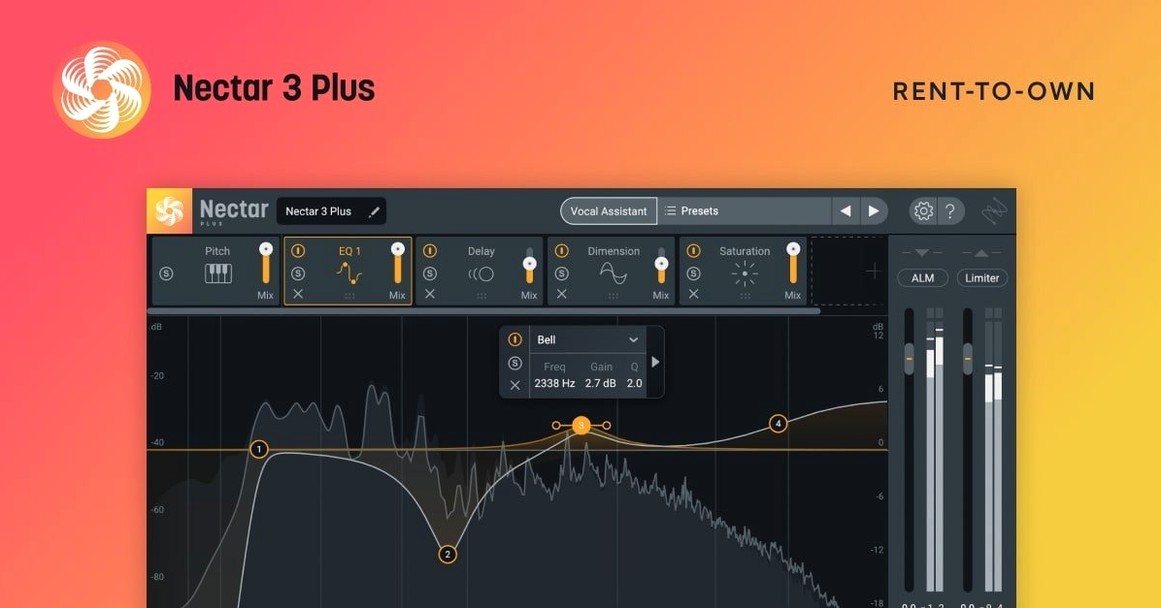
iZotope Nectar is a vocal mixing plugin suite for processing and shaping vocals, built for musicians and producers who want detailed control over every part of a vocal track.
One realistic task: clean up a lead vocal
Let’s say you’ve recorded a vocal take with a bit of breath noise and uneven loudness. Nectar 4 can handle it in one pass. The AI-powered assistive audio tech listens to the track and suggests settings, so you’re not starting from scratch. From there you tweak the tone, compression, echo, and width to fit the mix. You can even strip out breath noise and even out the levels without losing the performance’s character.
Going further with harmony
If you need background vocals but don’t have another singer around, Nectar has you covered. The Voices feature, available in Standard and Advanced editions, lets you add harmony or layer extra vocal parts. It works as a complete vocal processing plugin, whether you’re mixing, producing, or designing a sound from the ground up. Nectar 4 comes in Elements, Standard, and Advanced editions, so you can pick the level of control you need.
DAW compatibility and setup
One of the first things people wonder is whether Nectar will work alongside their current setup. The plugin runs as a 64-bit audio unit or VST, so it slots into most modern DAWs without trouble. If you’re on Logic Pro, Ableton Live, Pro Tools, or Cubase, you’re fine. The installer handles the placement, and your DAW should pick it up on next launch.
Another common question is about the iLok situation. Nectar 4.1.0 fixed an authorisation failure that affected Nectar Standard with iLok, so that’s sorted. The package includes an installation and activation guide, which walks you through the process. You don’t need a physical iLok dongle — the software-based approach works on your machine.
People also ask if they can use just one module without loading the whole suite. Yes. Nectar works as a single plugin instance, but you can bypass sections you don’t need.
And yes, the interface is in English only. There’s no language toggle, so if you’re comfortable with English menus and labels, you’re set.
macOS Ventura 13.7.4 required
Version 4.1.0 landed on June 25, 2025. For most users, the biggest change is the macOS minimum bump to Ventura 13.7.4. If you were still on Monterey or earlier, you’ll need to update your system before installing. That’s a one-time shift, but it means Nectar now relies on newer system frameworks, which tends to keep things consistent across future updates.
Windows HiDPI support was added, so if you run Nectar on a Windows machine with a high-resolution screen, the interface scales properly. On Mac, the interface was already Retina-ready, so no change there.
The supported DAW and NLE versions were updated too. If you’re on an older DAW version, it’s worth checking compatibility before upgrading Nectar. The fix for the iLok authorisation failure with Nectar Standard removes a headache that some users hit during activation. That should make the initial setup smoother.
Apple Silicon and Intel support
Nectar 4.1.0 requires macOS Ventura 13.7.4 or later. It runs on both Apple Silicon and Intel Macs, so whether you’re on an M-series chip or an older Intel machine, it works. The plugin is 64-bit only, which is standard for modern audio software — no 32-bit support here.
The installer is straightforward. You download the package, run it, and point it to your plugin folder. The activation guide inside the package explains the rest. No background services or extra daemons running after install — just the plugin files where they belong.
Because it’s a native Mac application, it behaves like any other audio plugin. It doesn’t install a standalone app; you open it inside your DAW. That keeps your system clean and avoids unnecessary processes.
Vocal Assistant on a raw vocal track
I had a vocal track recorded at home — a verse and a chorus, single take, no processing. I dropped Nectar 4 on the track insert in my DAW. First thing I did was open the Vocal Assistant. It analysed the recording for about ten seconds, then suggested a starting point with compression, EQ, and a touch of reverb. The assistant is not a set-and-forget tool, but it saves time when you’re not sure where to begin.
From there, I adjusted the EQ to cut some boxiness around 300 Hz. The interface is laid out like a channel strip, so each module is visible and you can click to open its controls. I tweaked the compressor ratio from the suggested 3:1 to 4:1 because the vocalist had a wide dynamic range. The de-esser handled sibilance without making the track sound dull.
Then I turned on the Backer module, which is available in Standard and Advanced. It added a subtle layer underneath the main vocal, giving the chorus more weight. I set the blend low so it sat behind the lead, not competing with it. That took about a minute.
For the bridge, I wanted a wider stereo image. I used the Width module to spread the vocal slightly, then added a short slap delay from the Echo section. The whole chain stayed inside one plugin window — no need to route to separate aux tracks.
When I was done, I saved the preset under the singer’s name. Next time I work on that project, I can load the same chain with one click. That’s the kind of session where Nectar earns its place: one plugin, a few adjustments, and the vocal sits where it should.
- Windows HiDPI support added.
- Fixed an authorization failure for Nectar Standard with iLok.
- Updated supported DAW/NLE versions.
- Minimum macOS version changed to Ventura 13.7.4.
- macOS Ventura 13.7.4 or later
- Intel or Apple Silicon
- Interface language: English
Kit check at a glance
| System | macOS 10.15 or later |
| Chip | Apple Silicon, Intel 64-bit |
| Download | 545 MB |
| Older pressings | 2 in the crate |



Chat from the booth
Sign in or grab a free account to leave a comment.
Nobody has said a word in the booth yet. If you played a set with this build, tell the next person how it went.