
- Build in the crate
- 1.2.2 Fix
- Made by the team at
- Excite Audio
- Menu languages offered
- English
- How you pay for it
- Included
- macOS it plays on
- macOS 10.15 or later
- CPU it runs on
- Apple Silicon, Intel 64-bit
Screenshots
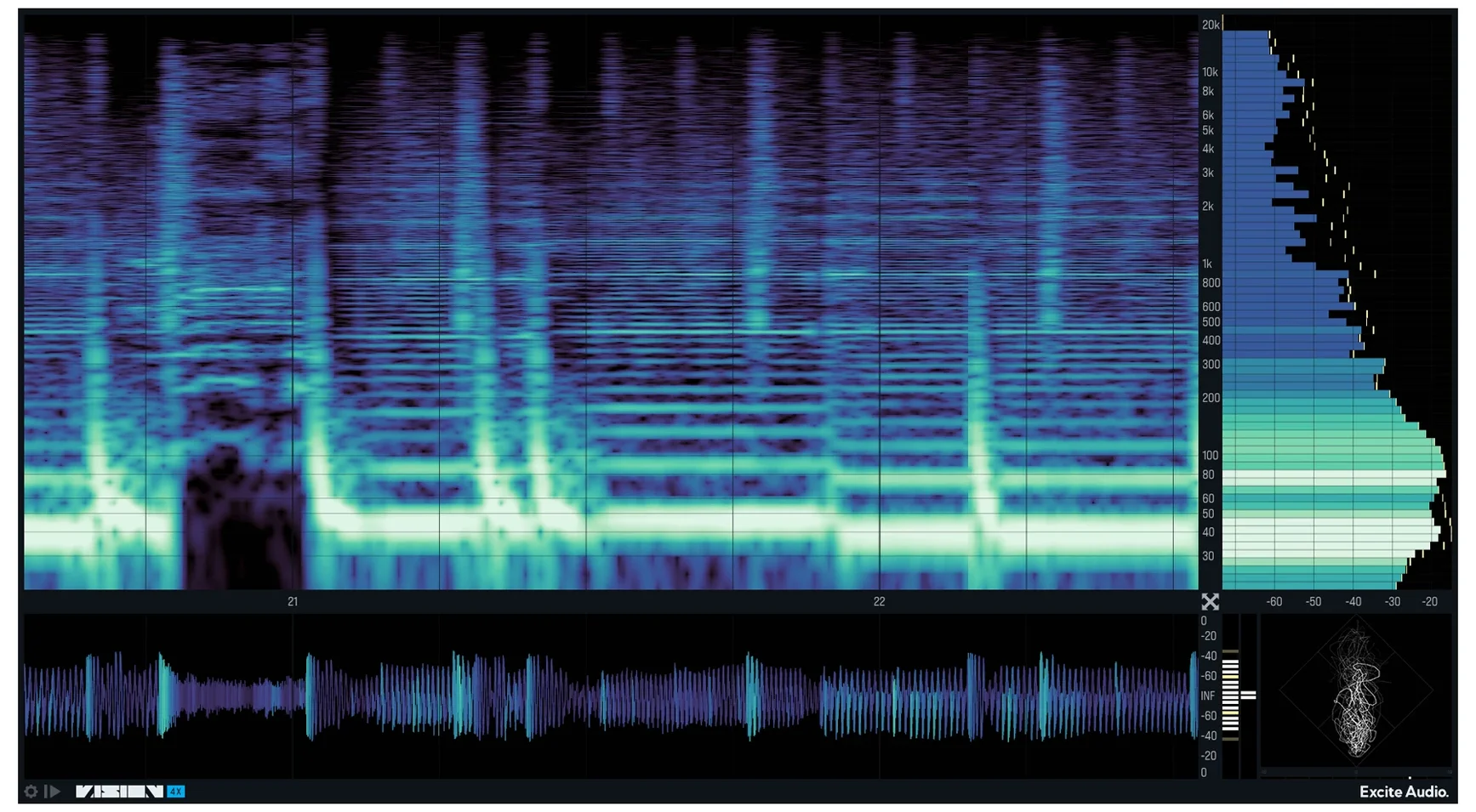
VISION 4X is a visual analysis plugin built for mixing and mastering, designed alongside Noisia.
What the analyzers show
You get a spectrogram, a bar graph, a waveform, and a phase correlation meter, each in its own resizable window. The spectrogram pays extra attention to low frequencies, so rumble and sub-bass show up clearly. The waveform can highlight anything clipping above 0 dB, which saves you from hunting for problem spots by ear. The phase correlation meter handles stereo spread and left-right phase difference in one view.
Peak Hold reveals transient reach
The histogram has a Peak Hold control, handy when you want to see how far a transient actually travelled. You can run the analyzers continuously, or set them to a looped time slice and inspect a specific passage. There is also a restart trigger: analysis resets whenever VISION 4X receives a MIDI signal, which works nicely if you are checking different sections of a track from a controller.
Noisia collaboration sharpens low-end detail
If you mix electronic music, the collaboration with Noisia shows in the low-end detail and the histogram's frequency band control. Bass-heavy genres benefit from the spectrogram's low-frequency resolution, and the Peak Hold function on the histogram lets you see exactly how long a kick tail lingers. For mastering engineers, the looped time slice and the phase correlation meter are practical for checking problem sections repeatedly without losing focus. Music producers working with sample-heavy material will appreciate the spectrum highlighting: it marks resonant frequencies that might clash with other elements in a mix.
Ten colour maps expose frequency clusters
The ten colour maps on the spectrogram are not just cosmetic. Different maps can reveal different energy clusters in the frequency range, especially when you bias the display toward lows or highs. The histogram's adjustable band count lets you decide how much detail you need: fewer bands for a broad overview, more bands when you are zeroing in on a narrow range. The waveform's VU and RMS metering gives you two ways to gauge loudness without switching plugins. And if you are working with a lot of material, the MIDI restart trigger saves you reaching for the mouse — send a note and the analysis starts fresh.
Who gets the most from it
Mixing engineers who deal with dense arrangements will find the four simultaneous views useful for spotting conflicts fast. If you work in electronic music, the low-frequency bias on the spectrogram helps you keep sub-bass and kick layers separate. Mastering engineers can rely on the looped time slice to check the same few bars across different processing chains without resetting anything manually. Producers who build tracks from samples will appreciate the spectrum highlighting for finding resonant peaks that might need a cut before they stack up.
Small conveniences you might miss
The resizable windows let you focus on one analyzer while the others stay visible in the background — handy when you want a large spectrogram but still want to keep an eye on phase. The waveform's clipping highlight works in real time, so you can adjust a compressor and see instantly if the peaks are still crossing zero. The MIDI restart trigger is more flexible than it first appears: you can assign it to a pad or key on your controller and trigger a fresh analysis without leaving the mix position. And because all four analyzers run simultaneously, you never have to switch between tabs or reload the plugin to check a different view — the information is already there.
- Fixes a bug in the standalone version that prevented macOS from granting microphone permission.
- macOS 10.15 or later
- Apple Silicon or Intel 64-bit
- Interface language: English
Kit check at a glance
| System | macOS 10.15 or later |
| Chip | Apple Silicon, Intel 64-bit |
| Download | 42 MB |



Chat from the booth
Sign in or grab a free account to leave a comment.
Nobody has said a word in the booth yet. If you played a set with this build, tell the next person how it went.