
- Build in the crate
- 3.13.3 (6106)
- Made by the team at
- Arturia
- Menu languages offered
- English
- How you pay for it
- K'ed by MORiA
- macOS it plays on
- macOS 11 or later
- CPU it runs on
- Apple Silicon, Intel 64-bit
Screenshots
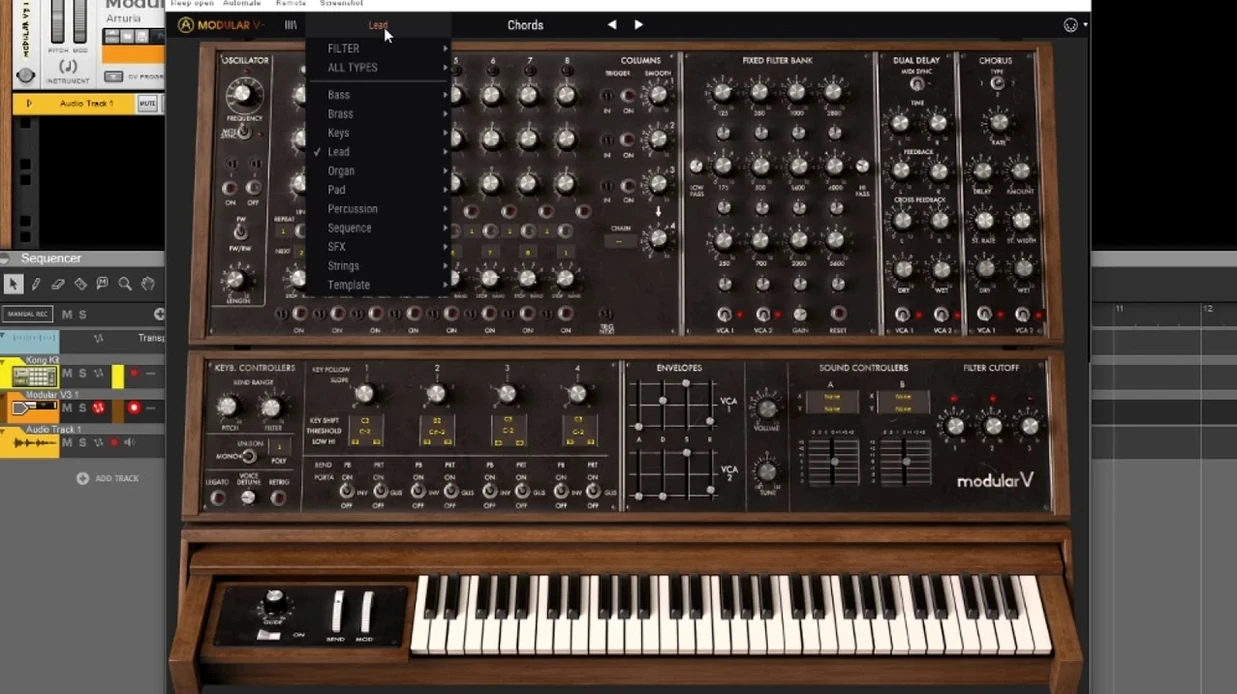
The latest update keeps the focus on authenticity. True Analog Emulation means the oscillators, filters, and VCAs behave like the original hardware, not just samples of it.
Patch the signal flow
Plugins on the virtual patchbay connect modules just like the physical instrument. Drag a cable from the oscillator output to the filter input, then route the envelope to the filter cutoff. You hear the result instantly, and you can save any patch for later.
Sweep from warm to nasal
The filter section lets you sweep from warm and round to sharp and nasal. Modulation sources — LFOs, envelopes, and noise — can target pitch, filter cutoff, or amplitude. It is that flexibility that makes every patch feel like your own.
Play it live
Connect a MIDI keyboard and the modular responds with the immediacy of a hardware instrument. You can tweak knobs while a sequence runs, and the plugin sits comfortably in your DAW alongside other Arturia instruments.
Softube Modular vs. all-in-one modules
There are a few ways to get modular synthesis on a Mac. Softube Modular offers a more modular-modular approach — you buy individual modules from a growing catalogue and build racks from scratch. It sounds excellent, but the cost adds up if you want a full system. u-he Bazille takes a different angle: it is a semi-modular hybrid with digital oscillators and a distinctive, almost aggressive character. Its patching is deep but the workflow leans toward experimental sound design rather than classic analogue warmth.
Arturia Modular V sits somewhere in between. You get a complete, pre-built instrument modelled on a specific 1960s system rather than a universal platform. You do not need to hunt for modules or worry about compatibility. The trade-off is that the patching stays within the original hardware's architecture — you cannot add a modern effect module or a third-party oscillator. For someone who wants that specific vintage character without building a system from zero, it is the most direct option.
Don't over-patch normalled connections
New users often plug a cable into every jack they see. The original hardware had a lot of normalled connections — some inputs are already connected internally unless you insert a cable. Over-patching can break the intended signal path and produce silence or noise. It helps to start with the factory patches, look at how they route the signal, and then modify one connection at a time.
Another common slip is forgetting to save a patch before tweaking. The plugin loads a preset, you turn a few knobs, and then you load another preset — and your work is gone. The save function is simple to use, but it is easy to skip when you are in the middle of experimenting. Get into the habit of saving early.
Beginners also tend to ignore the tuning section. The original modular drifted, and the plugin can simulate that instability. Leaving everything perfectly in tune sounds cleaner, but it loses the character that makes this instrument interesting. A little drift goes a long way in pads and leads.
Native on Apple Silicon since Big Sur
Does it work on Apple Silicon? Yes, version 3.13.3 runs natively on both ARM and Intel Macs, so it will work on an M-series machine without Rosetta overhead. The minimum macOS is 11, which covers Big Sur and later.
Do I need a powerful Mac? Arturia lists a 4-core CPU at 3.4 GHz or an M1 chip, 4 GB of RAM, and 3 GB of free disk space. That is not demanding by modern standards. An M2 MacBook Air handles it without trouble, especially since the plugin does not rely on heavy sample streaming.
Can I use it in any DAW? The plugin loads as a standard instrument in any major DAW on Mac — Logic, Ableton Live, Cubase, Studio One, and others. The installation uses Arturia Software Center, which handles download and authorisation, and the standard installer places the component, VST, and AAX files where your DAW expects them.
Is it a modular simulator or a fixed synth? It is a fixed synth with a modular patchbay. You cannot add third-party modules or change the module selection, but you can reroute the internal modules freely. Think of it as one specific modular system captured in software, not a modular environment like VCV Rack.
Do the tutorials help? Yes, the plugin includes in-app tutorials that walk you through patching and modulation. They are worth running through once, even if you already know synthesis, because the patching logic is specific to this instrument.
- macOS 11 or later
- Intel or Apple Silicon (ARM) Mac
- 4 GB RAM
- 3 GB free disk space
- 4-core CPU at 3.4 GHz or M1 CPU
- OpenGL 2.0 compatible GPU
Kit check at a glance
| System | macOS 11 or later |
| Chip | Apple Silicon, Intel 64-bit |
| Download | 707 MB |
| Older pressings | 7 in the crate |



Chat from the booth
Sign in or grab a free account to leave a comment.
Nobody has said a word in the booth yet. If you played a set with this build, tell the next person how it went.