

- Build in the crate
- 1.6.0
- Made by the team at
- BABY Audio
- Menu languages offered
- English
- How you pay for it
- k'ed by BTCR
- macOS it plays on
- OS X 10.11 or later
- CPU it runs on
- Apple Silicon, Intel 64-bit
Screenshots
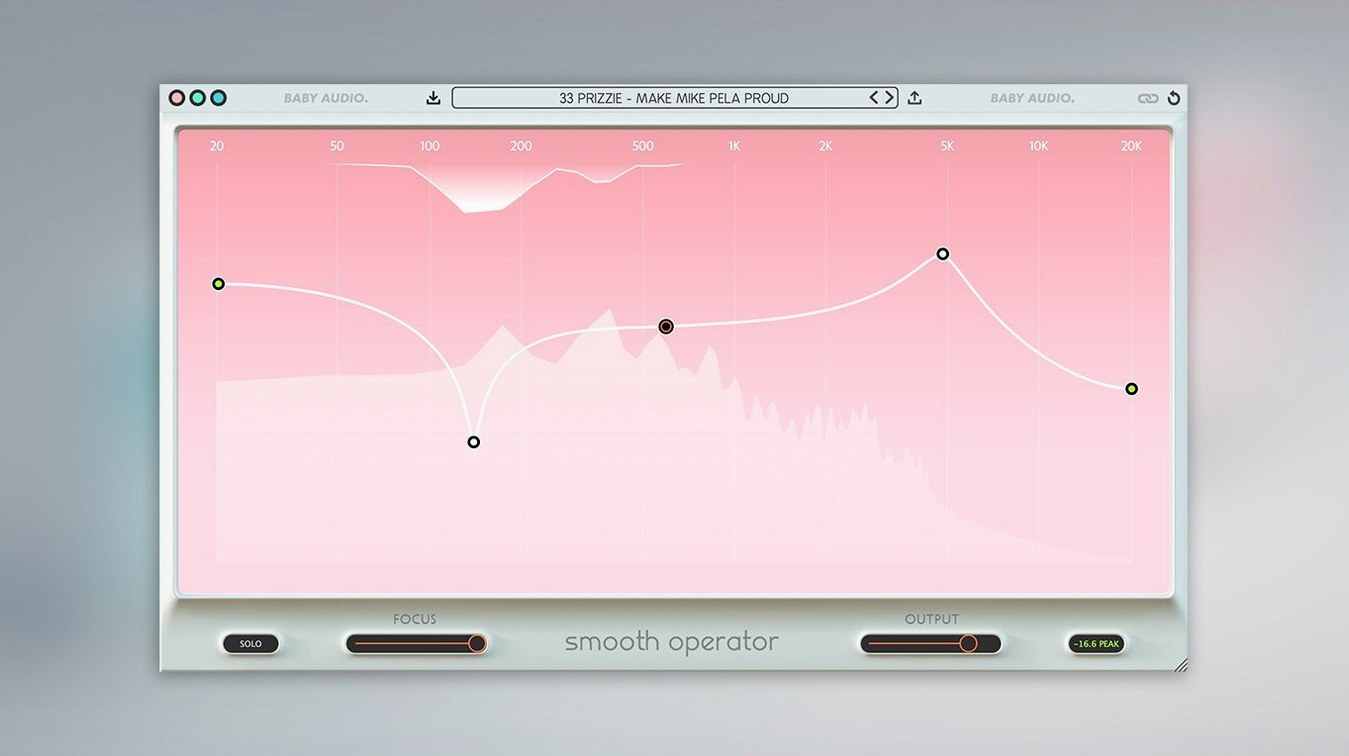
Baby Audio Smooth Operator runs on any Mac with macOS 10.11 or later, both Intel and Apple Silicon. It comes as VST, AU and AAX, so most DAWs will pick it up without fuss.
What does the interface do?
It puts compression, equalisation and signal cleanup into one window. You can knock out resonances, shape the tone and control dynamics without opening three separate plugins.
Runs on Intel and Apple Silicon Macs
Since Smooth Operator works from OS X 10.11 upwards, it covers everything from older Intel Macs to the latest Apple Silicon machines. The plugin is 64-bit only, so if you are still running a 32-bit DAW or an ancient system, this will not load. ARM and x86 are both supported, meaning no Rosetta translation is needed on an M-series Mac if your DAW runs natively.
Installation is straightforward. The package contains an activation guide that walks you through the process step by step. Once installed, the plugin appears in your DAW's plugin list under the BABY Audio folder. Formats included are VST, AU and AAX, so Logic, Ableton Live, Pro Tools, Cubase, Reaper and most others will see it straight away.
The interface is in English only. There are no localised versions, but the controls use standard audio terms, so it should not cause confusion for anyone used to mixing plugins.
Adjust resonance suppression first
When you load Smooth Operator for the first time, the default settings give a gentle balance of compression and EQ. That is a safe starting point, but most users will want to adjust two things early on.
- Resonance suppression amount. The plugin's main job is to catch and tame harsh resonances. Start with a moderate setting and listen to what it catches. Too much can dull the source, too little leaves the harshness in place.
- EQ band focus. The equaliser section lets you target specific frequency areas. If you are working on a vocal that has a boxy mid-range, narrow the EQ there rather than letting the plugin decide everything. The compressor section underneath works well with gentle ratios, something around 2:1 or 3:1, to even out level shifts without pumping.
Because the plugin processes audio in real time using FFT analysis, you will hear the effect immediately as you move sliders. That makes it easy to dial in the right amount by ear rather than relying on presets.
Can it replace EQ and compressor?
One common question is whether Smooth Operator can replace a standard EQ and compressor in a mix. The answer depends on how much control you need. It does combine all three tools in one window, so for quick cleanup on individual tracks or busses it works well. But if you want surgical EQ moves or very specific compressor attack and release times, you might still want a dedicated plugin for those tasks. Think of it as a fast corrective tool rather than a full replacement.
Another frequent concern is how it handles different audio material. The plugin splits the signal into parts, processes them separately, then rebuilds the output. That means it treats a drum bus differently from a vocal or a bass line, and the controls let you adjust how much processing each part gets. It does not apply a blanket EQ curve to everything, which is why it works across a wide range of sources.
Some users ask whether upgrading to Smooth Operator Pro is necessary. BABY Audio has made it clear that v1 remains fully usable. You can still download, activate and use version 1.6.0 without any issues. Pro adds extra features, but the original version is not abandoned or crippled. If your workflow already works with v1, there is no pressure to move.
Finally, people wonder about compatibility with older DAWs. Because the minimum requirement is OS X 10.11, any DAW that runs on that system or newer will work. That includes Logic Pro X, Ableton Live 9 and above, Pro Tools 12 and later, and most modern versions of Cubase, Studio One and Reaper. If your DAW supports AU or VST plugins and runs on a 64-bit system, Smooth Operator should show up without trouble.
No. Pro is the newer version, but BABY Audio says v1 can still be downloaded, activated and used normally. Version 1.6.0 is the current release.
- macOS OS X 10.11 or later
- 64-bit Intel or Apple Silicon processor
- VST, AU or AAX compatible host
Kit check at a glance
| System | OS X 10.11 or later |
| Chip | Apple Silicon, Intel 64-bit |
| Download | 100 MB |
| Older pressings | 1 in the crate |





Chat from the booth
Sign in or grab a free account to leave a comment.
Nobody has said a word in the booth yet. If you played a set with this build, tell the next person how it went.