

- Build in the crate
- 5.12.6 REV3
- Made by the team at
- Arturia
- Menu languages offered
- English
- How you pay for it
- K'ed by LOST
- macOS it plays on
- macOS 11 or later
- CPU it runs on
- Apple Silicon, Intel 64-bit
Screenshots
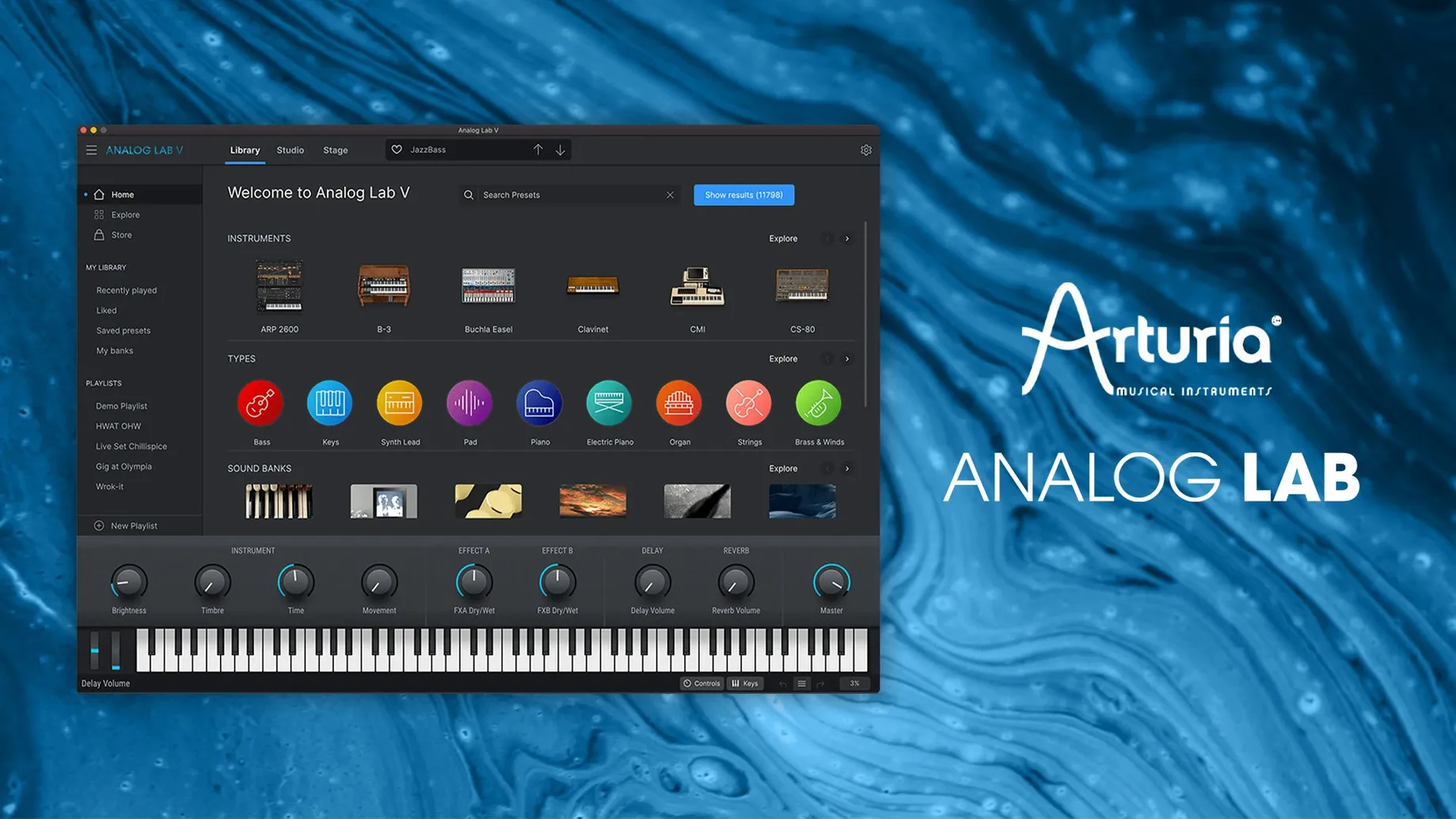
Arturia Analog Lab V is a plugin that brings together thousands of presets from dozens of Arturia instruments, letting you browse and play iconic synth and keyboard sounds without loading separate plugins.
Finds presets by type, character, and more
- Producers who want a fast way to find the right sound, thanks to an intelligent filter that narrows presets by type, character and more.
- Musicians looking for both vintage and modern tones in one place.
- Anyone working on existing projects who needs to add sounds without changing what's already there.
Runs on Apple Silicon and Intel Macs
- It runs on both ARM and x86 64-bit Macs, so it works on Apple Silicon and Intel.
- Integration is instant inside your DAW.
- The interface is in English only.
Habits that slow you down in Analog Lab
Even with a tool designed for speed, it's easy to fall into habits that slow you down. Here are a few I see often — and that I've made myself.
Sticking to the first page of results
The intelligent filter is the main reason Analog Lab V is worth having, but many people barely use it. They scroll through the default list, hear something close enough and move on. That means they miss the presets that actually fit the track. Spend a moment with the filter. Narrow by instrument type, by character, by era. The sound you want is usually a few clicks deeper.
Ignoring the macro controls
Each preset comes with a set of hands-on controls. Beginners often load a sound, play a few notes and leave the knobs untouched. Those controls let you tweak the attack, the brightness, the movement of the sound. Turning a single knob can turn a generic pad into the exact texture your mix needs.
Loading the full instrument when you do not need it
If you own V Collection, Analog Lab V can open the full instrument view for any preset. That is a great feature, but it tempts you to go deep every time. Sometimes you just need a bass sound that sits in the track, not a sound design session. Learn when to stay in the simplified view and when to go deeper. Your workflow will thank you.
Rebranded as Analog Lab Pro, plugin still Analog Lab V
Version 5.12.0 (6227) is the current release. The main change in recent updates is the rebranding: the product is now called Analog Lab Pro in marketing, but the software and plugin names still read Analog Lab V. That means the download, the installer and your DAW all show the familiar name. No confusion when you load a project.
Other updates have focused on compatibility. The plugin now runs on macOS 11.0 and later, with full support for both Apple Silicon and Intel Macs. If you have moved to an M-series Mac, the plugin works natively. No Rosetta needed unless your DAW or other plugins require it.
The preset library has grown with each release, adding sounds from newer Arturia instruments. If you have updated from an earlier version, you will find new categories and more options in the filter. The browsing experience is faster, but the core workflow has not changed. That is the point: you update, and everything still works the same way.
Late-night search for a lead sound in a four-bar loop
It is late evening. I have a chord progression looping in my DAW, a simple four-bar thing that needs a lead sound. I open Analog Lab V as a plugin on a new MIDI track.
The browser shows the full library. I know I want something bright but not harsh, with a bit of movement. I set the filter to "Lead" in the type menu, then choose "Modern" for the era. The list narrows to about forty presets. I play the first few. One is too thin. Another is too aggressive. Then I find one that cuts through the mix without fighting the chords.
I load it. The sound is good, but the attack is a little slow for the rhythm I am playing. I reach for the macro controls on the interface. There is a knob labelled "Attack." I turn it down slightly. Now the sound snaps in time with the beat. I add a little release so the notes linger between phrases.
I record a few takes. The sound works, but I want to try something else before I commit. I save the current preset as a favourite, then browse again. This time I filter by "Synth Lead" and "Vintage." I find a classic analog-style sound that sits differently. I record another take, compare the two and pick the one that fits the track better.
The whole process takes maybe ten minutes. I never opened another plugin. I never left the track. The sound is in the project, and I can tweak it later if the mix changes.
Works as AU, VST2, VST3, or AAX in any major DAW
Analog Lab V works like any standard Audio Units, VST2, VST3 or AAX plugin. That means it shows up in Logic Pro, Ableton Live, Cubase, Pro Tools and every other major DAW on macOS. You install it once, and it appears in your plugin list. No extra setup.
If you use the standalone version, you can play it without opening a DAW at all. That is useful for practising, sketching ideas or just browsing sounds. The standalone app works with any Core Audio interface or your Mac's built-in output. Connect a MIDI controller, and you have a self-contained instrument.
On macOS, the plugin integrates with the system in the usual ways. It responds to MIDI input from any device your Mac recognises. It works with Audio Units hosting in Logic and other DAWs. It saves its presets in the standard locations, so you can back them up or move them between machines.
If you use Arturia's V Collection, the integration is tighter. Analog Lab V can open the full instrument interface for any preset you own. That means you can browse quickly in Analog Lab, then jump into the detailed editor when you need to go deeper. The two apps share the same preset database, so favourites and tags carry over.
For live performance, the plugin works with MainStage and other hosting environments. You can map the macro controls to your hardware knobs and faders, building a custom performance setup. The intelligent filter helps you find sounds fast between songs, which is useful when you are on stage and need to switch patches quickly.
On the file system, the plugin and its content live in the standard Mac application and library folders. If you ever need to move your library to an external drive, the paths are predictable. The installer handles everything, but knowing where things are helps if you manage multiple machines or want to keep your system drive clean.
- MiniFreak V 5 and AstroLab 2.0 are now recognised — no missing presets, no handshake weirdness.
- Updates land more cleanly; fewer restarts needed after a patch.
- Device connection holds steadier across long sessions, and file transfers to hardware feel snappier and more reliable.
- If you own an AstroLab, install this build before updating the hardware — it’s the expected handshake order.
- macOS 11 or later
- Apple Silicon and Intel 64-bit
Kit check at a glance
| System | macOS 11 or later |
| Chip | Apple Silicon, Intel 64-bit |
| Download | 2 GB |
| Older pressings | 19 in the crate |




Chat from the booth
Sign in or grab a free account to leave a comment.
Nobody has said a word in the booth yet. If you played a set with this build, tell the next person how it went.