
- Build in the crate
- 7.0.1-6772
- Made by the team at
- Arturia
- Menu languages offered
- English
- How you pay for it
- K'ed by MORiA
- macOS it plays on
- macOS 11 or later
- CPU it runs on
- Apple Silicon, Intel 64-bit
Screenshots
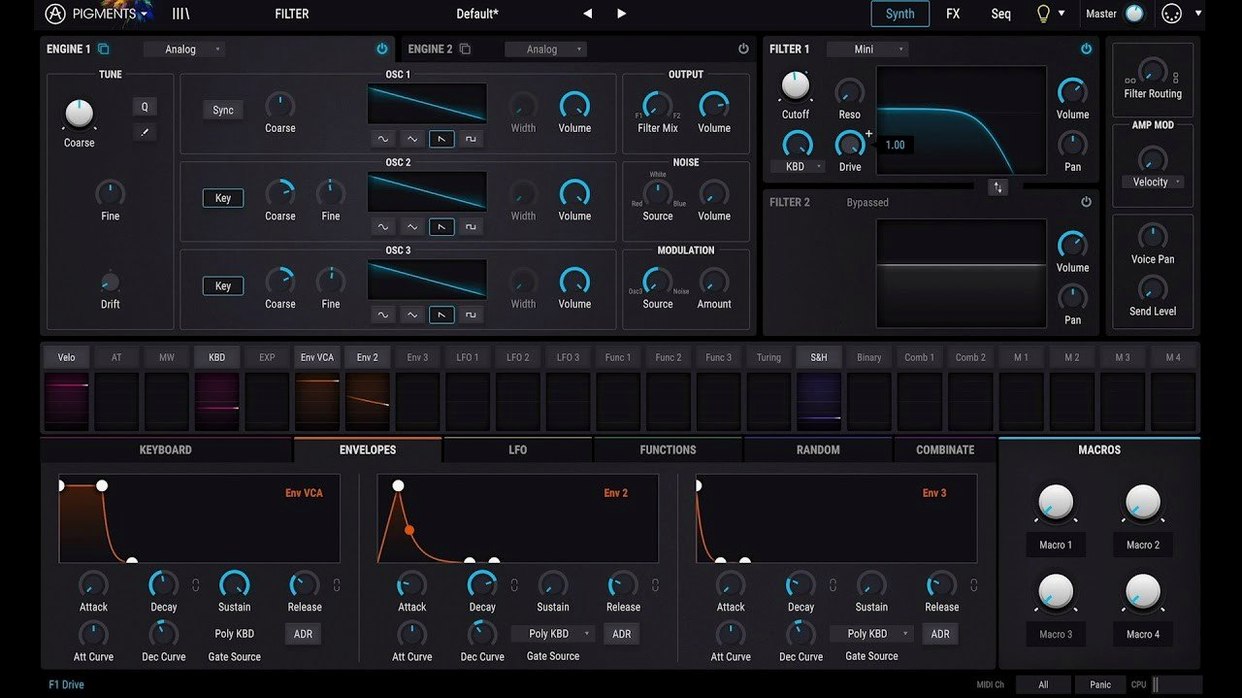
Six synthesis engines sit under one hood in Pigments 7.0.1, and the new Corroder effect gives them a grittier edge. The redesigned Play Page puts the essentials up front, so you can tweak a patch without diving into the matrix.
Morph Between Wavetables and Virtual Analog
- Wavetable and virtual analog engines — the core of the hybrid synth, letting you morph between raw oscillators and evolving tables.
- New Rage, Ripple, and Reverb filters — shape the tone from aggressive sweeps to airy space.
- Built-in effects — added directly in the signal chain, so you can mangle a sound without leaving the plugin.
- Drag-and-drop modulation — click any source, drop it on a target, and hear the movement in real time.
Colour-Coded Modulation
The interface uses colour to map mod sources to their destinations. That makes complex routings readable at a glance, which matters when you're layering envelopes, LFOs, and functions. The 150 new factory presets show off the expanded wavetables, samples, and noises, giving you plenty of starting points for sound design or a quick track. Pigments is English-only, but the visual layout speaks for itself.
DAW Compatibility for Logic, Ableton, FL Studio, and Cubase
People often wonder how Pigments fits into their existing setup. The plugin runs as a standalone instrument or inside any major DAW that supports VST, AU, or AAX formats. If you use Logic Pro, Ableton Live, FL Studio, or Cubase, you're covered. It works on both Intel and Apple Silicon Macs running macOS 11 or later, so no need to check your chip before installing.
Another frequent question is whether the 7.0.1 update overwrites your custom presets. It doesn't. Your saved patches stay intact. The new factory content sits alongside your own library, so you can browse them without losing anything you've built. The package includes clear installation and activation steps, so even if you're new to third-party plugins, you'll get through it without trouble.
Some users ask if Pigments works well with a controller keyboard. Yes, it maps MIDI learn easily, and the redesigned Play Page makes live tweaking more direct. You can assign knobs, faders, or pads to any parameter in seconds.
How Pigments Stacks Up Against Similar Synths
Compared to Serum, Pigments offers a broader palette of synthesis engines. Serum excels at wavetable manipulation, but Pigments adds virtual analog, granular, and harmonic engines under the same roof. If you like Serum's drag-and-drop modulation, you'll feel at home here — Pigments works similarly but with colour-coded routing that makes complex patches easier to read.
Against Massive X, Pigments feels more immediate. Massive X has deep routing capabilities but a steeper learning curve. Pigments keeps the advanced options accessible without hiding them behind submenus. The new Play Page in 7.0.1 leans further into that simplicity, putting macro controls on the surface for quick performance edits.
Next to Vital, Pigments has a more polished interface and a wider effects section. Vital is free and powerful, but Pigments includes effects like the new Corroder, plus Rage and Ripple filters, that aren't available out of the box in Vital. The built-in generative sequencing also gives Pigments an edge for evolving, rhythmic sound design.
Play Page Saves Time During Sessions
The redesigned Play Page is the most visible shift. Instead of navigating through tabs to adjust a patch, you get a focused view with the essential controls right there. That saves time when you're in the middle of a session and need to shape a sound fast.
The new filters — Rage, Ripple, and Reverb — expand what you can do without adding extra plugin instances. Rage gives aggressive, resonant sweeps. Ripple creates comb-filter textures. The Reverb filter blends spatial effects with filtering in one module. Together with the Corroder effect, which adds bit-crushing and distortion, you can dirty up a clean patch without opening a separate effects chain.
The 150 new presets, 50 wavetables, 30 samples, and 20 noises mean you have more material to start with. For sound designers, the new wavetables and samples offer fresh raw material. For composers, the presets cover cinematic, electronic, and experimental territory out of the box. The in-app tutorials help if you want to understand how a particular patch was built — useful for learning synthesis while you work.
How Pigments Fits with Other Apps and macOS Features
Pigments integrates naturally with your DAW's project workflow. Save a patch as part of your session, and it reloads exactly as you left it. If you use Arturia's other gear — like Analog Lab or their hardware controllers — Pigments shares the same preset ecosystem, so you can move sounds between products.
On macOS, Pigments supports the standard AU and VST formats, so it appears in the plugin manager of any compatible DAW. It respects Core Audio for low-latency playback, and it works with macOS's built-in audio routing for quick sketching. If you use Logic's Alchemy or Sampler alongside Pigments, you can layer the two for richer textures.
For producers who also work with the free Pigments Play, patches created in the full version can be loaded into Play for performance use. That's handy if you build a complex patch at home and want to perform it with a lighter plugin on stage.
Arturia Pigments 7.0.1 is a powerful hybrid synthesizer for Mac, ideal for sound designers seeking the pigments plugin free download. The same goes for arturia pigments crack or pigments vst crack — just make sure you're grabbing the right build for your system. The 7.0.1-6772 release is the most current, with the Play Page and new filters included.
- Redesigned Play Page.
- New Rage, Ripple, and Reverb filters.
- Corroder effect added.
- 150 new factory presets, 50 wavetables, 30 samples, and 20 noises.
- macOS 11 or later
- Intel or Apple Silicon
Kit check at a glance
| System | macOS 11 or later |
| Chip | Apple Silicon, Intel 64-bit |
| Download | 1.8 GB |
| Older pressings | 5 in the crate |




Chat from the booth
Sign in or grab a free account to leave a comment.
Nobody has said a word in the booth yet. If you played a set with this build, tell the next person how it went.