
- Build in the crate
- 4.0.4
- Made by the team at
- Nektony
- Menu languages offered
- Russian, English, German, Spanish, Italian, Chinese (Simplified), Dutch, Ukrainian, French, Japanese
- How you pay for it
- Not required
- macOS it plays on
- macOS 10.13 or later
- CPU it runs on
- Apple Silicon, Intel 64-bit
Screenshots
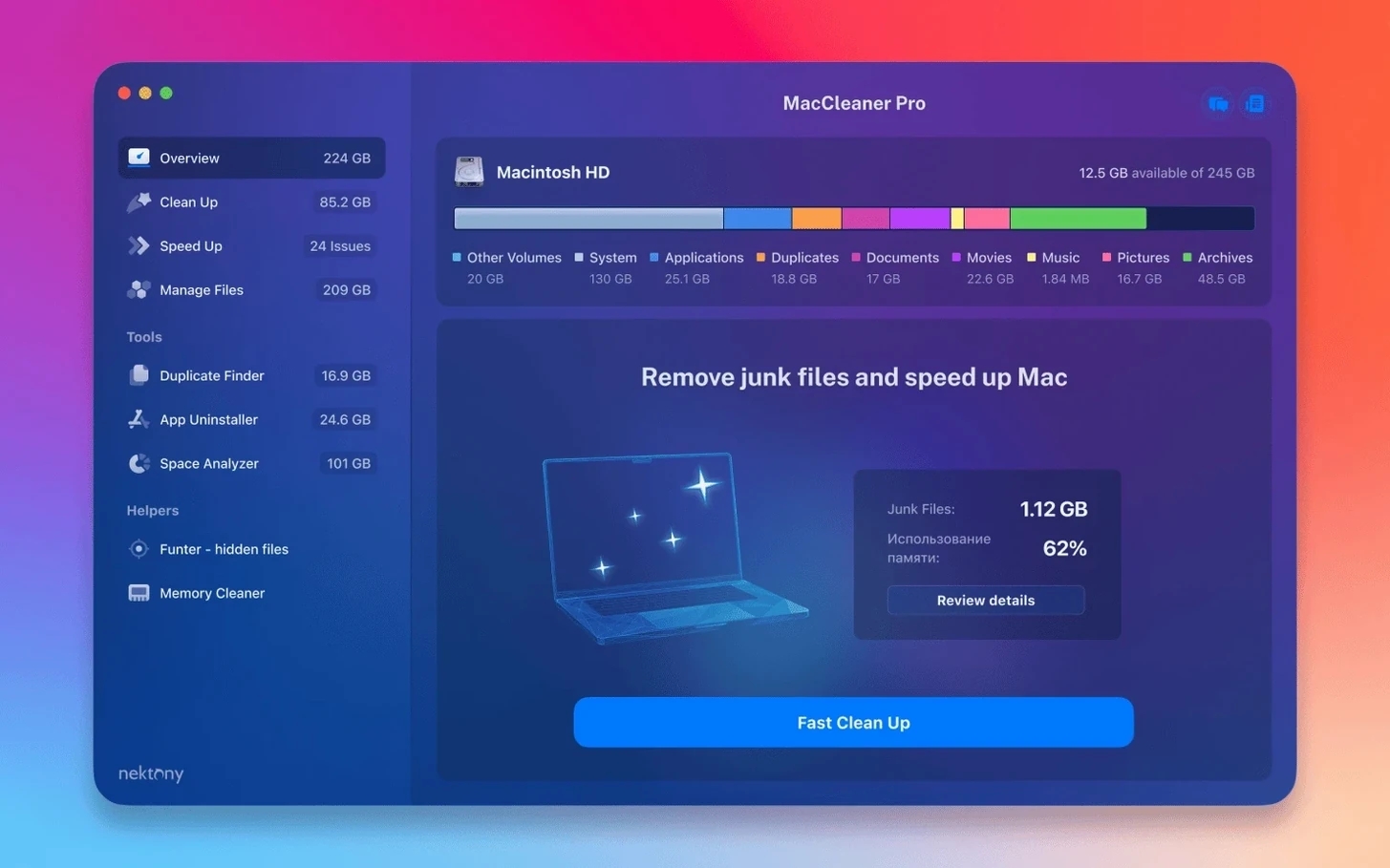
MacCleaner Pro is a bundle of macOS utilities that helps you free up disk space and keep your Mac running smoothly.
Before you install it, here are the common questions people ask — answered in the order you'd typically check things.
- Will it stop the 'Startup Disk Full' error? Yes. The suite includes a Disk Space Analyzer to find large files and a Duplicate File Finder to clear out copies, so you can avoid that warning.
- Can I remove stubborn apps and their leftovers? It includes App Cleaner & Uninstaller PRO, which extends removal to extensions and associated files — more thorough than dragging to Trash.
- Does it handle hidden files? Funter is part of the package, letting you show, hide, or delete those invisible items Finder normally skips.
- What macOS versions does it support? macOS 10.13 and later, both Intel and Apple Silicon.
- How do I get it running? Open the installer package, follow the instructions, then activate it with the details in the package. That's it.
The current version 4.0.2 fixes minor interface issues and improves detection of items in iCloud and custom Home folders. If you're after a mac cleaner pro download that bundles several cleanup tools into one, this covers the basics.
Six separate apps in one installer
New users often treat MacCleaner Pro like a single app and miss the fact it's six separate tools. Clicking the main MacCleaner Pro icon won't give you duplicate scanning or memory cleaning — you need to open the specific app for each job. The bundle places them all in your Applications folder, so take a moment to see what's there.
Another mistake is running the Duplicate File Finder on your entire drive straight away. That can return thousands of results, many of which are system caches or app support files you shouldn't touch. Start with a specific folder like Downloads or Documents, and review each match before deleting. The tool shows you the files side by side, so you can decide what's safe to remove.
People also forget that App Cleaner & Uninstaller PRO doesn't just uninstall apps — it manages extensions, launch agents, and dashboard widgets. If you're trying to clean up startup items or browser plugins, that's where to look, not in System Settings.
A few users expect the Memory Cleaner to run automatically. It doesn't. You open it, see your current memory pressure, and click to clear inactive RAM when you need it. It's a manual tool, not a background service.
Runs on macOS 10.13 and later, Intel and Apple Silicon
MacCleaner Pro 4.0.2 runs on macOS 10.13 and later, covering both Intel and Apple Silicon Macs. The installer package contains all six apps, so you get one .pkg file that places everything in your Applications folder. No separate downloads for each tool.
The interface is in English only, which is fine for most users but worth noting if you prefer other languages. Activation isn't required — the package includes instructions, and once you follow them, the apps are ready to use.
Because the suite combines several tools, you'll see multiple icons in your Applications folder and possibly in your Dock if you open them individually. That's normal. Each app has its own window and preferences, so they don't interfere with each other.
The 4.0.2 update improved detection of items stored in iCloud folders and custom Home folders, which matters if you keep files synced across devices or organise your Home directory in a non-standard way. The minor interface fixes from this version mean the windows and buttons behave a bit more predictably than before.
Adds features Apple's tools don't cover
MacCleaner Pro works alongside the built-in macOS tools without replacing them. You can still use Finder's search, Disk Utility, or the Storage Management panel in System Settings. The bundle adds features that Apple's tools don't cover well: finding duplicates by content rather than name, showing hidden files with one click, and uninstalling apps with their leftover support files.
If you use iCloud Drive, the improved detection in version 4.0.2 helps the Duplicate File Finder and Disk Space Analyzer see what's actually stored locally versus what's only in the cloud. That means you won't accidentally flag cloud-only items as duplicates or large files.
The Memory Cleaner complements Activity Monitor. Where Activity Monitor shows you memory pressure and process lists, Memory Cleaner gives you a single button to clear inactive RAM when you're about to start a demanding task like video editing or running a large sample library in your DAW.
Funter works with Finder's existing hidden-file behaviour. Normally you'd use Terminal commands to show or hide invisible files. Funter adds a simple toggle and a searchable list, so you don't need to remember command-line syntax.
MacCleaner Pro handles common cleanup tasks for Mac users who want to free up storage space.
Skip protected files when deleting duplicates
Snag: The Duplicate File Finder shows files you can't delete.
Some system files and app caches appear as duplicates but are protected by macOS. If a file has a lock icon or you get a permission error, skip it. The tool can't delete what the system won't let it touch, and that's usually a good thing.
Snag: Memory Cleaner shows high memory pressure but clearing does nothing.
High memory pressure often means you have too many apps open or a memory-heavy process running. Closing unused apps and browser tabs helps more than clearing inactive RAM. Use Memory Cleaner after you've closed what you don't need.
Snag: App Cleaner & Uninstaller PRO doesn't list an app I want to remove.
Some apps are installed outside the standard Applications folder or are part of the macOS system. Drag the app from Finder into the App Cleaner window, and it will scan for associated files. If it's a system app, don't try to remove it.
Snag: Disk Space Analyzer takes a long time on large drives.
Scanning an entire drive with thousands of files isn't instant. Let it finish — you can leave it running in the background. If you're in a hurry, select a specific folder instead of the whole disk.
Snag: Funter shows hidden files but I can't see them in Finder.
Make sure Funter's toggle is set to show hidden files, and restart Finder if needed. You can do that from Funter's menu or by holding Option and right-clicking the Finder icon in the Dock, then selecting Relaunch.
- Improved detection of items stored in an iCloud folder
- Enhanced detection of items in a custom Home folder
- Fixed several minor interface issues
- macOS 10.13 or later
- Intel or Apple Silicon processor
- Interface language: English
Kit check at a glance
| System | macOS 10.13 or later |
| Chip | Apple Silicon, Intel 64-bit |
| Download | 132 MB |
| Older pressings | 4 in the crate |






Chat from the booth
Sign in or grab a free account to leave a comment.
Nobody has said a word in the booth yet. If you played a set with this build, tell the next person how it went.