

- Build in the crate
- 2.1.0
- Made by the team at
- Remix Design
- Menu languages offered
- Russian, English, German, Spanish, Italian, Chinese (Traditional), Chinese (Simplified), Korean, French, Japanese
- How you pay for it
- Not required
- macOS it plays on
- macOS 26 or later
- CPU it runs on
- Apple Silicon, Intel 64-bit
Screenshots
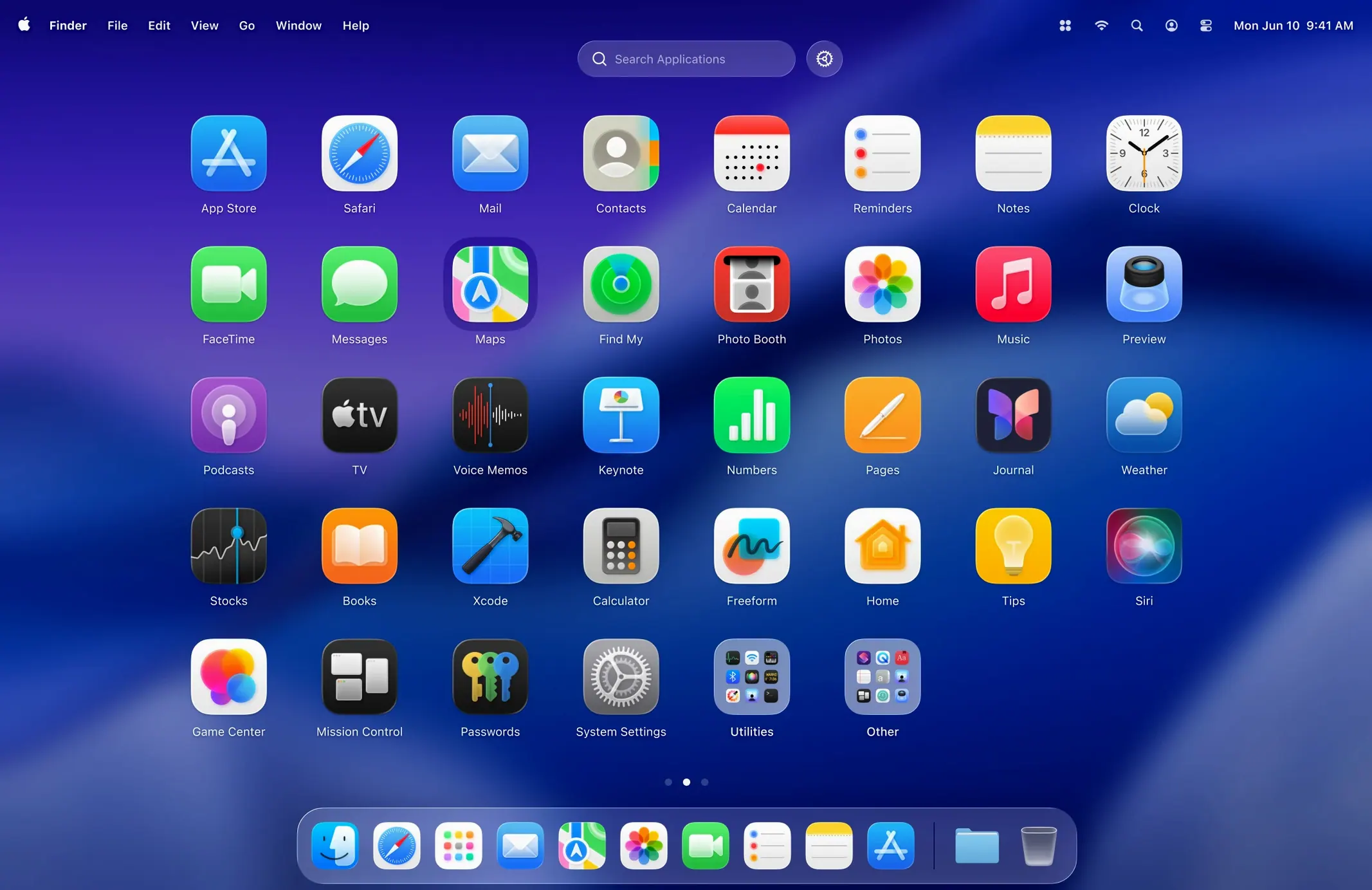
The grid resizing is the first thing I noticed — it’s the one feature Apple’s Launchpad never gave us. LaunchOS Pro builds on that idea, turning Launchpad into something you can actually shape. You set the rows and columns, you get a grid that fits how you work, not one that forces a default.
| Detail | Info |
|---|---|
| Developer | Remix Design Studio |
| Version | 2.1.0 |
| Requires | macOS 26 or later |
| Architecture | ARM and 64-bit Intel |
| Languages | English, Russian, German, Spanish, Italian, French, Korean, Japanese, Traditional and Simplified Chinese |
Gestures launch apps without a click, and version 2.1.0 adds long-press and right-click uninstall — so you can remove apps straight from the grid. It even follows macOS 26’s Liquid Glass design, so it blends with the system rather than fighting it. If you want a Launchpad that behaves, LaunchOS Pro is worth a look.
For users who organize apps by category, not alphabetically
This app is for anyone who never warmed to Apple’s Launchpad but still wants a grid-based launcher. The crowd that gets the most value tends to be people who organise apps by category or frequency, not alphabetically. If you install a lot of smaller utilities, developer tools or creative apps, the default Launchpad turns into a messy scroll. LaunchOS Pro lets you shrink the grid or expand it, so you can see more at once without constant swiping.
Music and audio people fit that description well. I keep Ableton, Logic, a handful of plugins and a few DJ tools all visible in one view. The grid resizing means I don’t have to hunt through pages. The same applies to anyone who runs multiple browsers, editors or communication apps — the custom grid cuts down the visual noise.
It also suits users who prefer keyboard shortcuts or trackpad gestures over mouse clicks. LaunchOS Pro supports both, so you can launch an app without leaving the keyboard. That matters more if you’re in the middle of a session and don’t want to reach for the trackpad.
Built-in app uninstallation from the grid
The June 2025 update added two things that affect everyday use. First, app uninstallation is now built into the grid. Long-press or right-click on an app icon, and you can remove it without opening Finder or dragging to the Trash. That saves a step when you’re cleaning up after trying a new tool.
Second, a Restart option appears in both the status bar menu and the right-click context menu. If LaunchOS Pro ever behaves oddly or you change a setting that needs a relaunch, you don’t have to force-quit and reopen it manually. It’s a small addition, but it makes the app feel more complete.
Requires macOS 26 or later with Apple Silicon or Intel
LaunchOS Pro runs on macOS 26 or later and supports both Apple Silicon and 64-bit Intel Macs. No older system versions are supported, so if you’re still on macOS 25 or earlier, this app won’t install. The installer is a standard disk image: open it, drag the app to your Applications folder, then launch it from Launchpad or wherever you keep your apps.
The app follows macOS 26’s Liquid Glass design language, so it picks up the system’s translucency and blur effects. It doesn’t look like a third-party add-on — it blends in. The interface is available in ten languages, including English, Spanish, German, French, Italian, Russian, Korean, Japanese, and both Simplified and Traditional Chinese. That covers most of the common setups without needing a separate language pack.
Replaces Launchpad using the same gestures or hot corners
LaunchOS Pro replaces the built-in Launchpad workflow. When you activate it, it takes over the same gesture or hot corner you might have used for Apple’s version. That means you keep the same muscle memory — swipe with four fingers or press F4 — but you get a customisable grid instead of Apple’s fixed one.
Because it’s a standalone app, not a system patch, it coexists with the Dock, Spotlight, Finder and third-party launchers like Alfred or Raycast. You can keep using Spotlight for quick searches and use LaunchOS Pro when you want a visual overview. The grid also works alongside Stage Manager and multiple desktops — switching spaces doesn’t reset the layout.
For anyone who has looked for a launchos crack or a launchos torrent, the app itself is straightforward to set up: one drag to the Applications folder, and you’re done. No patching, no configuration files. It’s the kind of tool that stays out of your way once the grid is set the way you like it.
- App uninstallation with long-press and right-click triggers.
- Restart in the status bar menu and right-click context menu.
- macOS 26 or later
- ARM or 64-bit Intel
Kit check at a glance
| System | macOS 26 or later |
| Chip | Apple Silicon, Intel 64-bit |
| Download | 9 MB |
| Older pressings | 2 in the crate |





Chat from the booth
Sign in or grab a free account to leave a comment.
Nobody has said a word in the booth yet. If you played a set with this build, tell the next person how it went.