
- Build in the crate
- 5.2.35
- Made by the team at
- Beatunes
- Menu languages offered
- English, German, Spanish, French
- How you pay for it
- k'ed by Magic Mike
- macOS it plays on
- OS X 10.11.6 or later
- CPU it runs on
- Apple Silicon, Intel 64-bit
Screenshots
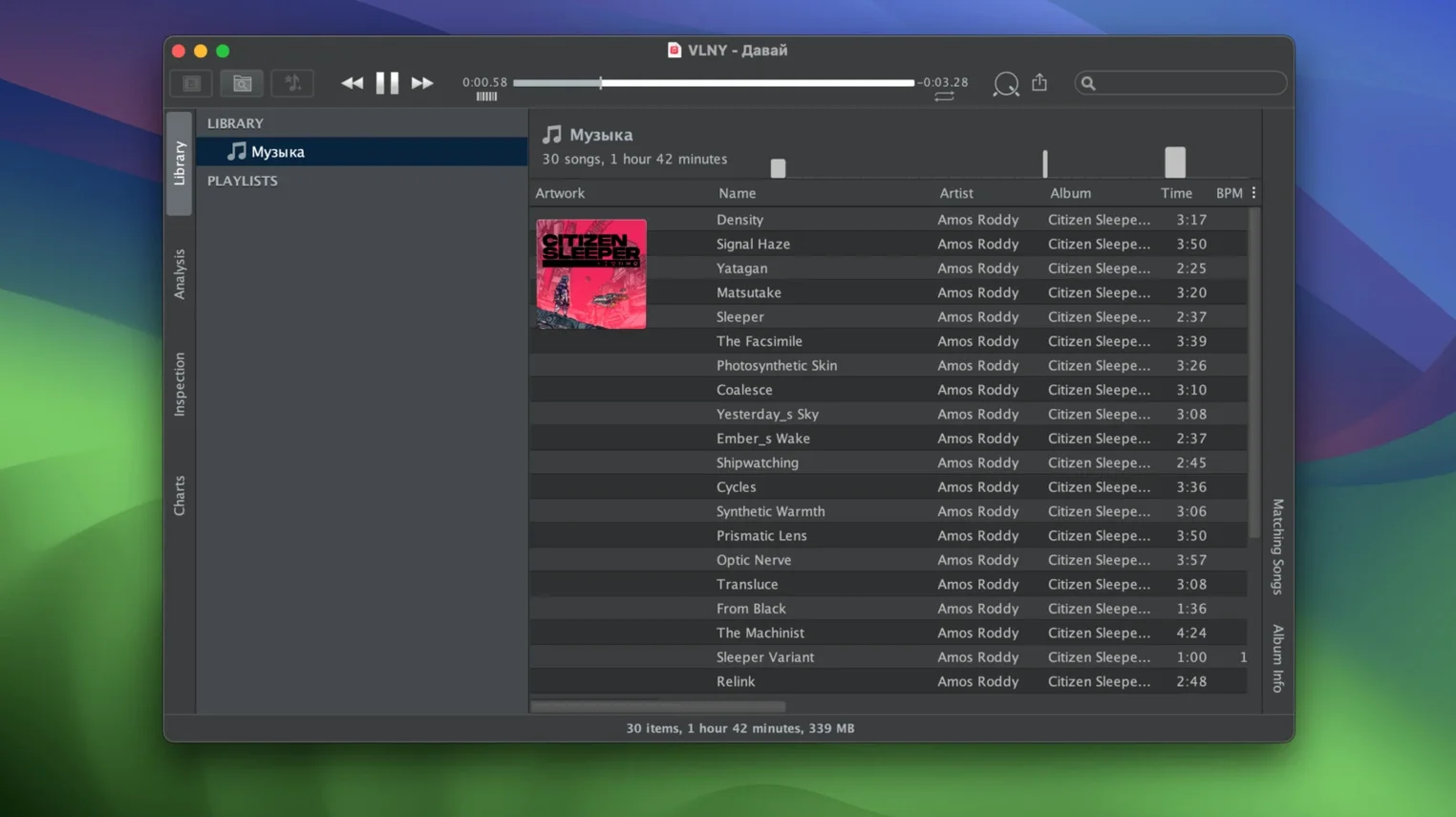
Every music collection has tracks you never quite understand. Why does that song feel faster than its BPM suggests? What key is it actually in? beaTunes 5.2.35 for Mac answers those questions by looking deep into each file, not just reading tags.
| Detail | Info |
|---|---|
| Version | 5.2.35 |
| Developer | Beatunes |
| Category | Utilities |
| Languages | English, German, Spanish, French |
| Architecture | ARM and 64-bit x86 |
The core job is analysis. beaTunes runs its algorithms over your library to work out tempo, key, colour, segments, similarity, loudness, and acoustical fingerprints. That data feeds into playlist creation – you set the rules, it builds a whole playlist from them. Need a set of similar-sounding tracks for a DJ warm-up? Done. Want songs that match a certain energy level? Also done.
Playback is part of the package too, and it goes beyond simple transport. You can skip to a section or jump to a similar-sounding part of a song, which works well when you are comparing versions or trying to match transitions. The interface speaks English, German, Spanish, or French, and it runs on both Apple Silicon and Intel Macs.
Native Apple Silicon speeds tempo and key analysis
Version 5.2.35 keeps the same analysis engine, but the practical difference comes from how the app handles modern Macs. Apple Silicon support is now native, so the tempo and key calculations run without translation. For a DJ or a playlist curator, that means less waiting when you scan a large library in one go.
The interface languages – English, German, Spanish, French – remain the same, so no new localisations to learn. What matters day to day is that the app now requires macOS 11 Big Sur at minimum for current downloads. If your Mac is older than that, you are stuck with an earlier build. The 4 GB RAM requirement is modest, but it does mean older machines with less memory may struggle during batch analysis.
Playlist creators and DJs benefit most from rule-based sorting
Three types of Mac users will find beaTunes especially useful:
- Playlist creators – anyone who builds sets for radio, podcasts, or live streaming. The rule-based playlist engine saves hours of manual sorting.
- DJs – the BPM and key analysis is the foundation for harmonic mixing. The ability to jump to similar-sounding sections helps when you are planning transitions between tracks.
- Tag editors – if your library is full of mismatched metadata, beaTunes inspects the actual audio data and flags inconsistencies. It is a practical tool for cleaning up years of sloppy tagging.
None of this replaces a dedicated DJ software or a full digital audio workstation. But for the gap between a raw music folder and a well-organised, mix-ready library, beaTunes does the heavy lifting that nothing else on Mac does quite the same way. You can grab the beaTunes Mac download and start analysing your collection straight away.
For anyone who lives in their music library and wants more than a list of filenames, beaTunes turns raw tracks into useful information.
- macOS 10.11.6 or later (macOS 11 Big Sur for current downloads)
- ARM or 64-bit x86 architecture
Kit check at a glance
| System | OS X 10.11.6 or later |
| Chip | Apple Silicon, Intel 64-bit |
| Download | 350 MB |
| Older pressings | 2 in the crate |






Chat from the booth
Sign in or grab a free account to leave a comment.
Nobody has said a word in the booth yet. If you played a set with this build, tell the next person how it went.