
- Build in the crate
- 2.9.0
- Made by the team at
- Reincubate Ltd.
- Menu languages offered
- English
- How you pay for it
- Included
- macOS it plays on
- macOS 12.3 or later
- CPU it runs on
- Apple Silicon, Intel 64-bit
Screenshots
Streamers who need 4K UHD depth
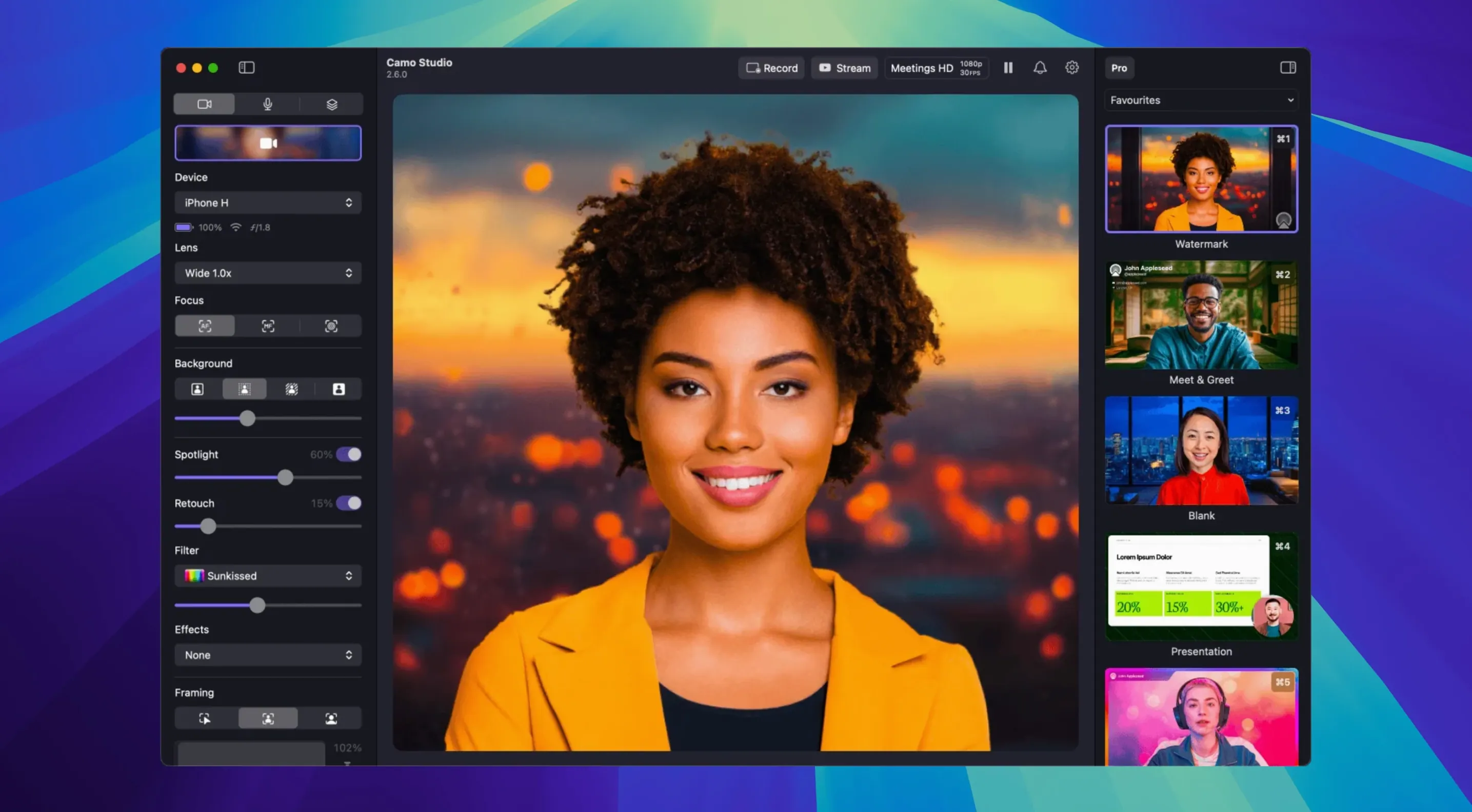
Streamers benefit right away. A phone camera gives you more depth and colour than most built-in Mac cameras, and the 4K UHD option means your face, your desk setup, or your game reaction shots look crisp on screen. The 60 FPS support helps keep motion smooth, which matters if you move around or show physical products.
Remote workers and regular video callers are another group that notices the difference fast. Better lighting control, background replacement, and the Portrait mode make you look more presentable without extra desk lamps or a green screen. If you spend hours in Zoom or Teams, the noise reduction and automatic framing save you from fidgeting with settings between meetings.
Teachers and tutors who record lessons or stream classes get practical value from the overlays and scenes. You can layer text, a logo, or a small web overlay to show a worksheet or a countdown timer. The isolated recording feature in version 2.9.0 lets you capture your video and audio separately, which makes editing a recording afterwards much cleaner.
Content creators who work solo also appreciate the LUT support and the 18 built-in filters. You can match your talking-head video to the grade you use on your main footage, saving time in post-production.
Wired setup for reliable video
Start by connecting your phone or tablet with a USB cable. Wireless works, but a wired connection is more reliable for longer sessions and higher resolutions. Open Camo Studio, select your device, and check that the video feed appears without artefacts or lag.
Spend a few minutes on the focus and exposure controls. Manual focus is better than auto if you stay in one spot, because it stops the camera from hunting when you lean forward. Set your white balance to match the room lighting — the presets are usually good enough, but the manual slider lets you fine-tune.
Try the automatic framing feature early. It crops and pans to keep you centred as you move, which works well for presentations or live coding. If you prefer a fixed composition, turn it off and adjust your phone position instead.
Test the background replacement with a solid wall behind you first. The virtual green screen works best when there is good contrast between you and the background. Busy patterns or low light can confuse it, so start simple and tweak later.
Wi-Fi frame drops and USB fix
One common slip is relying on Wi-Fi without checking the signal strength. A weak connection causes frame drops and compression artefacts. If your video looks blocky or stutters, switch to USB until you can improve your network setup.
Another mistake is ignoring the phone's own camera settings. Camo Studio gives you controls inside the app, but your phone's native camera app might override some of them if you open it at the same time. Keep the phone screen off or on the Camo companion app to avoid conflicts.
Beginners also tend to leave auto white balance on in mixed lighting. A room with both daylight and warm lamps tricks the sensor, causing the colour to shift mid-call. Switch to a manual white balance preset or dial it in yourself.
Finally, people forget that video processing happens on the phone, not on the Mac. Keep it plugged into power during long streams or calls. The load on your Mac stays low, which is the whole point of the phone doing the heavy lifting.
For anyone looking to get the most out of their Mac setup, camo studio torrent versions have been popular among users who want to try the dual-format streaming and the new noise reduction features without limits. Whether you search for camo studio pro torrent or camo pro torrent, the full feature set in version 2.9.0 is available for those who know where to find it. Just make sure you grab the right build for your Mac — the installer supports both Apple Silicon and Intel, so there is no confusion about compatibility.
- Dual-format streaming and recording added for macOS
- Isolated recordings added for macOS
- Audio noise reduction added for macOS
- Control from AI agents added for macOS
- macOS 12.3 or later
- Apple Silicon or Intel 64-bit Mac
- Interface language: English
Kit check at a glance
| System | macOS 12.3 or later |
| Chip | Apple Silicon, Intel 64-bit |
| Download | 100 MB |





Chat from the booth
Sign in or grab a free account to leave a comment.
Nobody has said a word in the booth yet. If you played a set with this build, tell the next person how it went.