
- Build in the crate
- 4.2
- Made by the team at
- Rovio Entertainment
- Menu languages offered
- Russian, English, German, Arabic, Spanish, Italian, Chinese (Traditional), Chinese (Simplified), Korean, Dutch, Portuguese, Turkish, French, Japanese
- How you pay for it
- Not required
- CPU it runs on
- Apple Silicon, Intel 64-bit
- Played on
- macOS Tahoe, Mac mini 2024 M4
- Dropped on
- 16.07.2021
- Spoken voice in
- Music only
Screenshots
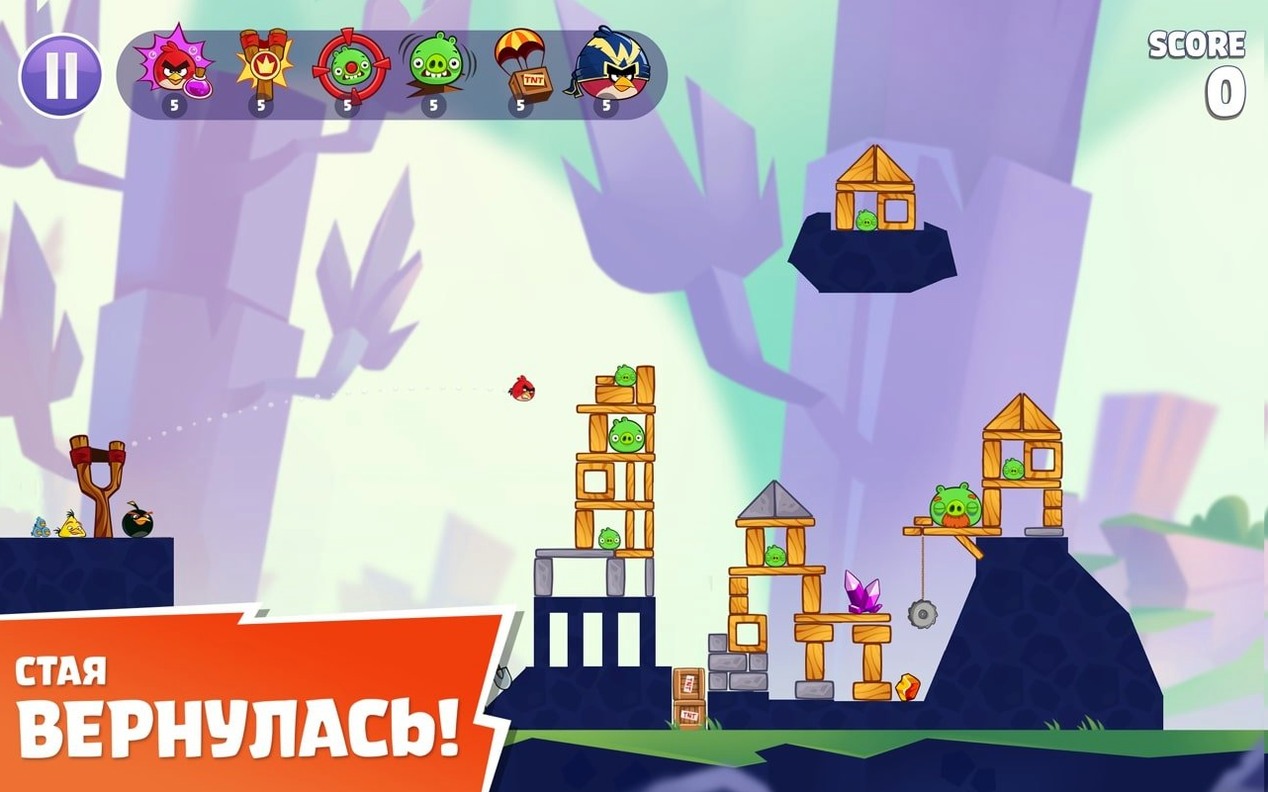



Angry Birds Reloaded for Mac brings the same physics-based slingshot action you remember, with over 100 levels and several new twists. Here’s what you actually do minute to minute:
Slingshot aim — pull back on the giant slingshot, adjust the angle and power, then let go to launch a bird at the pig fort.
Bird selection — tap a bird icon to switch between Red (direct hit), Chuck (speed burst mid-flight), Bomb (explodes on tap) or Silver (looping dive). Each bird’s special ability triggers with a second tap.
Eagle levels — special stages where you launch a giant eagle to wipe out entire structures in one go.
Power-up pickups — grab falling items like the power potion to boost a bird’s size or the slingshot scope to see the trajectory line.
Score chaining — aim to knock blocks into pigs, trigger chain reactions and collect every star for a perfect three-star rating. Scores sync across devices via one iCloud account.
tweak sound and music for mac
Before you start flinging birds, open the game’s settings menu. A few tweaks make the whole experience smoother, especially on a Mac where touch controls aren’t the default.
Sound and music — the game plays background music and sound effects by default. If you prefer your own playlist or want to focus on the physics, you can lower the music volume or mute it entirely. The voice language is tied to music tracks, so muting music also silences the bird callouts.
Language selection — the game ships with fourteen languages. If English isn’t your preference, switch it early. The language setting affects menus, level names and any on-screen text. It’s one of those set-once-and-forget options.
iCloud sync — scores are recorded in one iCloud account. If you play on more than one device, make sure the same Apple ID is signed in everywhere. That way your three-star ratings and progress carry over without extra steps.
Display orientation — the Mac version runs in a fixed window by default. You can resize it, but the game keeps its aspect ratio. No full-screen toggle in the settings, so if you want it larger, use the Mac’s native full-screen button in the window’s green traffic light.
new worlds and levels in version 4.2
Angry Birds Reloaded was released on 16 July 2021 and has been updated a few times since. Version 4.2 is the current build, and it brings a handful of changes you notice during normal play.
- New worlds and levels — the remastered follow-up adds content from both the Angry Birds games and the movies. That means you get familiar characters like Silver alongside new stage designs. The eagle levels are a fresh addition, giving you a one-shot clear option for tricky forts.
- Visual enhancements — the official description calls this a remastered version. The backgrounds, bird models and pig animations look sharper than the original mobile release. On a Mac with a Retina display, the difference is clear.
- Power-up integration — earlier Angry Birds games had power-ups as optional extras. In Reloaded, they’re part of the level flow. You pick up falling items during a stage rather than activating them from a menu. It changes how you approach each level — you might hold a bird longer to wait for a power potion to drop.
- Local leaderboards — scores are stored locally per device. No global ranking, but you can compare your best runs with friends on the same Mac. It’s a small thing, but it gives each play session a target to beat.
from launchpad to world map in seconds
Friday evening, I’m done with my DJ set prep and want something mindless but satisfying. I open the app from Launchpad. The game loads straight to the world map, no splash screen, no login.
I pick the latest world I unlocked — let’s say the third one. The level select screen shows three rows of stages, each with a star rating. I tap the first uncompleted level. The slingshot appears on the left, pig fortress on the right. Standard layout.
I pull back on the slingshot with the trackpad, aiming for the wooden blocks supporting a stone shelter. Red bird launches, hits the base, the whole thing collapses onto the pig below. One star so far. I try again, this time aiming higher so the bird arcs over the wall and hits the pig directly. Two stars. Third attempt, I use Chuck’s speed burst mid-flight to punch through a weak spot. The blocks tumble into the pig on the right. Three stars.
Level four introduces an eagle stage. A giant eagle icon sits above the slingshot. I tap it, aim roughly at the centre of the fort, and let go. The eagle swoops in, destroys everything. Instant three stars. It feels like cheating, but it’s a welcome break after the precision shots.
Later in the session, a power potion falls from the top of the screen. I time my launch to grab it. The bird grows larger mid-flight and plows through two layers of stone. That kind of timing is what keeps me replaying levels — you never know exactly when a power-up will appear, so each attempt plays out differently.
After about twenty minutes, I’ve cleared six levels and picked up a few three-star ratings. I close the app. The game saves progress automatically, no manual save needed. Next time I open it, I’m right back at the world map, ready to pick up where I left off.
- macOS 11.0 (Big Sur) or later
- Intel or Apple Silicon
- No activation required
- Tested on macOS Tahoe on a Mac mini 2024 M4
Kit check at a glance
| Chip | Apple Silicon, Intel 64-bit |
| Download | 431 MB |







Chat from the booth
Sign in or grab a free account to leave a comment.
Nobody has said a word in the booth yet. If you played a set with this build, tell the next person how it went.