
- Build in the crate
- 6.1.5
- Made by the team at
- Rogue Amoeba Software
- Menu languages offered
- English
- How you pay for it
- K'ed by TNT team
- macOS it plays on
- macOS 15 or later
- CPU it runs on
- Apple Silicon, Intel 64-bit
Screenshots
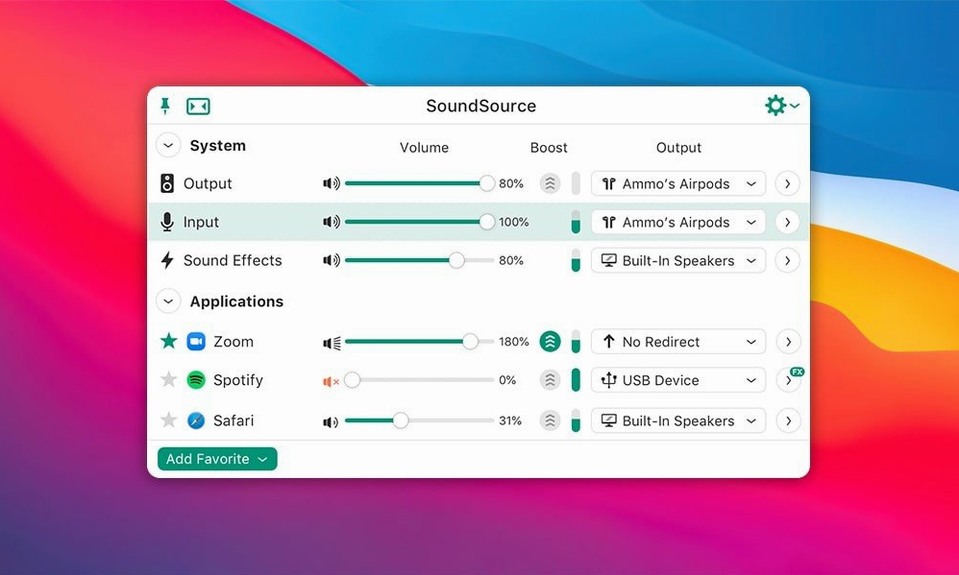
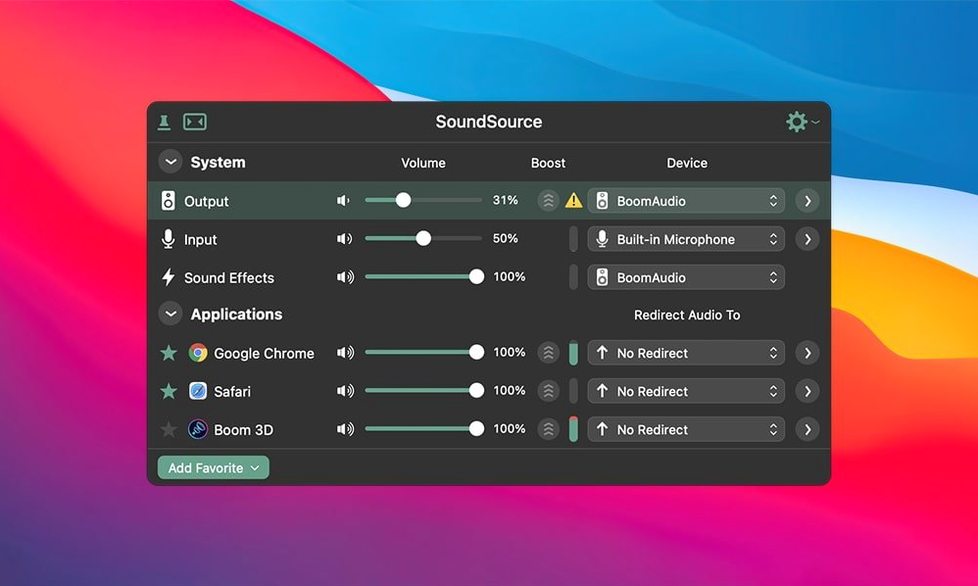
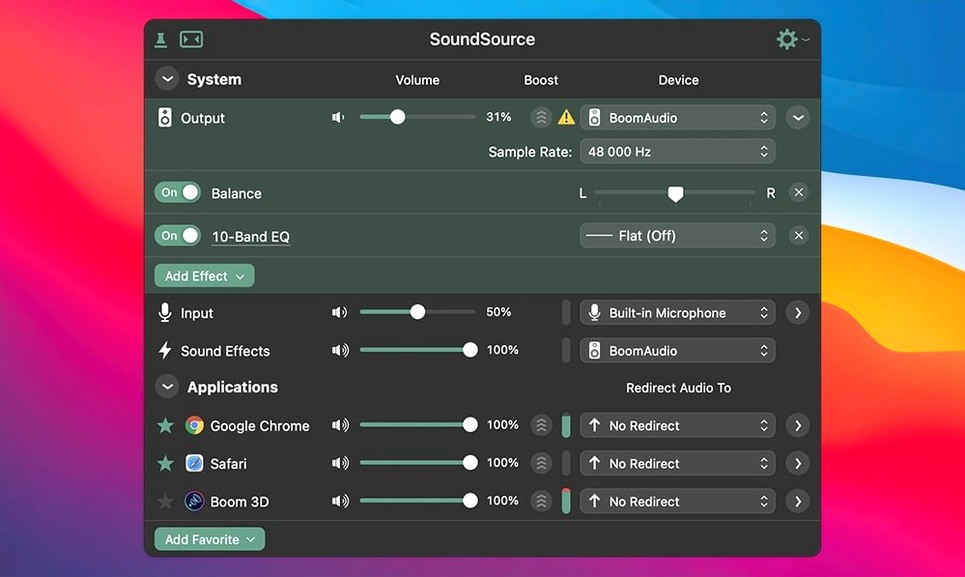
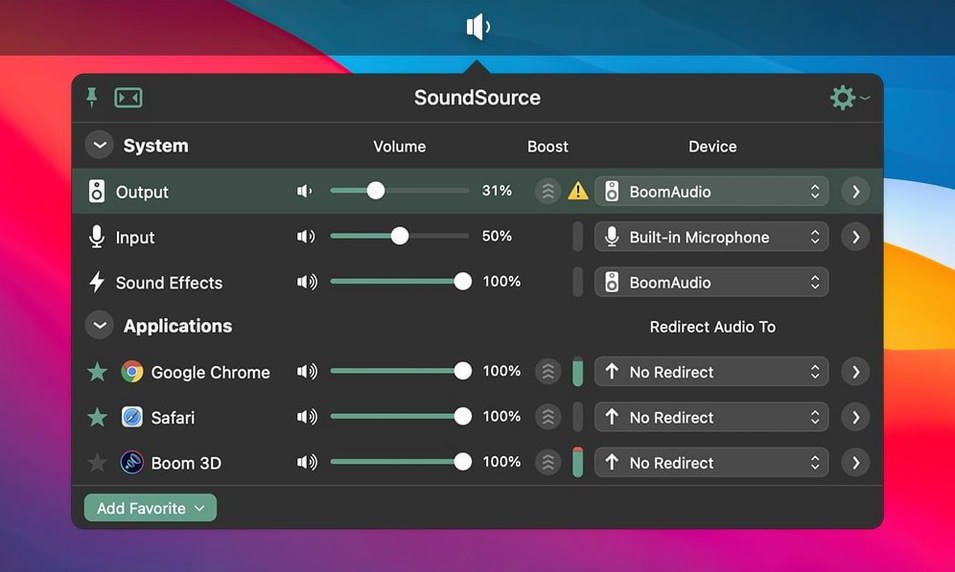
Start with the Headphone EQ. It’s built in, and it works per app, so you can give your music player a bit of warmth while leaving system alerts untouched. That’s the whole idea of SoundSource: every app gets its own audio treatment, without messing with global settings.
Next, try Output Groups. You can send audio to your speakers and headphones at the same time, which is handy when you’re showing a track to someone else in the room. No extra hardware, just a couple of clicks in the menu bar.
Device switching is the thing you’ll use daily. SoundSource lets you change input, output, and sound effects devices in two clicks, right from the menu bar. No more digging through System Settings when you plug in a different interface.
Finally, the volume controls. Each device gets its own volume slider, so you can balance levels without touching the system mixer. It’s a small thing, but it makes a difference when you’re going between studio monitors and headphones.
Per-app audio without extra windows
SoundSource hides a few handy details that don't get much attention but save time once you know about them.
- Per-app audio without extra windows. Each app that plays or records audio appears in the SoundSource list automatically. You don't need to hunt for it. Click the app, adjust volume or apply an effect, and close the menu. That's it.
- Output Groups are saved between sessions. Once you set up a group — say, speakers plus headphones — it stays there until you remove it. You don't rebuild it every time you restart your Mac.
- AirPlay streaming is listed like any other device. If you have an AirPlay speaker or Apple TV, it shows up in the output list. You can switch to it the same way you'd switch to built-in speakers.
- The Headphone EQ effect works on individual apps only. It's not a global toggle. You apply it to your music player, not to system sounds, so you keep alerts clear and music warm at the same time.
- Sound configurations save everything. You can save the whole audio setup — devices, volume levels, per-app effects, output groups — and load it later with one click. Good for switching between music production and everyday use.
Switching outputs mid-playback in Logic
Say it's a Saturday afternoon. I'm working on a mix in Logic, and I want to check it on headphones and then on the studio monitors without stopping playback.
I click the SoundSource icon in the menu bar. The output device is already set to my audio interface. I open Output Groups and add both the interface and my Bluetooth headphones. Now the mix plays through both at once. I can hear the low end on the headphones and the stereo field on the monitors without switching anything.
Next, I open Safari to pull up a reference track. SoundSource shows Safari in the app list automatically. I set its volume a bit lower so it doesn't overpower my mix. I also apply the Headphone EQ to Safari — just a gentle curve — so the reference track sounds closer to what I'm used to on these headphones.
Later, I unplug the interface and switch to built-in speakers. SoundSource updates the device list immediately. I drag the built-in speaker volume slider down a notch because I don't want to blast the room. The whole thing takes maybe two seconds.
At the end of the session, I save the whole configuration as "Saturday Mixing." Next weekend I can load it with one click and everything — devices, volumes, per-app effects — is back where I left it.
Missing apps and permission fixes
Most issues with SoundSource come from macOS permissions or device quirks. Here are a few you might run into.
- An app doesn't appear in the list. Some apps need to play audio first before SoundSource picks them up. Start playback in the app, then check the list again.
- Bluetooth audio stutters or cuts out. This can happen on macOS 27. The 6.1.4 update fixed Bluetooth output performance issues on that version, so make sure you're running the latest release.
- A Bluetooth device causes a crash. Version 6.1.4 also fixed a crash with Bluetooth devices that don't honour the buffer sizes macOS asks for. If you still see crashes, try disconnecting and reconnecting the device.
- Gatekeeper blocks the install. SoundSource needs a little extra step to bypass Gatekeeper. After mounting the disk image, run Open Gatekeeper friendly and press Enter in the Terminal window. Then drag the app to Applications and launch it.
- An output group doesn't appear. Make sure you've added at least two devices to the group. If one device is disconnected, the group may not show until that device is available again.
Lightweight and compatible with Apple Silicon and Intel
SoundSource 6.1.4 runs on macOS 15 and later. It works on both Apple Silicon and Intel Macs with 64-bit processors, so it covers the vast majority of Macs still in active use.
The app itself is lightweight. It lives in the menu bar and doesn't open a separate window unless you need one. The interface is in English only.
Installation follows the usual Rogue Amoeba pattern: mount the disk image, bypass Gatekeeper via the Terminal command, and drag the app to Applications. No extra frameworks or background services to manage.
If you're looking for a sound source mac crack or a soundsource torrent, you're probably after the full version. The TNT team has handled the activation for this release, so the build is ready to use after a straightforward install. That said, the app itself is worth using for the per-app control alone — it's one of those tools you wonder how you managed without.
- ARK plugin updated to version 13.5.4.
- Fixed a crash that could occur with Bluetooth devices on macOS 27.
- Fixed Bluetooth output performance issues on macOS 27.
- macOS 15 or later
- 64-bit application
- Supports Apple Silicon and Intel Macs
Kit check at a glance
| System | macOS 15 or later |
| Chip | Apple Silicon, Intel 64-bit |
| Download | 46 MB |
| Older pressings | 13 in the crate |





Chat from the booth
Sign in or grab a free account to leave a comment.
Nobody has said a word in the booth yet. If you played a set with this build, tell the next person how it went.