
- Build in the crate
- 3.6.0
- Made by the team at
- Native Instruments
- Menu languages offered
- English
- How you pay for it
- K'ed by TEAM HCiSO
- macOS it plays on
- macOS 13 or later
- CPU it runs on
- Apple Silicon, Intel 64-bit
Screenshots
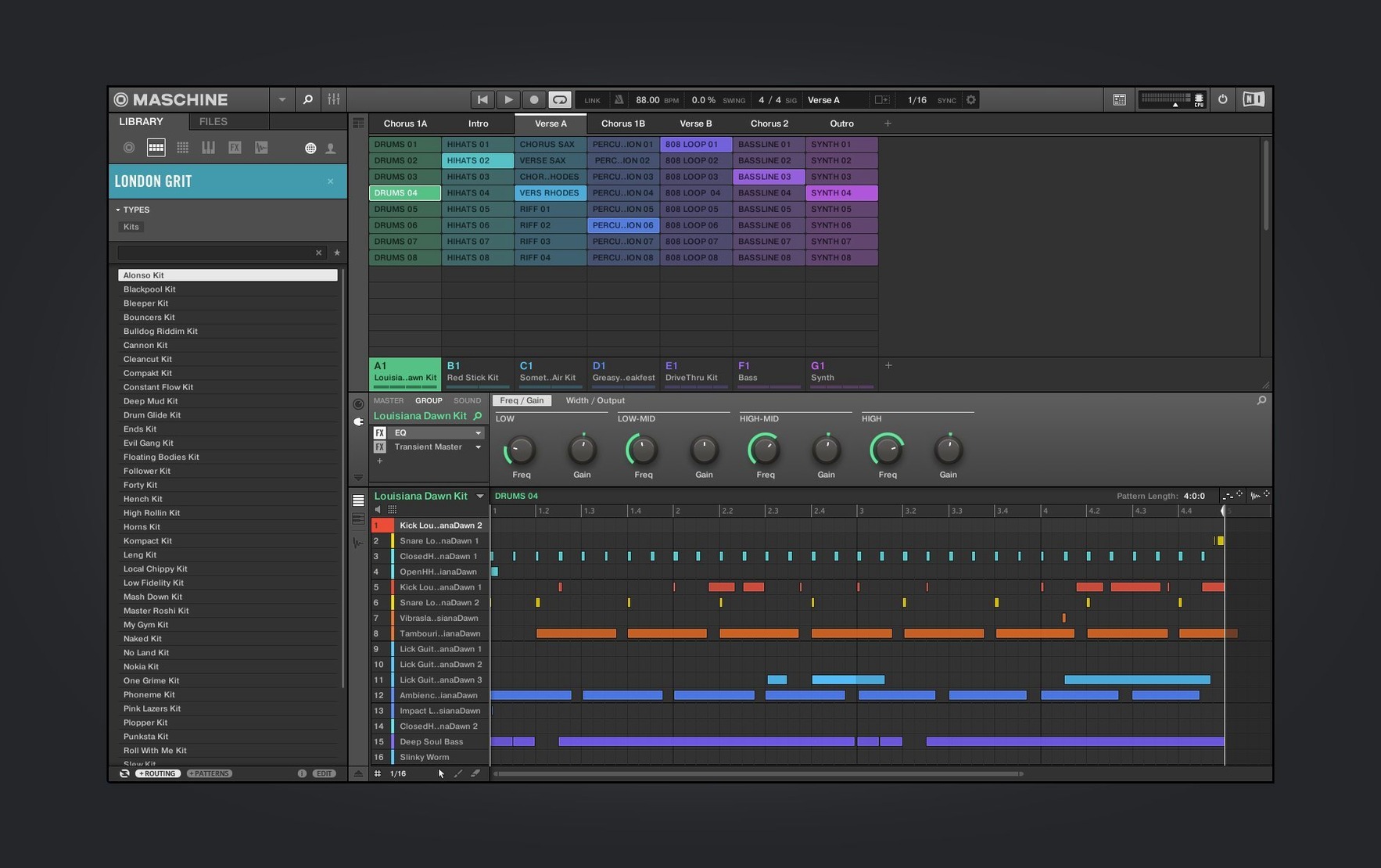
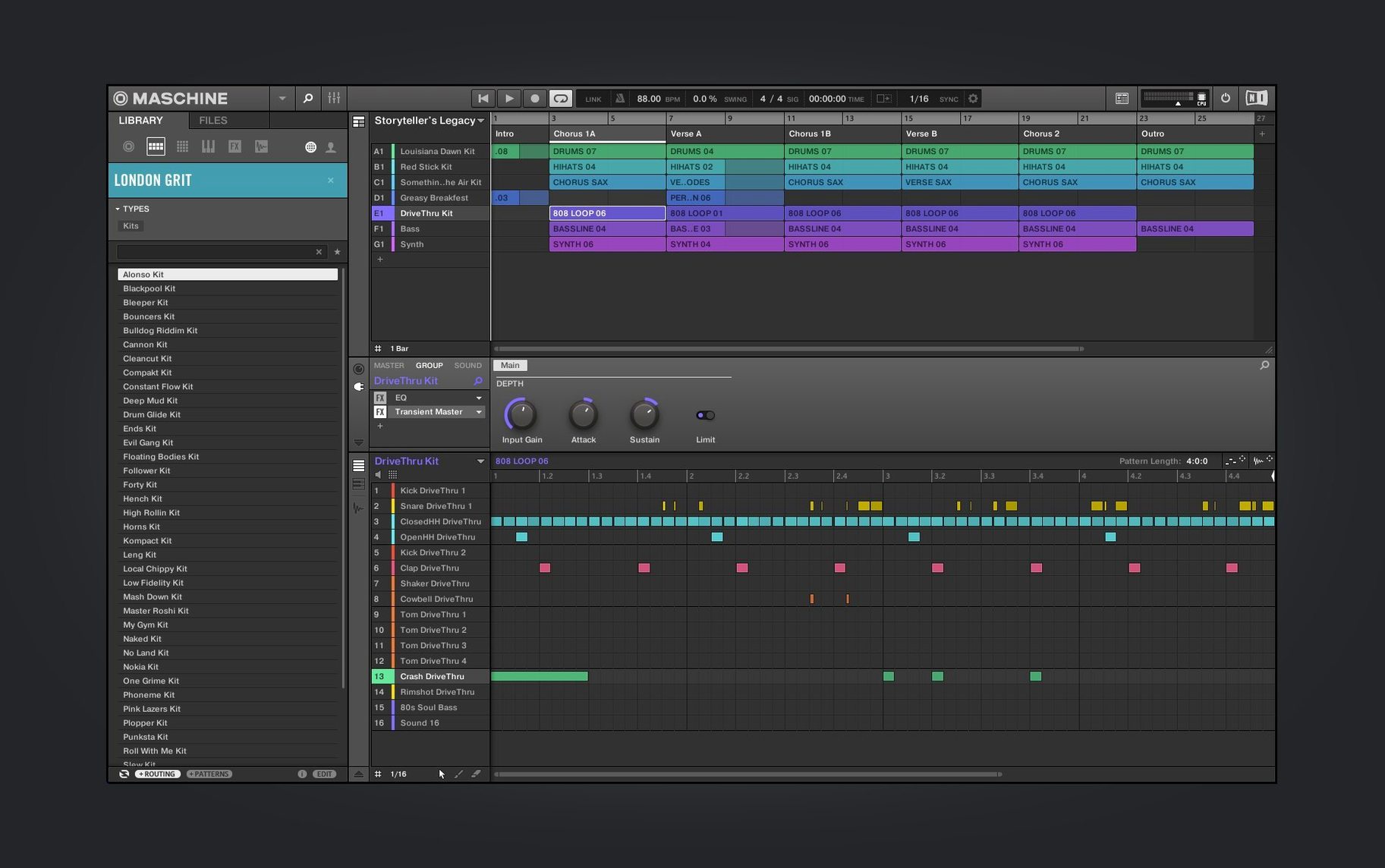
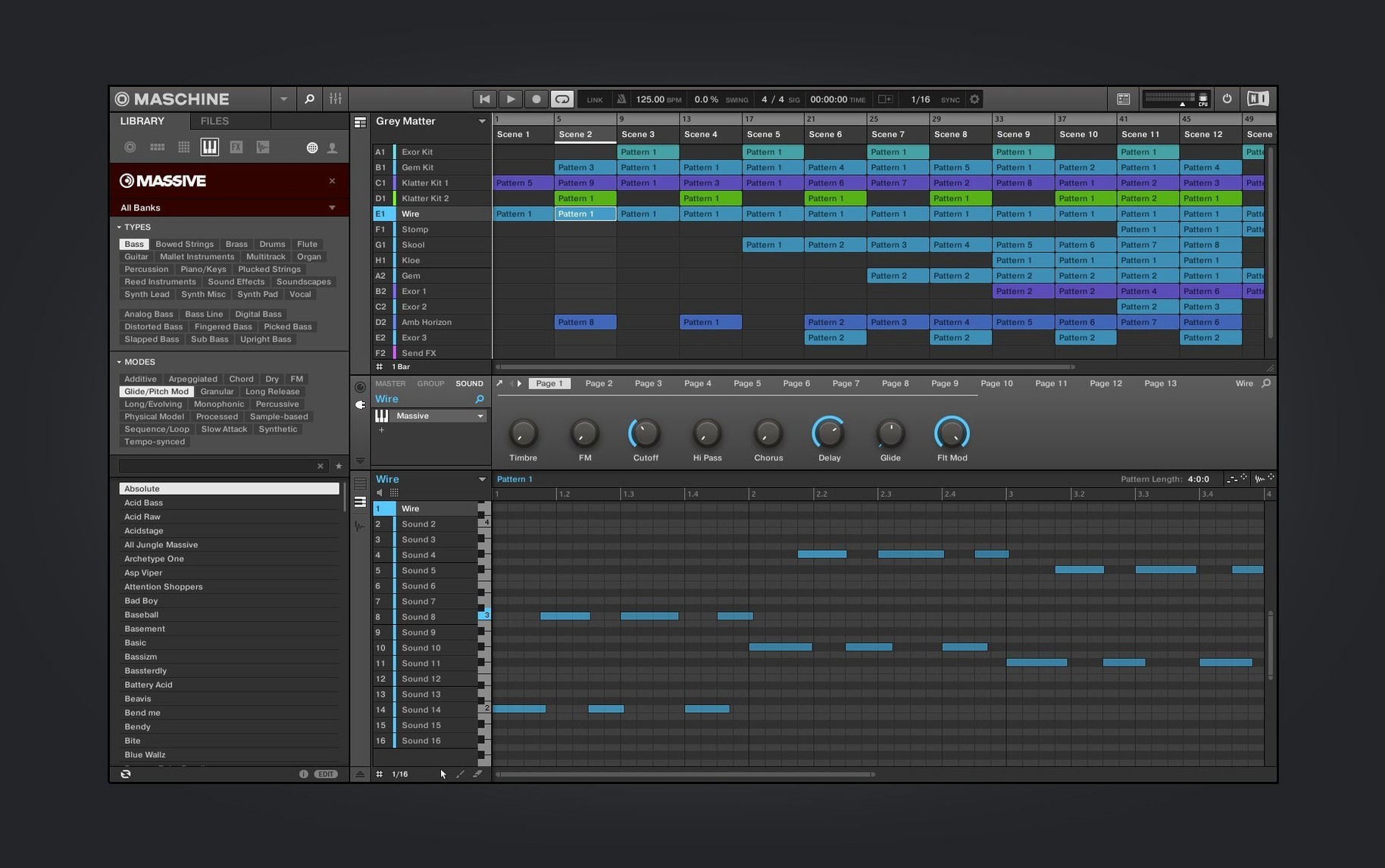
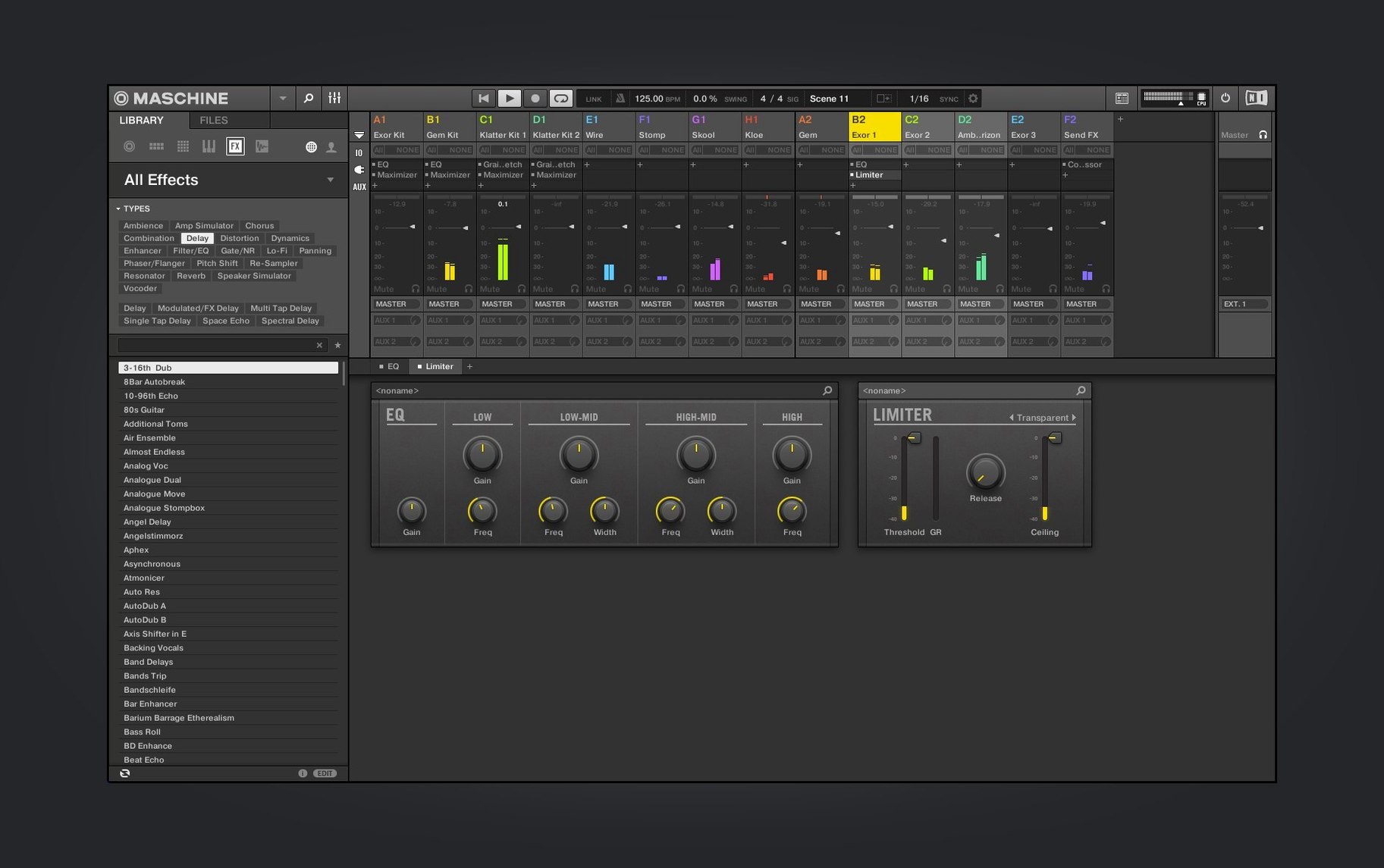
Native Instruments Maschine 3.6.0 runs on Macs with macOS 13 or later, supporting both Intel and Apple Silicon machines. The beat-making software that blends sampling, sequencing, and performance keeps its core character while adding a few meaningful updates in this version.
- Redesigned UI for the Audio, Poly Synth, and Drum Synth modules — cleaner, more immediate.
- Continued Mixer view redesign work, making routing and levels easier to follow.
- Added NKS Connect support, starting with AKAI MPK mini IV, so you can control more hardware directly.
- NKS Mode integration works with compatible NKS Connect controllers for tighter plug-in control.
- Runs standalone or as a plug-in, so you can stay in your DAW or work on its own.
If you already know the Maschine workflow, version 3.6.0 keeps everything familiar while polishing the parts you look at most. The sampler, drum sequencer, and mixer are still there — just a bit sharper now.
adjust audio and controller settings before starting
Before you start making beats, a handful of settings make the experience smoother. Open Maschine in standalone mode and go to the Preferences panel. Here are the ones I'd adjust early on.
- Audio setup. If you use an external audio interface, select it under Audio Device. Maschine includes a built-in audio interface, so it works with the Mac's internal output, but a dedicated interface cuts latency noticeably. Set the sample rate to whatever your project needs — 44.1 kHz is fine for most beat work.
- MIDI sync. If you plan to sync Maschine with a DAW or external gear, turn on Sync in the MIDI section. Choose whether Maschine sends or receives clock. This saves you the head-scratching later when your hardware doesn't follow the tempo.
- Controller setup. Maschine works with NKS controllers and now supports NKS Connect controllers like the AKAI MPK mini IV. In the Controller section, make sure your hardware is detected. If you use an unsupported MIDI controller, you can still map it manually, but the NKS path is easier.
- Project defaults. You can set a template project that loads every time you start a new beat. Save a bare scene with your favourite drum kit, one synth, and the mixer routing you like. Then set it as the default in the Project tab. Saves you rebuilding the same foundation each session.
- Browser locations. Maschine's browser scans your Mac for samples, kits, and presets. Point it to your main sample folders in the Content tab so it doesn't waste time searching system directories. If you keep samples on an external drive, add that path too.
no hardware controller required to run Maschine
I get the same few questions from friends who are thinking about running Maschine on their Mac. Here's what I tell them.
Does it need a Native Instruments hardware controller to work?
No. The software runs standalone or as a plug-in with just a keyboard and mouse. You lose the hands-on feel, but the on-screen pads and knobs work fine. That said, a controller speeds up drum programming and performance. If you have an NKS keyboard or a Maschine controller, you get the full experience.
Can I use it inside Logic Pro or Ableton Live?
Yes. Maschine 3.6.0 works as a plug-in in any DAW that supports VST, AU, or AAX. You can load it on a track, build a pattern there, and route the audio out. Or you can run it standalone and export stems later. Both ways are valid.
Will it work on an Intel Mac running macOS 13?
Yes. The installer includes both ARM and x86 64-bit binaries. Native Instruments has supported Intel Macs through the transition, and this version keeps that compatibility. Just make sure your macOS is 13 or later.
Does it come with sounds or do I need to buy packs?
Maschine includes a library of kits, samples, and presets out of the box. The welcome screen in 3.6.0 also links to demo projects and tutorial videos to get you started. You can expand the library with Native Instruments expansions or third-party sample packs. The built-in content is enough to make full tracks, though.
Can I slice a loop and map it across the pads?
Yes. The loop slicing function is a core feature. Drop an audio clip into the sampler, choose the slicing mode, and Maschine chops it into hits mapped to the pads. You can then play them in any order, trigger them from a controller, or rearrange them in the sequencer.
loading drums and building a beat from scratch
Friday evening, I open Maschine on the MacBook and start a new project. The welcome screen shows a few demo projects, but I skip them and hit Create.
First, I load a drum kit from the browser. I browse by type, pick a hip-hop kit, and it lands on the pads. I play a basic kick-snare pattern using the on-screen pads — just eight bars to get a loop going. The pattern-based sequencer shows each pad's hits as coloured bars, so I can see the groove at a glance.
Next, I add a Poly Synth module. The redesigned UI makes the envelope and filter controls clearer than before. I dial in a warm pad sound, write a simple chord progression, and let it play over the drums. I tweak the filter cutoff as it runs to add some movement.
Then I bring in a vocal sample I have on the desktop. I drag it onto an Audio module, and Maschine analyses the file. I use the loop slicing function to cut it into eight pieces, mapped across the pads. I play a few of the slices live, recording the pattern into the sequencer. The timing locks to the project tempo, so no warping needed.
With three patterns running, I open the Mixer view. The redesign here groups channels clearly — each sound has a volume fader, pan, and insert slots. I add a reverb send to the vocal slices and a compressor to the drum bus. I adjust the levels until the kick sits right.
I play the whole scene from start to finish, making small tweaks as it loops. When I'm happy, I export the stems. Maschine writes each sound as a separate audio file, ready to mix in my DAW. Total time: about forty minutes. No crashes, no confusion — just building a beat.
maschine not seeing your controller fix
Even with a straightforward install, a few things can trip you up. Here are the ones I see most often.
- Maschine doesn't see my controller.
Check the USB cable first. Then open Preferences and go to Controller Setup. If your controller supports NKS Connect, make sure the controller's own firmware is up to date. For older MIDI controllers, you may need to add a manual MIDI mapping. Maschine doesn't auto-detect every device. - Audio crackles or cuts out.
This usually points to the buffer size being too low. In the Audio Preferences, increase the buffer size. 512 samples is a safe starting point for most projects. If you use a built-in audio interface, that's fine, but a dedicated interface handles lower buffers better. - Plug-in version doesn't open in my DAW.
Make sure you ran the installer that includes the AU, VST, or AAX version you need. Some installers let you choose which formats to install. If the plug-in doesn't appear, rescan your plug-in folder in your DAW. Also check that your DAW is running in 64-bit mode — Maschine doesn't support 32-bit hosts. - Project files from an older Maschine version won't load.
Maschine 3.6.0 should open projects from version 2 and later. If a project doesn't load, try opening it in an older version first and resaving. Sometimes third-party plug-ins used in the old project cause the issue. Missing sounds can be relocated via the browser. - Sounds are out of sync after slicing.
When you slice a loop, check that the tempo detection matched the original file. If the loop's tempo differs from your project tempo, Maschine may stretch it. You can adjust the stretch algorithm in the Sampler module or set the loop's tempo manually before slicing.
- Redesigned UI for the Audio, Poly Synth, and Drum Synth modules.
- Continued Mixer view redesign work.
- Added NKS Connect support, starting with AKAI MPK mini IV.
- Added NKS Mode integration for compatible NKS Connect controllers.
- macOS 13 or later
- Intel or Apple Silicon
- Interface language: English
Kit check at a glance
| System | macOS 13 or later |
| Chip | Apple Silicon, Intel 64-bit |
| Download | 1.3 GB |
| Older pressings | 14 in the crate |

Chat from the booth
Sign in or grab a free account to leave a comment.
Nobody has said a word in the booth yet. If you played a set with this build, tell the next person how it went.