
- Build in the crate
- 5.0.1 [MAS]
- Made by the team at
- Sascha Simon
- Menu languages offered
- Russian, English, German, Arabic, Spanish, Italian, Chinese (Simplified), Portuguese, French, Hindi, Japanese
- How you pay for it
- K'ed by TNT team
- macOS it plays on
- macOS 15.6 or later
- CPU it runs on
- Apple Silicon, Intel 64-bit
Screenshots
You already know the feeling: you're in the middle of a session, the audio starts stuttering, and you have no idea which part of the Mac is struggling. System Dashboard Pro 4.4.2 is the kind of tool you open when you want that answer fast, without digging through Activity Monitor.
| Detail | Info |
|---|---|
| Version | 4.4.2 |
| Developer | Sascha Simon |
| macOS | 15.6 or later |
| Architecture | Apple Silicon and Intel 64-bit |
| Languages | English, German, Spanish, French, and more |
One realistic task: you're about to record a live set, and you need to know if the Mac can handle it. Launch the app, glance at the CPU panel for current load and the last few seconds of history, check memory the same way, then look at disk speed to make sure the drive isn't the bottleneck. That's your whole pre-flight check in one window.
Runs on macOS 15.6 or later
System Dashboard Pro runs on macOS 15.6 or later, and it works on both Apple Silicon and Intel 64-bit Macs. No surprises there — it's a modern app built for current hardware. The developer says it was completely redeveloped and optimised for the latest systems, so you're not getting a port of something from ten years ago.
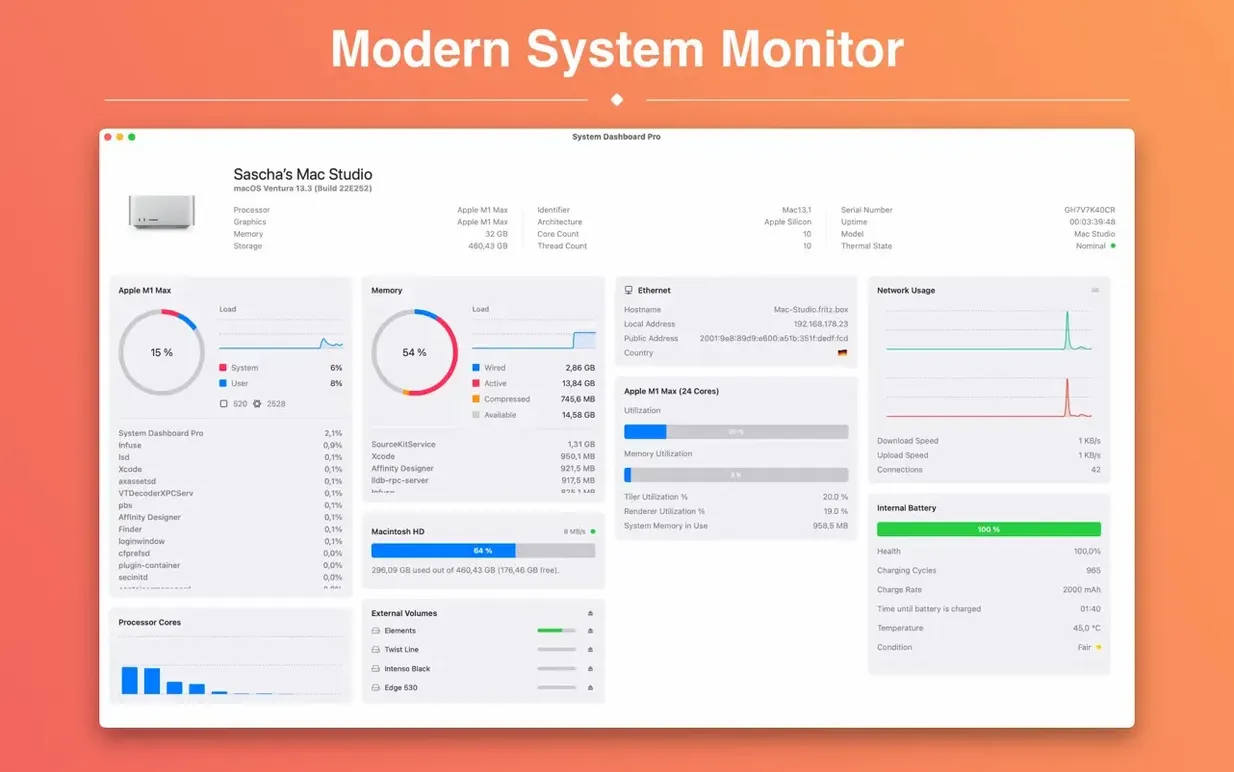
What you see is a set of live panels. The CPU panel shows current load plus a short history. The memory panel does the same. Network shows local and external IP addresses, WLAN transfer speed, current download and upload speeds, and the number of open connections. Storage shows used and free space plus current disk speed. There's also an overview panel that lists the macOS version and basic computer details.
The app includes eleven languages, so if English isn't your first language, there's a good chance yours is in there.
Gatekeeper fix in the disk image
The most common issue people hit is Gatekeeper. The app comes in a disk image, and macOS might refuse to open it the first time. The install steps are straightforward: mount the disk image, then launch Open Gatekeeper friendly. If that doesn't do it, open Terminal and press Enter to bypass Gatekeeper. Then drag the app to the Applications folder and open it. That sequence works every time.
Another thing: if you're running an older version of macOS — anything before 15.6 — the app won't launch. It's a hard requirement. Check your macOS version in About This Mac before you start.
Some users expect a menu bar icon or a floating widget. System Dashboard Pro is a windowed app with dashboard-style panels, not a menu bar utility. System Dashboard Pro gives Mac users a real-time overview of CPU, memory, and disk activity.
What to expect on your Mac
Once installed, the app opens to a clean window with separate panels for each monitored area. The dashboard items are labelled clearly, and you can see all of them at once or focus on the ones you care about.
The app doesn't sit in the menu bar by default. It's a window you open when you need it and close when you don't. That keeps your screen uncluttered during normal use.
Common snags and how to sort them
A few things catch people out after installation. Here are the ones I see most often:
- App won't open after dragging to Applications. Go back to the disk image and run Open Gatekeeper friendly again. If that fails, use the Terminal command — press Enter, then relaunch the app. Gatekeeper only blocks the first launch.
- Panels show no data. The app needs permission to access certain system information. On macOS 15.6, you might see a prompt the first time you open it. Grant access when asked. If you denied it by accident, check System Settings > Privacy & Security for System Dashboard Pro and enable the relevant permissions.
- If you're on a desktop Mac, it won't be there — that's normal. You'll still see all the other panels.
- Interface language is wrong. The app includes eleven languages. If it opened in the wrong one, look for a language setting in the app's preferences menu. The developer lists Russian, English, German, Arabic, Spanish, Italian, Simplified Chinese, Portuguese, French, Hindi, and Japanese as available options.
If you're searching for system dashboard pro for mac torrent, these are the small things that tend to trip people up. Once you've sorted permissions and the first launch, the panels just work.
- macOS 15.6 or later
- Apple Silicon or Intel 64-bit
Kit check at a glance
| System | macOS 15.6 or later |
| Chip | Apple Silicon, Intel 64-bit |
| Download | 8 MB |
| Older pressings | 6 in the crate |







Chat from the booth
Sign in or grab a free account to leave a comment.
Nobody has said a word in the booth yet. If you played a set with this build, tell the next person how it went.