

- Build in the crate
- 1.0.3
- Made by the team at
- Sonic Academy
- Menu languages offered
- English
- How you pay for it
- K'ed by TEAM HCiSO
- macOS it plays on
- OS X 10.9 or later
- CPU it runs on
- Apple Silicon, Intel 64-bit
Screenshots
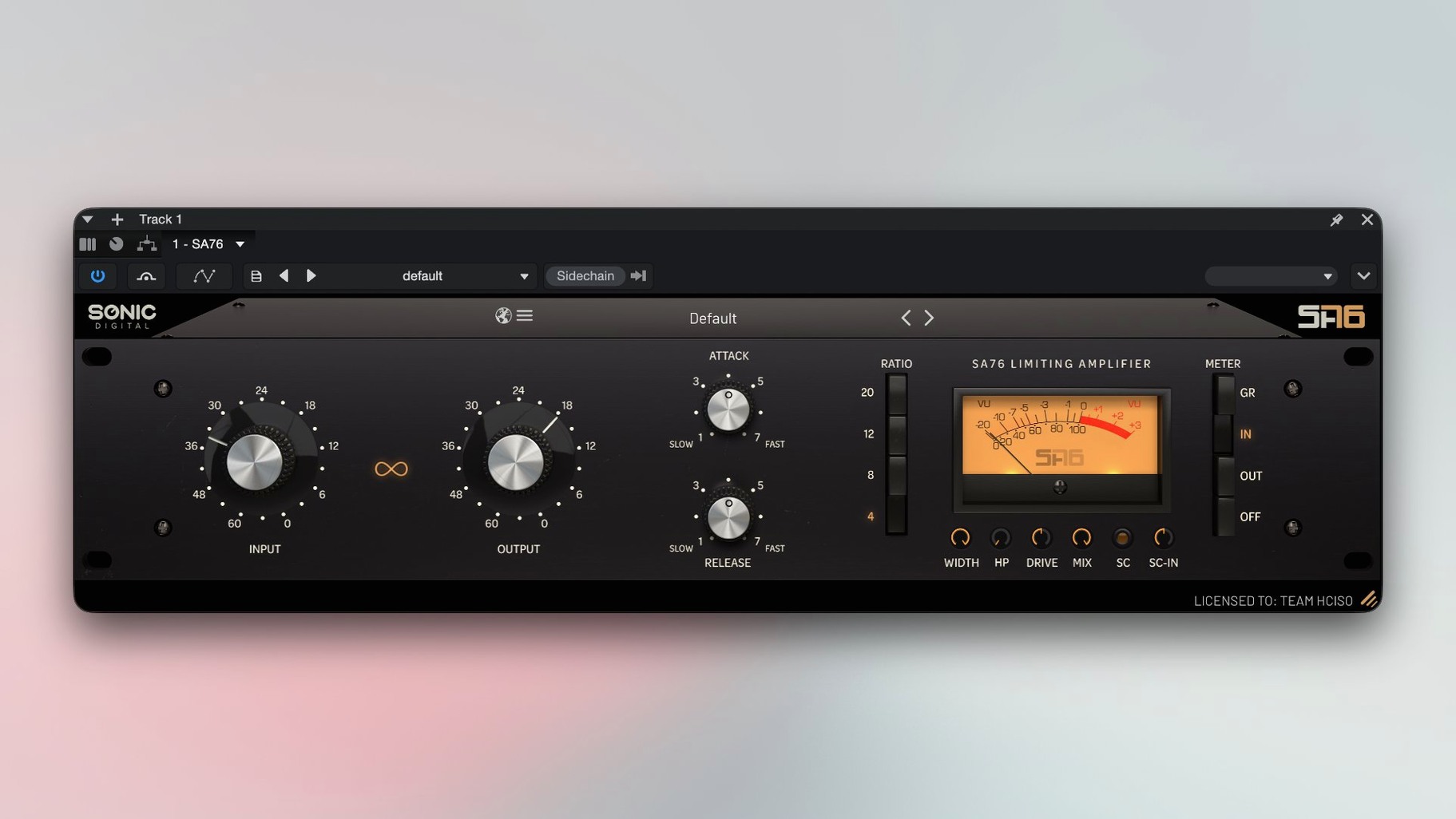
Any producer who wants that classic 1176 punch with modern flexibility will get on with the Sonic Academy SA76. This compressor plugin keeps the original's character — fast attack, aggressive release — then adds controls the old hardware never had.
- Set the ratio. Choose from 4, 8, 12, 20, or the famous All Buttons In mode for maximum squash.
- Dial in Attack and Release. Shape the transient response to fit your source — drums, vocals, or bass.
- Blend with the Mix control. Parallel compression is built in, no need for extra routing.
- Add saturation. The output saturation algorithm warms things up before it hits the next plugin.
- Use external sidechain. The built-in high-pass filter keeps the pumping clean and controlled.
Gain link keeps level consistent
The gain linking feature is easy to overlook. When you adjust the Input, the Output compensates automatically, so the overall level stays consistent. It means you can push the compression harder without constantly reaching for the make-up gain. Beginners often crank the Input, hear the volume jump, and think they've found the right sound — when really they just made it louder. Gain linking stops that trap.
Stereo width control is another one that doesn't get talked about much. It's right there on the interface, letting you narrow or widen the stereo image after compression. On a drum bus or a synth pad, a slight narrowing can tighten the low end without killing the spread. Most compressor plugins don't offer this at all, so it's worth remembering it exists.
The external sidechain high-pass filter is simple but effective. You can filter out low frequencies from the sidechain signal so the compressor reacts to the mids and highs only. That keeps kick drums from triggering unwanted pumping on bass parts — a common frustration that SA76 solves without extra routing.
Overlooked ratio settings beyond 4 and ABI
The biggest one is ignoring the ratio options beyond 4 and All Buttons In. The 8, 12 and 20 settings each behave differently — 8 is gentler than you'd expect, 12 hits harder, 20 is almost a brickwall. New users tend to stick with what they know and miss the range in between.
Another mistake is setting Attack and Release by eye rather than ear. The controls are responsive and small movements change the sound noticeably. Beginners often set them visually to a "standard" position and forget to adjust per track. A vocal needs different timing than a snare drum, even if the numbers look similar.
Overusing the saturation is common too. The algorithm adds warmth, but too much makes the mix muddy, especially on multiple tracks. It's better to add it sparingly on individual channels and let the mix bus stay clean.
Cycle ratio settings on a drum loop first
- Start with a single drum loop. Cycle through each ratio setting — 4, 8, 12, 20, All Buttons In — and listen to how the attack shape changes. You'll hear the difference faster on a simple source.
- Parallel compression is one of the quickest ways to get punch without losing dynamics.
- Try gain linking on and off. Switch it off to hear how much the Output actually changes when you move the Input. It teaches you what the compressor is doing to your level.
- Test the sidechain filter on a bass and kick pair. Route the kick into the sidechain, set the high-pass around 100 Hz, and listen to how the bass stays solid while the kick triggers the pump.
sonic academy sa76 mac full version is the kind of plugin that rewards experimentation. Spend an afternoon with it on different sources — vocals, drums, bass, a whole mix — and you'll find its sweet spots faster than reading a manual.
The result is a compressor that works like the original but fits into a modern mix workflow without workarounds.
- macOS OS X 10.9 or later
- Intel or Apple Silicon Mac
- Interface language: English
Kit check at a glance
| System | OS X 10.9 or later |
| Chip | Apple Silicon, Intel 64-bit |
| Download | 43 MB |







Chat from the booth
Sign in or grab a free account to leave a comment.
Nobody has said a word in the booth yet. If you played a set with this build, tell the next person how it went.