

- Build in the crate
- 1.2.4
- Made by the team at
- Sonix Audio
- Menu languages offered
- English
- How you pay for it
- k'ed by Team V.R
- macOS it plays on
- macOS 10.13 or later
- CPU it runs on
- Apple Silicon, Intel 64-bit
Screenshots
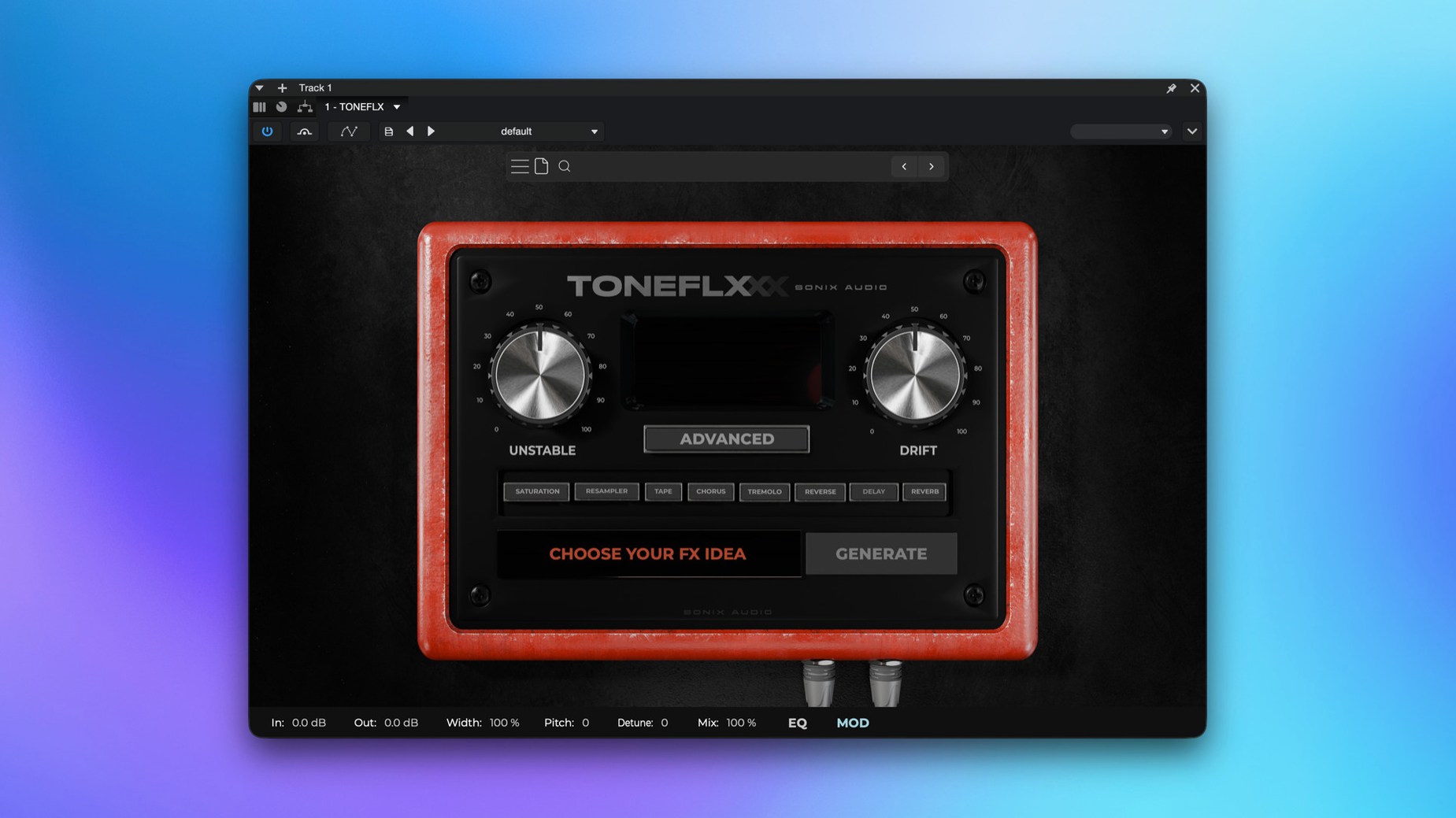
You drop a virtual instrument on a track — a synth pad or a sampled piano — and you want it to breathe, to move, to sit differently. That is where TONEFLX from SoniX Audio comes in. It lives on the insert of the track or an aux bus, shaping the sound with its analog-style multi-FX.
Works on tracks, buses, or master bus
TONEFLX works on individual instrument tracks, group buses or the master bus. On a single track, it dials in character — saturation, modulation, a little ambience. On a bus, it glues several sources together before they hit reverb or compression. The built-in effects act like an analog pedalboard: you chain them, reorder them, tweak each stage until the tone fits.
Native AAX for Pro Tools stability
Version 1.2.4 adds native AAX compatibility. That means it runs directly inside Pro Tools without a wrapper. For anyone mixing or producing in Pro Tools, it saves the extra step of bridging plugins and keeps the session stable. The core remains the same: a flexible multi-FX processor for virtual instruments and effects, aimed at getting a sound shaped fast.
Reorder effects by dragging in the chain
TONEFLX has a few details that don't grab attention at first but become part of your workflow once you spot them. The eight built-in effects are there to combine, and you can reorder them in the chain simply by dragging. No menu diving, no copy-paste — just move a module where you need it.
Another quiet one: the plugin generates new processing variations with a single click. If you are stuck on a sound, one click gives you a different arrangement or set of parameters to start from. It is not a randomiser in the chaotic sense — it keeps things musical, so you rarely get unusable noise.
The installer on the disk image runs the standard process. Nothing unusual there, but the support area covers setup, activation, presets and troubleshooting in plain steps. If you ever need to check how to get the plugin to appear in your DAW or how to handle an update, it is all laid out.
Warming up a sampled grand piano
Say you have a sampled grand piano that sounds too clean, too perfect. You load TONEFLX on its insert. You start with a touch of saturation from one of the built-in effects to add a little warmth. Then you add a modulation effect — something slow and subtle — to make the sustain drift slightly. Finally, you add a short room-style ambience at the end of the chain.
You listen. The piano sits differently now: it has texture, a little movement, a sense of space. But maybe you want more grit. One click on the variation button and the chain reorders itself — saturation becomes heavier, modulation shifts to a different rate, the ambience gets a different tail. You keep the one that works. The whole thing takes seconds, not minutes.
For a mix engineer, that speed matters when you have many tracks to shape. For a sound designer, the variation button is a fast way to explore options before committing to one.
Adjust chain order for bass synth
When you first load TONEFLX, take a moment to look at the chain order. The default arrangement might not suit your source. If you are processing a bass synth, try moving saturation to the front of the chain and modulation to the back. If you are working on a vocal effect, put ambience early and let modulation colour it afterwards.
The variation button is worth pressing early too. Even if you plan to dial in your own settings, pressing it once or twice shows you what the plugin can do. It gives you a starting point that might be better than starting from scratch.
Activation is straightforward: after installing, you get the plugin to appear in your DAW, activate the license key, and start using it. The k'ed version by Team V.R skips that step, so you can go straight to tweaking. Just make sure your DAW rescans plugins if TONEFLX does not show up immediately.
For Pro Tools users, version 1.2.4 is the one to grab — native AAX means no wrapper, no extra latency, just the plugin sitting on your insert list like any other AAX.
- Native AAX compatibility added
- macOS 10.13 or later
- Intel or Apple Silicon processor
Kit check at a glance
| System | macOS 10.13 or later |
| Chip | Apple Silicon, Intel 64-bit |
| Download | 369 MB |







Chat from the booth
Sign in or grab a free account to leave a comment.
Nobody has said a word in the booth yet. If you played a set with this build, tell the next person how it went.