

- Build in the crate
- 1.0.0
- Made by the team at
- PSPaudioware
- Menu languages offered
- English
- How you pay for it
- k'ed by GUISEPPE
- macOS it plays on
- macOS 10.14 or later
- CPU it runs on
- Apple Silicon, Intel 64-bit
Screenshots
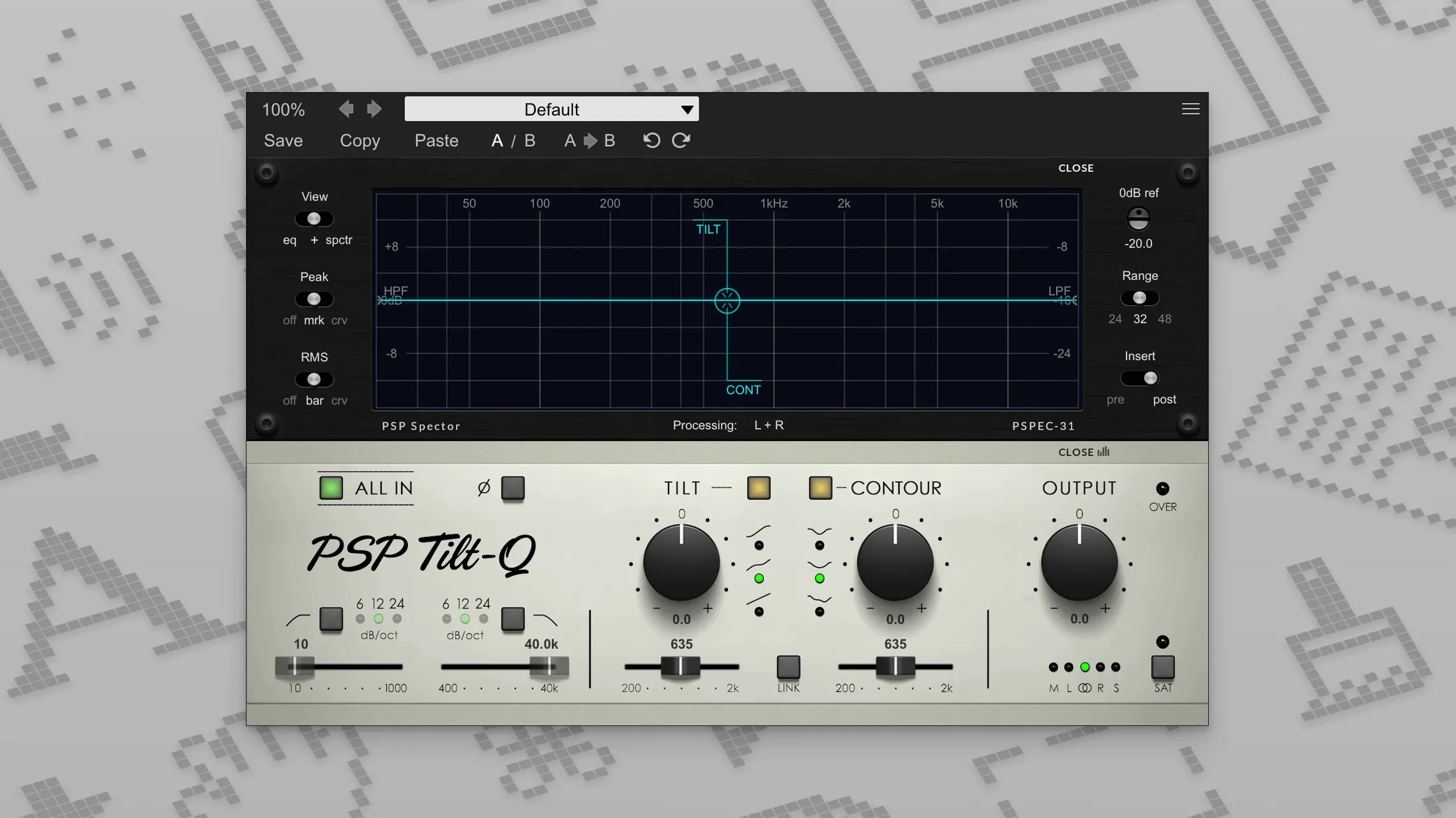
The Tilt control is the heart of PSP Tilt-Q. Dial it left for a darker, warmer sound; dial it right for air and presence. It shelves the highs and lows in opposite directions, so a single knob shifts the whole balance without messing with individual bands.
Tilt, contour, and high-pass/low-pass filters
- Tilt filter: broad tonal balance adjustment, from bass-heavy to bright.
- Contour filter: a band-pass shape that pulls down the mids while leaving lows and highs alone, or the reverse.
- High-pass and low-pass filters: six, twelve or twenty-four dB per octave slopes for cleaning up the extremes.
- PSP Spector PSPEC-31 analyzer: thirty-one-band spectrum display, pre or post processing, in real time.
- Output saturation: PSP soft saturation for a bit of analogue warmth on the way out.
Mix-bus or group-track tonal nudges
This isn’t a surgical EQ. It lives on the mix bus or a group track, where you want to nudge the whole tone without hunting for resonant peaks. The analyzer shows you what the filter is doing, and the saturation adds a subtle glue. It’s straightforward: a few controls, a clear display, and a sound that sits well in a track.
Runs on Intel and Apple Silicon from 10.14
PSP Tilt-Q runs on macOS 10.14 or later, covering both Intel Macs and Apple Silicon machines in 64-bit mode. The installer comes as a disk image — open it, run the standard procedure, and the plug-in lands in your usual component, VST or AAX folder. Version 1.0.0 is the first release, so no legacy baggage, just the current format support you’d expect from a modern PSPaudioware plug-in.
The interface is console-style: dark, clear, with labelled knobs and switches. No scrolling menus, no hidden pages. Every control — tilt, contour, filters, analyzer, saturation — is visible at once. On a laptop screen it stays readable without zooming. The plug-in processes in double-precision 64-bit internally, which is standard for PSPaudioware’s recent work.
Processing modes and three tilt curves
- Left, right, mid, side or stereo: The processing mode selector lets you treat just the centre, just the sides, or a single channel. Useful for tightening a stereo image without touching the whole mix.
- Three tilt curves: The tilt EQ isn’t one shape — it offers three curve characteristics. Same knob, slightly different slope behaviour depending on what the track needs.
- Three contour responses: The contour filter also has three options. You can pull the mids down or push them up with a shape that suits the source.
- Analyzer placement: The PSPEC-31 can show the spectrum before or after the filter. Flick between the two to see exactly what the EQ is doing to the signal.
- Bar or curve view: The analyzer display switches between bars and a continuous curve. Bars are clearer for spotting individual bands; the curve reads faster on a busy mix.
None of these are flashy. But they mean you can shape a track’s tone without opening a second plug-in for analysis or routing. PSPaudioware PSP Tilt-Q for Mac torrent offers tilt EQ for quick tonal balance in one streamlined window.
- macOS 10.14 or later
- Intel (x86 64-bit) or Apple Silicon (ARM)
Kit check at a glance
| System | macOS 10.14 or later |
| Chip | Apple Silicon, Intel 64-bit |
| Download | 143 MB |



Chat from the booth
Sign in or grab a free account to leave a comment.
Nobody has said a word in the booth yet. If you played a set with this build, tell the next person how it went.