

- Build in the crate
- 1.1
- Made by the team at
- CableGuys
- Menu languages offered
- English
- How you pay for it
- k'ed by GUISEPPE
- macOS it plays on
- macOS 10.13 or later
- CPU it runs on
- Apple Silicon, Intel 64-bit
Screenshots
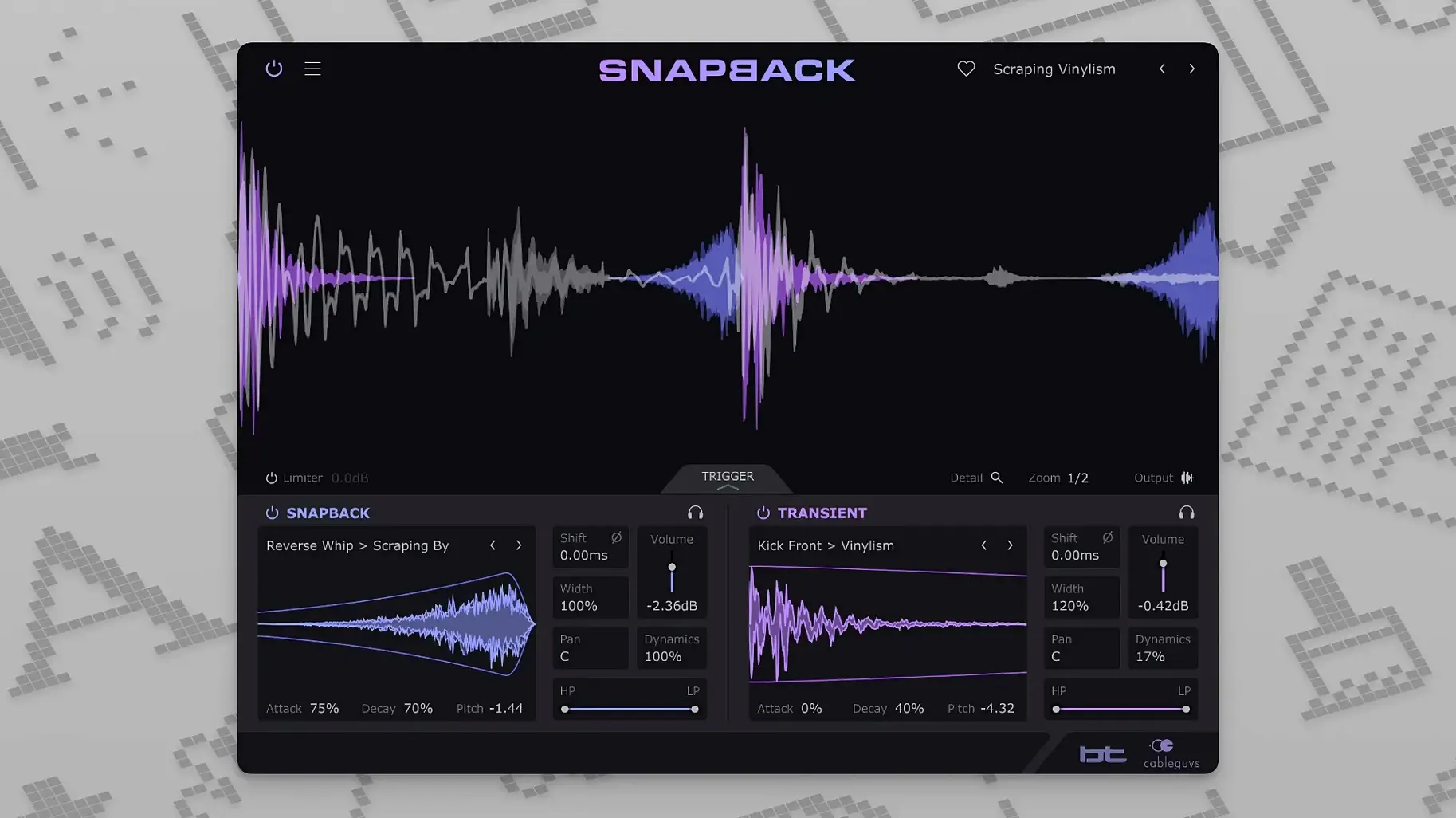
Getting a snare or kick to cut through a mix often means layering samples, and then spending ages lining them up by ear. Snapback removes that step: it detects each drum hit and syncs your added sample to it automatically. The result is a thicker, more characterful drum sound without the manual nudging.
Tools for deeper control
- Envelopes — shape the attack and decay of the layered sample beyond the preset’s default.
- Phase adjustment — flip or fine-tune phase to avoid cancellation between the original hit and the layer.
- Waveform visualiser — see exactly where the sample lands relative to the transient.
- User sample import — bring your own sounds alongside the 200+ included ones.
Built with BT
Snapback was developed in collaboration with BT, and it shows in the attention to timing and texture. The plugin works as VST 2, VST 3, AU, or AAX on both Intel and Apple Silicon Macs, so it fits into most setups. Version 1.1 adds a Reverse button for creative flips and expands MIDI port support from 16 to 256 — useful if you run a large template. For anyone layering drums regularly, it turns a fiddly task into a quick one.
A real-world use: tightening a live loop
Say you've recorded a drum loop from a hardware machine — the kick hits are solid, but the snare sounds thin. You load Snapback on the snare track, pick a fatter snare sample from the built-in library, and the plugin aligns it automatically. No zooming into waveforms, no dragging transients. The original snare keeps its feel; the layer adds body. If the sample lands a touch early, you adjust the phase or shift the envelope's attack until it sits right. The whole thing takes maybe a minute, and you're back to arranging.
Snapback's speed edge over Kontakt scripts
- Kontakt-based layering scripts — They can do similar sample stacking, but they often require a full Kontakt player and more manual mapping. Snapback's advantage is its speed: it detects hits on the fly without building a keymap or setting up round-robins. It's less flexible for complex multi-velocity setups, but far quicker for a single drum sound.
- DAW-native drum replacement (Logic's Quick Sampler, Ableton's Simpler) — These work well for basic layering, but they don't detect transients automatically from an audio track. You have to slice the region yourself or trigger the layer via MIDI. Snapback skips that step — it listens to the audio and syncs the sample to every hit in real time, which saves time on longer loops.
- Trigger 2 — A popular drum replacer with a large sample library. It's powerful, but its interface is denser and its workflow is built around replacing hits entirely rather than layering. Snapback is lighter and more focused: you keep the original sound and just add a layer. For mix engineers who want to reinforce a snare without losing its character, that distinction matters.
Workflow: layering a kick drum from scratch
- Insert Snapback as an insert effect on your kick track (or send to a bus if you prefer to keep the original dry).
- Play the loop. Snapback's waveform visualiser shows the kick hits; you'll see the plugin has already detected them.
- Browse the included samples — there are over 200. Pick a kick that adds the attack or low-end weight you need. The sample snaps to the hits instantly.
- If the layer sounds too dominant, use the envelope to shorten the decay or soften the attack. If it feels phasey, flip the phase button. Adjust the pitch to match the key of the track.
- Optional: add a filter to roll off high frequencies if the layer introduces unwanted sizzle.
- Done. The original kick remains untouched underneath, and the layered sample sits locked to every hit.
- Reverse button added in version 1.1.
- MIDI ports expanded from 16 to 256.
- macOS 10.13 or later
- Intel or Apple Silicon
- VST 2, VST 3, AU, or AAX host DAW
- Interface in English
Kit check at a glance
| System | macOS 10.13 or later |
| Chip | Apple Silicon, Intel 64-bit |
| Download | 37 MB |



Chat from the booth
Sign in or grab a free account to leave a comment.
Nobody has said a word in the booth yet. If you played a set with this build, tell the next person how it went.