

- Build in the crate
- 4.0.1
- Made by the team at
- Ample Sound
- Menu languages offered
- English
- How you pay for it
- Included
- macOS it plays on
- macOS 10.13 or later
- CPU it runs on
- Apple Silicon, Intel 64-bit
Screenshots
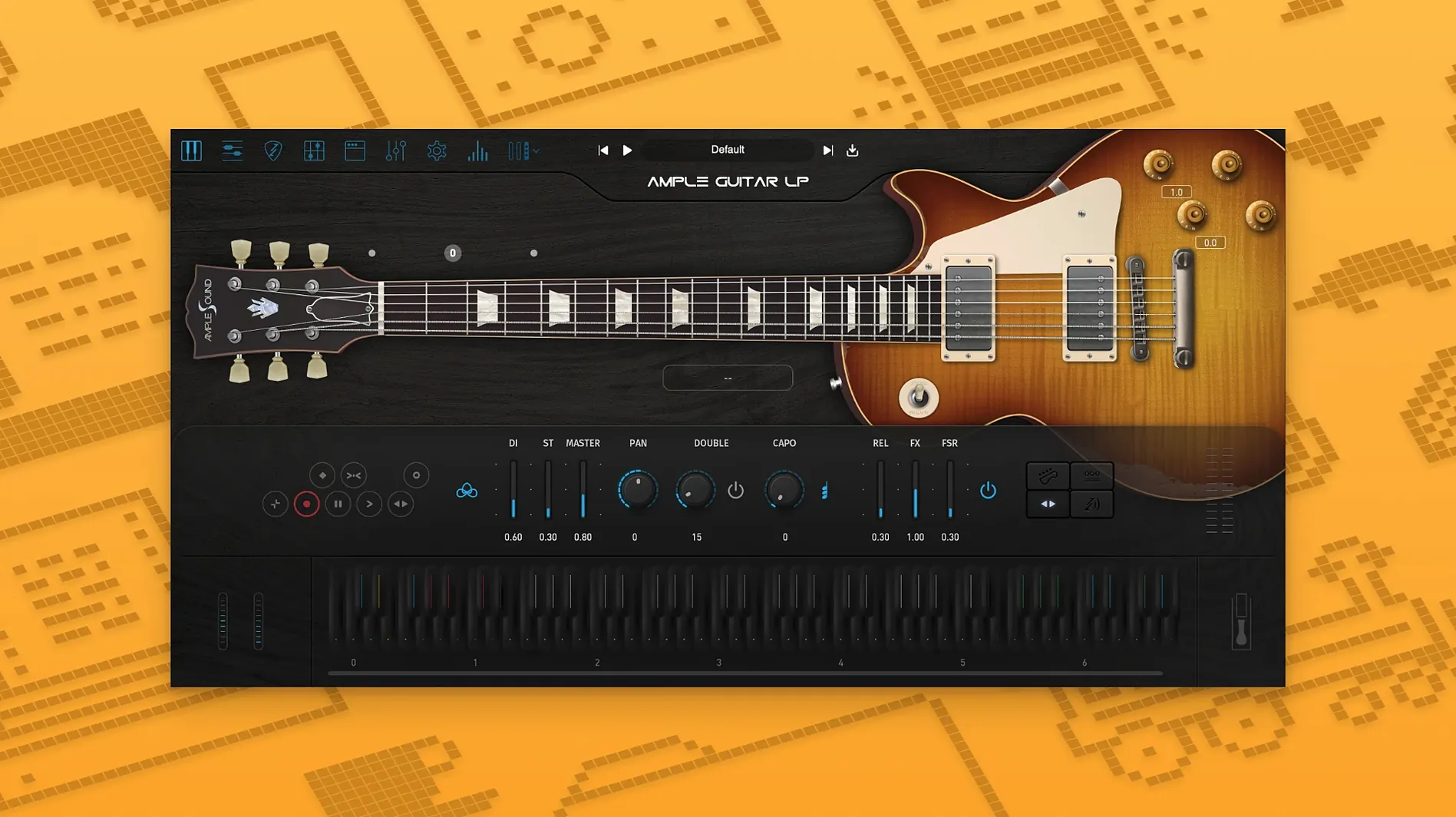
You're tracking a blues riff in Logic Pro and need that warm, punchy Les Paul tone without dragging a real amp into the bedroom. Ample Sound Ample Guitar LP III gives you a virtual electric guitar instrument plugin built around a Gibson Les Paul 1958.
- Format — VST, AU, AAX
- Works inside most Mac DAWs: Logic, Ableton Live, Cubase, Pro Tools, and others.
- System — macOS 10.13 or later, Intel and Apple Silicon
- Installs on both architectures natively; no Rosetta wrapper needed on M-series Macs.
- Tone — Les Paul 1958 with built-in amp and effects
- Covers rock, blues, and jazz parts. The included amp and effect chain means you can dial in a usable sound straight out of the plugin.
- Language — English interface
- No localisation to toggle; everything is in English.
Runs on macOS 10.13 and newer, Intel and Apple Silicon
Ample Guitar LP III runs on macOS 10.13 High Sierra and newer, covering both Intel and Apple Silicon Macs. The installer places the plugin as a standard package, so you point it at your usual VST, AU, or AAX folders and let it do its thing. No extra frameworks or background services are required — it's a straightforward instrument plugin that sits inside your DAW like any other virtual instrument.
The plugin itself is a single interface with the guitar body graphic, a control panel for articulations, and the amp/effects section. Once loaded, it responds to MIDI input immediately. The library includes the fingerstyle, picking, and string effect articulations, all accessible from the main panel. Version 4.0.1 brings the fingerstyle library recorded with a 1959 Reissue, which is the main addition over earlier versions.
Activation is handled through Ample Sound's Activation Manager. Offline activation uses a Challenge Code and User ID if your studio machine isn't connected to the internet. The installer includes instructions for both online and offline methods.
Loading the plugin in your DAW
After installation, load the plugin in your DAW and check that it appears in your instrument list. If your DAW requires a plugin rescan, do that first. Then play a few notes to confirm the sound engine is working and the library files are in the right place.
Spend some time with the articulation controls. The plugin responds differently to velocity and key switches depending on whether you're using fingerstyle or picked articulations. Try the same MIDI part with both to hear the difference. The string effects — slides, hammer-ons, pull-offs, and noises — are mapped to specific key switches or can be triggered via MIDI CC. Knowing where these are saves time later.
The built-in amp and effects are worth exploring early. You don't need to route the plugin through external amp sims unless you want a specific sound. The internal chain covers clean, crunch, and overdriven tones that work for rock, blues, and jazz. Save a few presets with different amp settings so you can switch sounds quickly during a session.
Adjusting the velocity curve for natural feel
Open the plugin's settings panel. A few adjustments make the instrument feel more natural from the start:
- Velocity curve — If the plugin feels too soft or too aggressive, adjust the velocity curve to match your keyboard or MIDI controller. This changes how the instrument responds to your playing dynamics.
- Polyphony and voice allocation — Set the maximum polyphony to a number that suits your arrangement. Lower polyphony saves CPU, higher polyphony avoids note cut-offs in dense parts.
- String noise and release samples — These are often set to a moderate level by default. If you want a cleaner sound, reduce them. If you want a more organic, played feel, increase them slightly.
- Capo position — The plugin lets you set a virtual capo. Moving it up the fretboard changes the voicing of chords and can make certain riffs easier to play on the keyboard.
- MIDI CC mapping — Assign the controls you use most (tone, volume, wah, pickup selector) to MIDI CCs from your controller. This saves mouse clicks during recording or performance.
These settings are saved per preset, so once you find a configuration that works, save it as a user preset. That way, next time you load the plugin for a rock or blues session, you're already set up.
For those working with the plugin regularly, it's worth checking the ample guitar mac torrent and ample guitar torrent resources if you need alternative access to the library files. The ample sound torrent and ample guitar crack mac searches sometimes come up in forums, though the standard installer and activation process covers most setups. The ample guitar l torrent variant is less common but occasionally appears in older discussions.
Take a few minutes to browse the factory presets that come with the plugin. They demonstrate different amp settings, articulation combinations, and microphone positions. Even if you end up building your own sounds, the presets show what the instrument can do.
- macOS 10.13 or later
- Intel or Apple Silicon processor
Kit check at a glance
| System | macOS 10.13 or later |
| Chip | Apple Silicon, Intel 64-bit |
| Download | 9.2 GB |
| Older pressings | 2 in the crate |




Chat from the booth
Sign in or grab a free account to leave a comment.
Nobody has said a word in the booth yet. If you played a set with this build, tell the next person how it went.