
- Build in the crate
- 11.0..0
- Made by the team at
- Antares
- Menu languages offered
- English
- How you pay for it
- Included
- macOS it plays on
- macOS 11 or later
- CPU it runs on
- Apple Silicon, Intel 64-bit
Screenshots
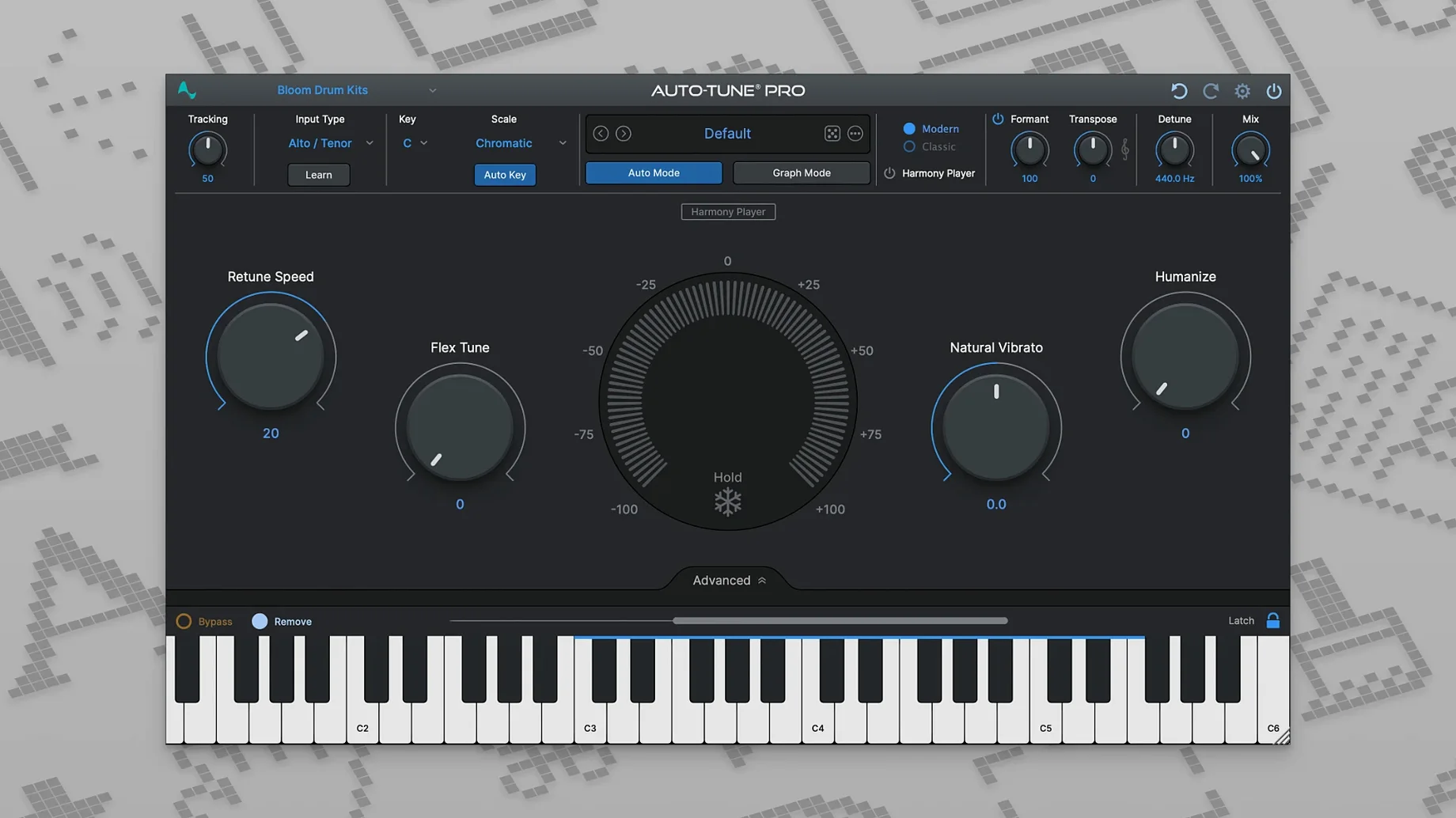
Auto-Tune Pro works in two distinct modes: Auto Mode for real-time correction on a live take, and Graph Mode for detailed manual pitch editing note by note.
Retune Speed and Humanize controls
Retune Speed — how fast the plugin pulls the pitch to the nearest target. Fast settings create the classic robotic effect; slower settings keep the performance natural.
Humanize — adds small, random pitch variations after correction so the result doesn't sound sterile.
Flex-Tune — lets notes that are already close to pitch stay where they are, bypassing correction. Useful for keeping expressive vibrato.
Graph Mode — lets you draw a custom pitch curve over the recorded audio. You see every note as a block and can move, stretch, or delete individual pitches.
Scale Editor — tells the plugin which notes to allow. Set a key and scale, and Auto-Tune only corrects to those pitches, ignoring anything outside the scale.
macOS 26 Tahoe support
The latest update brings support for macOS 26 Tahoe, which means if you are running that OS, Auto-Tune Pro still works without needing a workaround or an older macOS version. For most users on macOS 14 or higher, the behaviour of the plugin itself stays the same — the same Auto Mode and Graph Mode, the same Retune Speed and Flex-Tune controls. The practical change is that you can upgrade your Mac without worrying about compatibility. That matters for anyone who updates macOS as soon as a new version drops, especially live performers who rely on a stable rig.
Version 11.6 also continues the trend of full Apple Silicon support. Both ARM and x86 64-bit architectures are covered, so the plugin runs natively on an M-series Mac or an Intel Mac without Rosetta translation. In everyday use that means the plugin loads in your DAW alongside your other native plugins with no extra steps.
Graph Mode with ARA2 in Logic Pro
Auto-Tune Pro fits three types of workflows especially well.
Vocal producers working in Logic Pro, Studio One, or Cubase/Nuendo. The ARA2 integration means Graph Mode can read the audio directly from the timeline. You don't export or bounce tracks first. You open the plugin, see the pitch blocks, and edit. That saves time when you are comping a vocal take and need to tune a few notes without leaving the arrangement.
Recording engineers tracking singers in real time. Auto Mode with a slow Retune Speed and Flex-Tune on keeps the vocal sounding natural while catching the occasional off-pitch note. The singer hears a corrected version in their headphones, which can speed up the session. You don't have to go back and fix everything later.
Live performers running a Mac on stage. The real-time correction works with low latency in a live setup. You set the key and scale in the Scale Editor, enable Auto Mode, and the plugin handles the rest. The macOS 26 Tahoe support confirms that Antares is keeping up with the OS cycle, which matters if you tour with a MacBook that runs the latest system.
Melodyne 5 manual editing alternative
There are a few alternatives for pitch correction on macOS. Here is how Auto-Tune Pro sits next to them.
Celemony Melodyne 5. Melodyne is built around manual editing. You see every note as a blob on a timeline and can change pitch, timing, formant, and even individual notes within a chord. It does not have a real-time auto mode like Auto-Tune Pro. If you want the instant T-Pain effect or a live correction chain, Melodyne is not the tool for that. But for detailed note-by-note surgery on a vocal, Melodyne offers more control over timing and polyphonic audio. Auto-Tune Pro's Graph Mode is simpler and faster for monophonic vocal tuning, while Melodyne is better when you need to edit a complex performance note by note.
Waves Tune Real-Time. This is a simpler, cheaper alternative that focuses on real-time correction only. It has no graph mode and no manual editing. You set a key and a correction speed, and it does its thing. For live use or quick tracking, it works well. But if you need to go back and fix a specific phrase later, you have to retrack or use a different tool. Auto-Tune Pro gives you both real-time and manual modes in one plugin, which makes it more flexible for a full production workflow.
iZotope Nectar 4. Nectar is a vocal production suite — pitch correction is one module among many (EQ, compression, de-essing, reverb, and so on). Its pitch module works in real time and has a manual mode, but it is not as detailed as Auto-Tune Pro's Graph Mode. Nectar is good if you want an all-in-one channel strip for vocals and you only need basic tuning. Auto-Tune Pro is better if pitch correction is the main job and you want the industry-standard sound and controls.
- macOS 11 or later
- Intel or Apple Silicon processor
- Interface language: English
Kit check at a glance
| System | macOS 11 or later |
| Chip | Apple Silicon, Intel 64-bit |
| Download | 178 MB |





Chat from the booth
Sign in or grab a free account to leave a comment.
Nobody has said a word in the booth yet. If you played a set with this build, tell the next person how it went.