
- Build in the crate
- 1.6.12
- Made by the team at
- lo.cafe
- Menu languages offered
- Russian, English, German, Arabic, Afrikaans, Hungarian, Vietnamese, Greek, Danish, Hebrew, Spanish, Italian, Catalan, Chinese (Traditional), Chinese (Simplified), Korean, Dutch, Norwegian, Polish, Portuguese, Romanian, Serbian, Turkish, Ukrainian, Finnish, French, Hindi, Czech, Swedish, Japanese
- How you pay for it
- Included
- macOS it plays on
- macOS 14 or later
- CPU it runs on
- Apple Silicon, Intel 64-bit
Screenshots
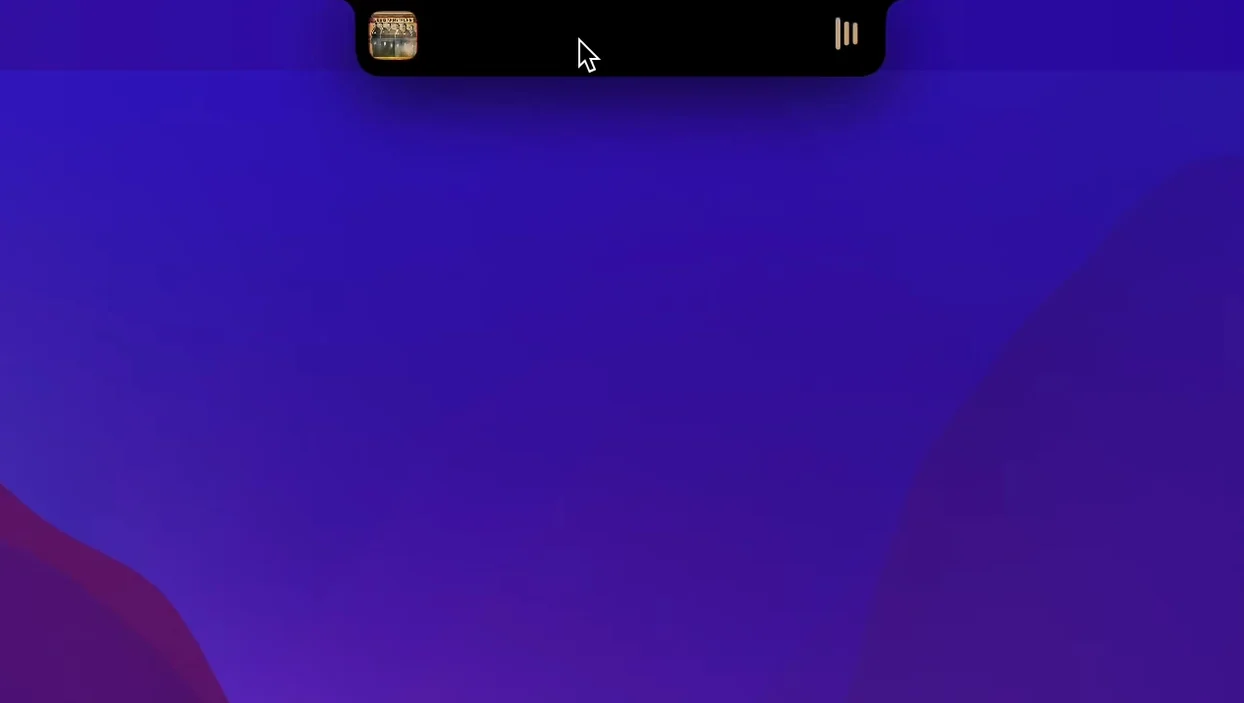
Live Activities on the notch — that's the idea behind NotchNook. It turns that dead space at the top of your screen into something useful.
What does NotchNook do exactly?
It extends the notch area with widgets and media controls. You get notifications there too, so the notch becomes an interactive element rather than just a camera housing.
Does it work like Live Activities?
Pretty much. It gives you similar functionality to Live Activities, but right on the MacBook notch. Music controls sit there, so you can skip tracks or pause without leaving your current app.
Walk through a typical session
You're working on a project in your DAW, headphones on. A track comes on that you want to skip. Instead of switching to Music or Spotify, you glance at the notch. There's the track title, a play/pause button, and skip controls. One click and you're back to your arrangement without missing a beat.
Later, you need to check what's coming up this week. A quick look at the notch shows a small calendar widget. No need to open Calendar or check your phone. The date and your next event are right there.
While exporting a mix, you drag a reference file to the notch area. The file shelf holds it. You keep working, and when you need that file again, it's waiting at the top of the screen. No digging through Finder tabs.
Notifications arrive quietly. Instead of a banner that blocks your workflow, they show up in the notch area. You can glance at them or dismiss them without switching context. The whole thing feels like the notch finally earns its keep.
music producers and DJs benefit most
NotchNook suits different Mac users, but some benefit more than others.
- Music producers and DJs — if you work in Ableton, Logic or any DAW, you frequently control playback. Having music controls in the notch means you never leave your arrangement window. The file shelf also helps when you're pulling samples or reference tracks.
- Writers and editors — when you're deep in a document or a script, switching apps breaks your flow. Calendar, music and notifications in the notch keep you in your writing environment.
- Developers — terminal sessions or code editors don't play well with interruptions. NotchNook lets you monitor notifications and control media without leaving your IDE.
- Anyone with a smaller screen — MacBook Air and 13-inch Pro users have less real estate. Using the notch for controls frees up space in the menu bar and dock.
runs on Apple silicon and Intel
NotchNook requires macOS 14.6 or later. It runs on both Apple silicon and Intel Macs with x86 64-bit processors, so compatibility is wide among recent MacBooks.
The app is localised in over twenty languages, including English, Russian, German, Arabic, Spanish, French, Japanese, Chinese and many more. If your system language is one of those, the interface should feel native.
Installation is standard: open the disk image, drag the app to Applications, then launch from Launchpad. No extra setup steps beyond that.
skipping permissions leaves features inactive
A few common slip-ups come up when people first use NotchNook.
- Not allowing permissions — like many macOS utilities, NotchNook needs accessibility or notification access to work fully. Skipping the permissions dialog means some features stay inactive. Check System Settings if something isn't showing.
- Expecting it on non-notch Macs — the app is designed for MacBooks with a notch. If you're on an older Mac or an external display without a notch, the behaviour will be different or limited.
- Ignoring the file shelf — some users only use the media controls and forget the shelf exists. Dragging a file to the notch area is the trick. Once you use it, you'll wonder why you didn't before.
- Overloading the area — if you enable every widget and notification at once, the notch area gets crowded. Start with music and one or two widgets, then add more as you get used to the layout.
- Forgetting to update — the current version is 1.6.2 fix. Running an older build might miss features or fixes. Keep an eye on the developer's updates.
NotchNook needs macOS 14.6 or later. It supports both ARM and x86 64-bit architectures, so Apple silicon and Intel Macs both work.
- macOS 14.6 or later
- Apple silicon or Intel (x86 64-bit)
Kit check at a glance
| System | macOS 14 or later |
| Chip | Apple Silicon, Intel 64-bit |
| Download | 41 MB |
| Older pressings | 2 in the crate |


Chat from the booth
Sign in or grab a free account to leave a comment.
Nobody has said a word in the booth yet. If you played a set with this build, tell the next person how it went.