
- Build in the crate
- 1.6.4
- Made by the team at
- Marcin Krzyzanowski
- Menu languages offered
- English
- How you pay for it
- Included
- macOS it plays on
- macOS 15 or later
- CPU it runs on
- Apple Silicon, Intel 64-bit
Screenshots
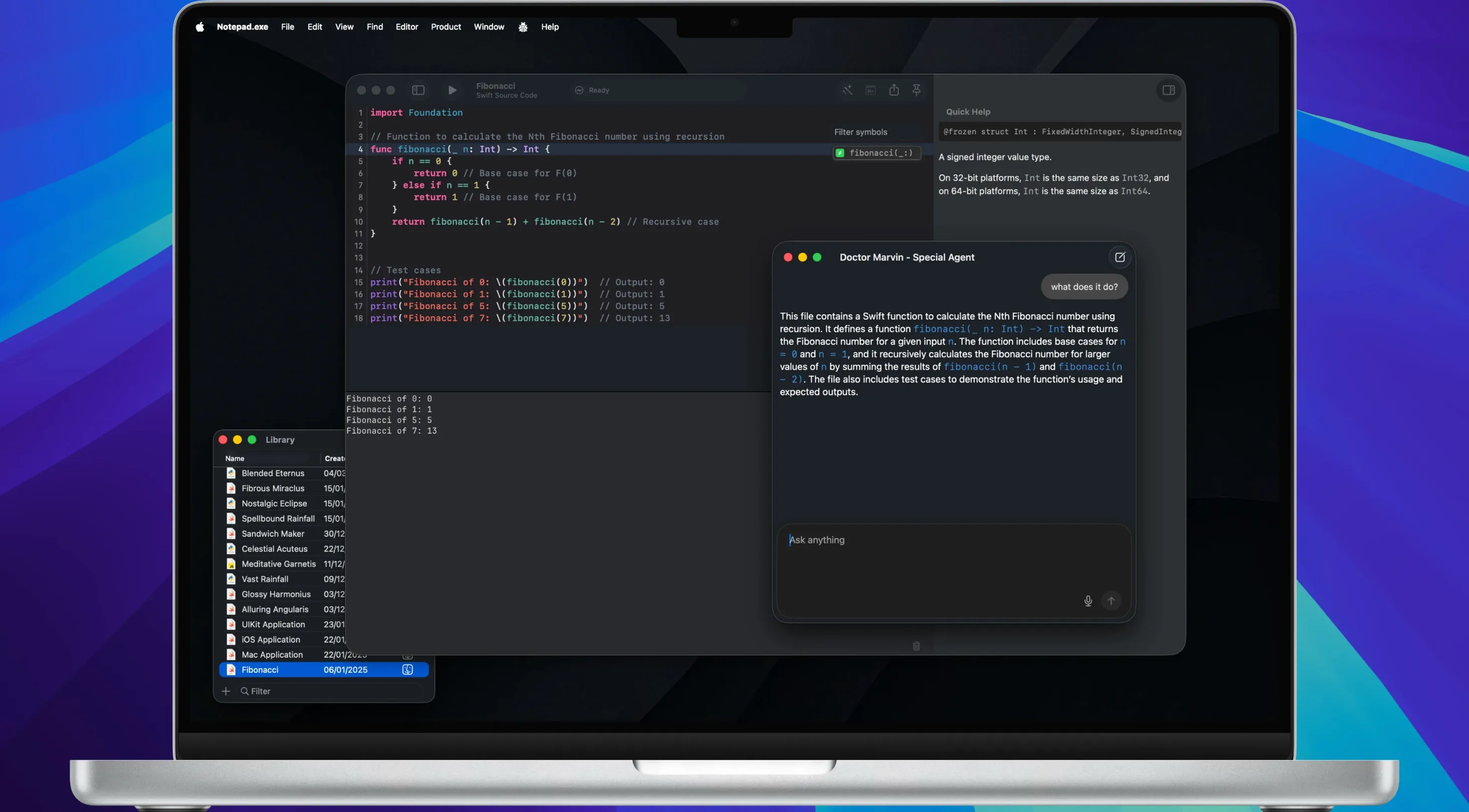
Notepad.exe (version 1.6.4) runs code in Swift, Python, and JavaScript without waiting for indexing or setting up configuration files. It's the small editor positioned between Notepad and Xcode — a practical tool for quick scripts, prototypes, or learning a language.
Run code immediately, no setup required
Open the app, write a few lines of Swift, Python, or JavaScript, and hit run. There's no project file, no build settings, no indexing delay. The editor uses the system's default interpreters for each language, but you can point it to a custom interpreter if you prefer. For Swift projects, it integrates with Swift Package Manager, so dependencies and build targets work without extra configuration. Build flags are supported when you need them. Go and Rust are also supported, though they're less common in this kind of quick-editing workflow.
Try the AI assistant without sending code anywhere
The built-in AI assistant can suggest completions, refactor your code, or explain what a block does. Everything stays on your Mac — no data leaves the machine. It's useful when you're stuck on a pattern or want to understand a library call without switching to a browser. Between the instant run cycle and the local AI, Notepad.exe covers the middle ground between a plain text editor and a full IDE.
Build a prototype from scratch in minutes
Start by opening Notepad.exe and writing a short SwiftUI view — a button that changes colour when tapped, for instance. Press ⌘R to run it directly in the iOS Simulator without creating an Xcode project or a workspace. Spot a typo or want to adjust the layout? Edit the code and run again. The cycle is fast enough that you can iterate through five or six variations in the time it would take Xcode to index a new project. Once the prototype looks right, export it as a ready .app for personal testing. No build scripts, no configuration files, no waiting.
Swift and Python coders with small experiments
Swift developers working on small UI experiments or library snippets will appreciate how little friction there is between an idea and a running app. Python scripters who want a lightweight editor with an integrated run button — something between a terminal and a full IDE — will find it fits their daily note-taking and quick-testing habits. JavaScript developers who write short functions or test API responses without spinning up a Node project also benefit. Essentially, anyone who reaches for a code scratchpad more often than a full project setup will find Notepad.exe useful. It's the notepad.exe mac full version that actually runs code, not just displays it.
Turn a script into a sharable snippet
You have a Python function that works — a quick data transformation or a file renamer. Instead of copy-pasting it into an email or Slack, use Notepad.exe to share it as an image with syntax highlighting. Write or paste the code, adjust the look if needed, and export the result. The recipient sees clean, coloured code without needing their own editor open. It’s a small feature, but it saves explaining formatting every time.
Who gets the most out of this editor
If you teach or mentor other developers, the combination of instant run and image export makes Notepad.exe a good companion. You can demo a Swift or Python concept live, then send the final snippet as an image for reference. The same applies to anyone who maintains a personal notes library of scripts: the Notes Library organises them alongside plain text, so you always have your working code and your reasoning in one place. Designers who prototype SwiftUI screens without wanting to open a full Xcode project will also appreciate the iOS Simulator integration. Notepad.exe is a simple text editor for Windows, ideal for writing quick notes or plain code.
- macOS 15
- Intel or Apple Silicon Mac
Kit check at a glance
| System | macOS 15 or later |
| Chip | Apple Silicon, Intel 64-bit |
| Download | 180 MB |







Chat from the booth
Sign in or grab a free account to leave a comment.
Nobody has said a word in the booth yet. If you played a set with this build, tell the next person how it went.