
- Build in the crate
- 1.15.6
- Made by the team at
- Blace Plugins
- Menu languages offered
- English
- How you pay for it
- K'ed by Monter Group
Screenshots
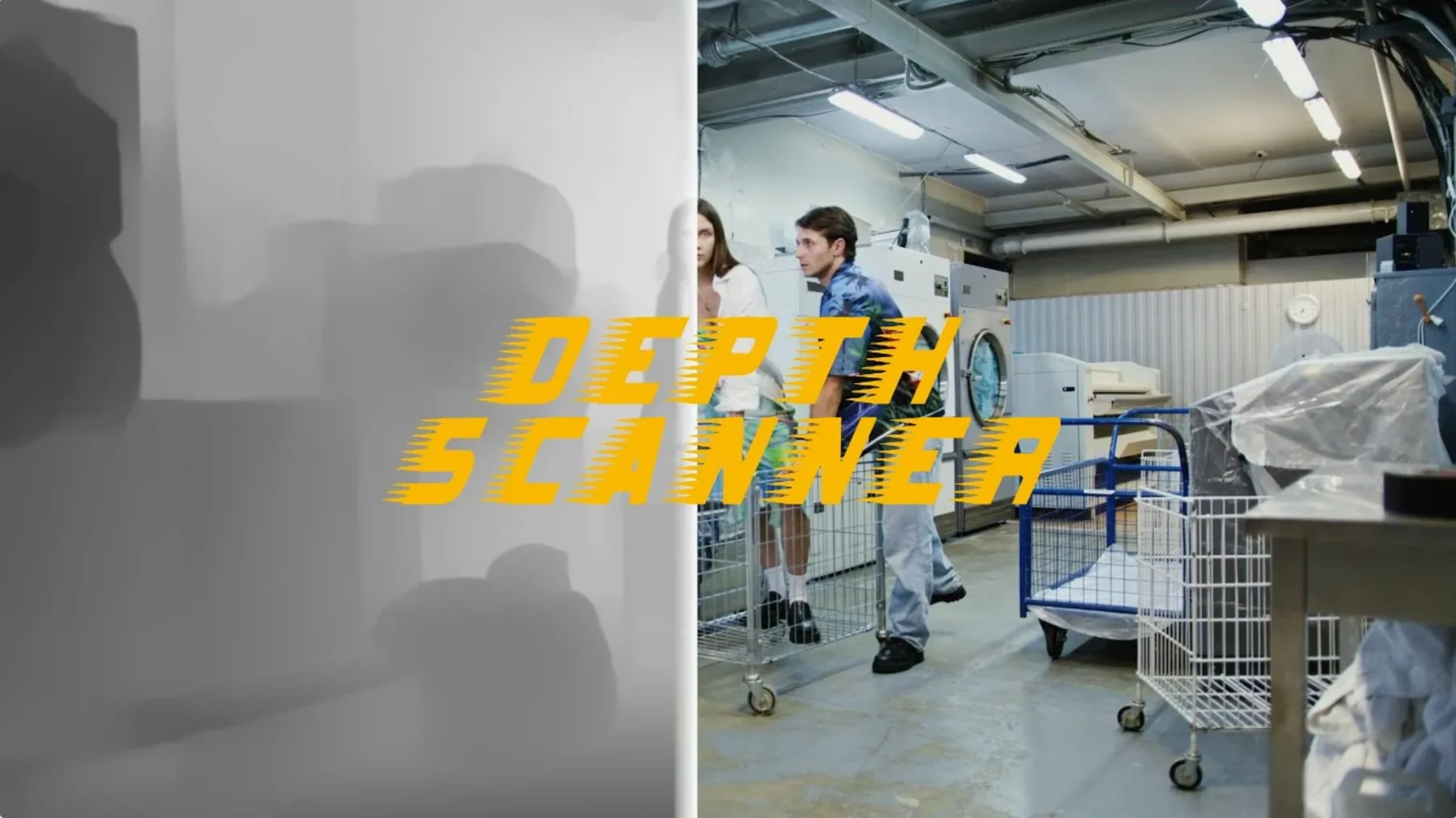
Depth Scanner is an Adobe After Effects plugin that generates depth maps from video clips and photographs.
Create depth-of-field effects
It analyses each frame to find the parts closest to the camera. You can use that depth map to blur the background while keeping the foreground sharp, just like a real camera lens.
Add 3D parallax motion
Map the depth data to displacement, and you get a convincing 3D parallax effect from a flat photo or clip. Move the camera in After Effects and the foreground shifts more than the background.
Build depth-based transitions
Use the depth map as a matte or a luminance mask to create transitions that follow the scene's depth. Objects closer to the camera can fade or wipe before the background does.
Estimates depth without a greenscreen or stereo camera
Other After Effects plugins can fake depth or generate masks from colour, but they work differently. Depth Scanner uses AI to estimate depth from the image itself, so you don't need a greenscreen, a stereo camera or manual painting of zones. A plugin like Boris FX's Depth of Field applies blur based on layer distances you define yourself — it's manual. Something like RSMB handles motion blur, not depth. And while After Effects' own Camera Lens Blur can use an alpha channel, you still have to build that channel by hand or with an external tool. Depth Scanner gives you the map automatically, which saves time on anything with real scenery or footage shot with a single lens.
VFX artists matching shallow depth-of-field on composites
If you do compositing or VFX on Mac, this plugin fits a few specific workflows:
- VFX artists who need to match shallow depth-of-field on green-screen composites. A depth map lets you blur the background in a way that stays consistent with the camera movement, instead of a uniform blur that looks fake.
- Motion designers turning still photos into animated scenes. The 3D parallax effect is the main use here — adding that to a product shot or a landscape can make a short animation without rebuilding the scene in 3D software.
- Editors working on music videos or short films who want depth-based transitions. Instead of cutting on a hard line, you can let the depth map guide the transition so it feels more natural.
- Anyone who does not want to paint masks for every shot. If you are working with dozens of clips, the automatic generation is the difference between finishing in a day or a week.
Runs as an After Effects plugin with English interface
Depth Scanner is a plugin, not a standalone app, so it runs inside After Effects. You need After Effects installed and working first. The plugin's interface is in English, and the build is from Blace Plugins. Version 1.15.6 is the current release. The activation is handled by the Monter Group release, so it follows the standard After Effects plugin install procedure — copy the file into the right plugin folder and restart After Effects. Once loaded, it adds a new effect or panel (depending on the version) that you apply to a layer. There is no separate background process or system tray icon. It runs on the same architecture as your After Effects installation, so whether you are on Intel or Apple Silicon, it works as long as After Effects does. No extra drivers or runtimes are needed beyond what After Effects already uses.
Two versions available: original and updated model
The documentation lists Depth Scanner alongside Depth Scanner 2, which means Blace Plugins has two versions of the same idea. The second version likely adds features or improves the AI model, but the first version still does the core job. That is useful if you want the simpler tool without extra options you might not need. The plugin works on both video clips and still photographs, so you are not limited to one format — drop in a JPEG, a PNG sequence or a ProRes clip and it treats them the same. Because it generates the depth map per frame, you can apply it to footage with movement and the map updates as the scene changes. That is not obvious from the description, but it makes a difference if you have a shot where someone walks closer to the camera. The depth map adjusts, and your blur or parallax follows correctly.
- macOS version not specified by the developer.
- Architecture not specified by the developer.
Kit check at a glance
| Download | 2 MB |
| Older pressings | 1 in the crate |





Chat from the booth
Sign in or grab a free account to leave a comment.
Nobody has said a word in the booth yet. If you played a set with this build, tell the next person how it went.