

- Build in the crate
- 2.3.1
- Made by the team at
- AIR Music Technology
- Menu languages offered
- English
- How you pay for it
- k'ed by GUISEPPE
- macOS it plays on
- macOS 13 or later
- CPU it runs on
- Apple Silicon
Screenshots
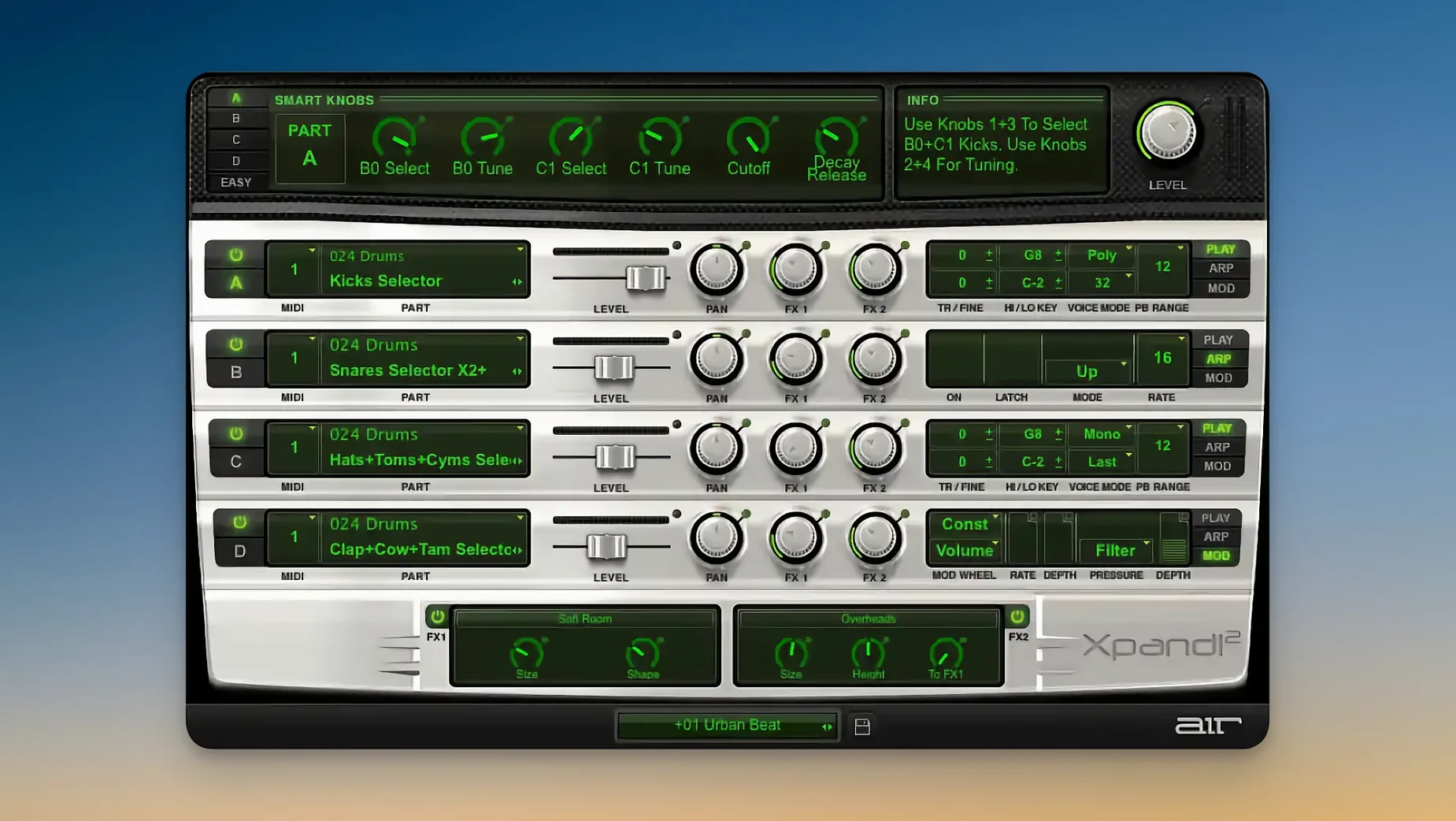
Xpand!2 is a multitimbral virtual instrument that packs four active sound slots into every patch, so one instance can carry a whole arrangement idea without eating up your track count.
In a session, that makes it a natural fit for sketching. Drop it on a single MIDI track, split the keyboard across the four parts, and you get a layered piano, a bass on the left hand and a pad on top — all from one plugin window. The interface scales nicely and handles Retina displays, which helps when you've got it open alongside your arrange page for long stretches.
Each part can run polyphonic (up to 64 voices) or switch to monophonic with First, Last, Highest or Lowest priority. That's handy for bass lines or lead synths where you want a clean single note response, and you can set different parts differently within the same patch.
For mixing, you can route the four parts to separate outputs and treat them like individual channels on a bus, applying your own EQ and compression. With 50 effects built in — reverb, delay, chorus and the wild Chaos Delay among them — it's also a quick way to get a finished sound without reaching for extra inserts.
Real-world scenario: live keys and backing
I know a keyboardist who plays weekend covers at a small club in Valencia. He runs Xpand!2 on a MacBook Air M2, with a single instance on one MIDI track. His left hand gets a simple synth bass (monophonic, Lowest priority so the lowest note always wins), his right hand gets a layered electric piano and a warm pad. The fourth slot holds a string swell triggered by a footswitch on a separate MIDI channel. One plugin, one track, and he's covering bass, keys, pad and strings without juggling four separate instruments. Between songs he adjusts the mix of the four parts from the smart controls — no mouse needed once the set starts.
Workflow: building a sketch in ten minutes
Start with an empty project and a single MIDI track. Load Xpand!2 and pick a patch from the 29 categories — something like "Cinematic Pad" for slot A. Set slot B to a plucked synth and assign it to MIDI channel 2. Set slot C to a bass patch, monophonic, First priority, on channel 3. Slot D can stay empty or hold a percussion loop if you want a rhythm guide.
Record your pad part on channel 1, then overdub the plucked part on channel 2. Tweak each slot's arpeggiator to add movement — the pluck can run a simple up pattern while the pad holds chords. Use slot C for a bass line that follows the chord roots. Once the sketch feels right, route each slot to a separate output in your DAW, then treat them with your own EQ and compression. You've got a full arrangement block from one instance.
Browse by category first
- Browse by category first. The 2,500 presets are split into 29 groups. Start with "Keys", "Pads" or "Bass" to get a feel for what Xpand!2 does before diving into the weirder ones.
- Map the smart controls. Each patch has six knobs that change the sound. Assign them to your MIDI controller's faders or knobs early — they let you shape the preset without opening the window.
- Learn the MIDI Learn. Right-click any parameter, move a hardware knob, and it's mapped. Do this for the arpeggiator on/off and the effect send levels. Saves time during a session.
- Try monophonic on leads. Switch a lead slot to monophonic with Highest priority. It stops overlapping notes and keeps the line clean. Good for solos and bass parts alike.
- Use Chaos Delay once. It's one of the 50 effects and it does exactly what the name says. Put it on a pad slot and automate the feedback — instant texture that evolves.
- macOS 13 or later
- Apple Silicon
- English interface
Kit check at a glance
| System | macOS 13 or later |
| Chip | Apple Silicon |
| Download | 1.2 GB |





Chat from the booth
Sign in or grab a free account to leave a comment.
Nobody has said a word in the booth yet. If you played a set with this build, tell the next person how it went.