
- Build in the crate
- 1.0.4
- Made by the team at
- Session Loops
- Menu languages offered
- English
- How you pay for it
- K'ed by TEAM HCiSO
- macOS it plays on
- macOS 10.15 or later
- CPU it runs on
- Apple Silicon, Intel 64-bit
Screenshots
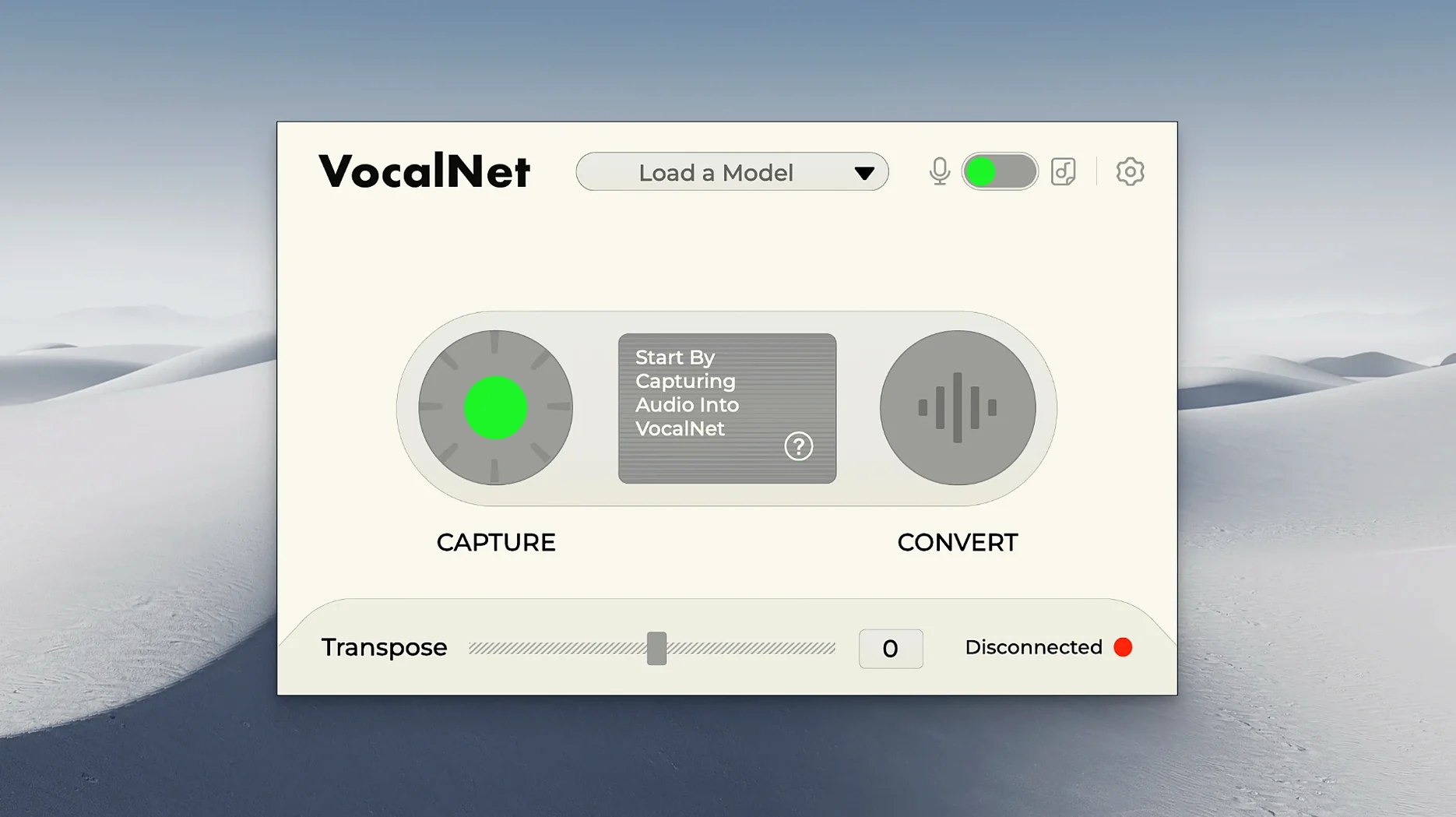
The blend slider is where VocalNet starts to make sense. You move it between two voice samples and the plugin crossfades the character of the sound in real time. That is the core trick — no layering, no extra tracks, just one plugin on a vocal channel doing the work.
Drop it on a vocal track or route it to a bus
On a vocal track — process a lead or backing vocal directly. Raise or lower the voice, add a different timbre, or turn a single take into a hybrid character without recording another performer.
On a bus — route several harmony parts or spoken-word clips through one instance.
For sound design — feed it a voice, move the blend while the track plays, and write automation. The morph happens in real time, so you get movement without cutting or comping.
Plugin formats and performance
The Mac installer gives you VST3, AU, and AAX. It runs on Apple Silicon and Intel 64-bit systems under macOS 10.15 or later. All processing stays local — the recordings never leave your computer.
Why two similar voice samples produce no change
The blend slider is simple, but that simplicity can trick you. A lot of first-time users load two very similar voice samples and wonder why nothing changes. The crossfade needs contrast — try a bright, breathy sample against a dark, chesty one. The morph becomes obvious, and you can dial it back to where it sounds natural.
Another mistake is moving the blend slider while recording without checking the output level. Two samples at different volumes create a jump when you crossfade. Normalise your samples first, or at least match their gain before you start automating. A quick vocal take can get lost if the blend swings into a quieter sample mid-phrase.
Beginners also forget that VocalNet works on spoken word, not just sung vocals. If you are testing it for the first time, record a simple spoken sentence and play with the blend. You hear the transformation clearly because there is no melody masking it. That helps you understand how each sample changes the character before you commit to a full vocal performance.
One more thing — loading too many samples into a single instance. The plugin keeps them in memory, so a long list of voice samples can slow down the project. Two or three is plenty for most sessions. Swap them out as you go rather than stacking ten from the start.
Works with existing vocal takes in real time
Will VocalNet work with my existing vocal takes? Yes. Drop it on the track, load a voice sample, and the transformation happens in real time. You do not need to re-record or export the audio first. The plugin processes whatever is on the track, whether it is a raw take or a processed one.
Does it add latency? VocalNet processes locally on your computer, so it introduces some processing overhead. How much depends on your system and the buffer size in your DAW. A lower buffer setting might cause crackles if you run many instances, so start with a moderate buffer and raise it if needed.
Can I use it live? Yes. It runs in real time, so you can sing or speak through it while monitoring the result. Use a low-latency buffer and disable any other heavy plugins on the same channel for the cleanest monitoring experience.
Do I need to own Session Loops products already? No. VocalNet works on its own. It does not require any other Session Loops software or samples. The voice samples you load can come from anywhere — a recording you made, a royalty-free sample pack, or a friend's voice note.
Move the blend slider slowly through a looped track
Start with one vocal track and one voice sample. Spend twenty minutes moving the blend slider slowly from one end to the other while the track loops. Hear how the character shifts, where it sounds natural, and where it sounds synthetic. That listening session teaches you more than any tutorial.
Save your favourite blend positions as presets if your DAW supports plugin presets. VocalNet itself does not include a preset manager, but your DAW can save the whole plugin state. Name the presets after the character they give — "airy", "dark", "robot" — so you can recall them quickly in future sessions.
Try the plugin on a backing vocal before the lead. Backing vocals are often buried in the mix, so small changes in timbre are less noticeable. You learn how the blend slider behaves in context without risking the main performance.
Use VocalNet on a drum bus or a synth pad for unexpected results. It is built for voice, but a snare hit or a synth stab run through the blend can give you unique textures. No rules say you have to keep it on vocals.
Keep your voice samples organised from day one. Name them clearly — "female breathy", "male chest", "whispered low" — and store them in a folder inside your project. VocalNet loads samples from disk, so a neat folder saves time when you are in the middle of a session.
- macOS 10.15 or later
- Apple Silicon or Intel 64-bit
Kit check at a glance
| System | macOS 10.15 or later |
| Chip | Apple Silicon, Intel 64-bit |
| Download | 669 MB |






Chat from the booth
Sign in or grab a free account to leave a comment.
Nobody has said a word in the booth yet. If you played a set with this build, tell the next person how it went.