

- Build in the crate
- 1.8.10-2026.09.04-Complete
- Made by the team at
- XLN Audio
- Menu languages offered
- English
- How you pay for it
- K'ed by TEAM HCiSO
- macOS it plays on
- macOS 10.13 or later
- CPU it runs on
- Apple Silicon, Intel 64-bit
Screenshots
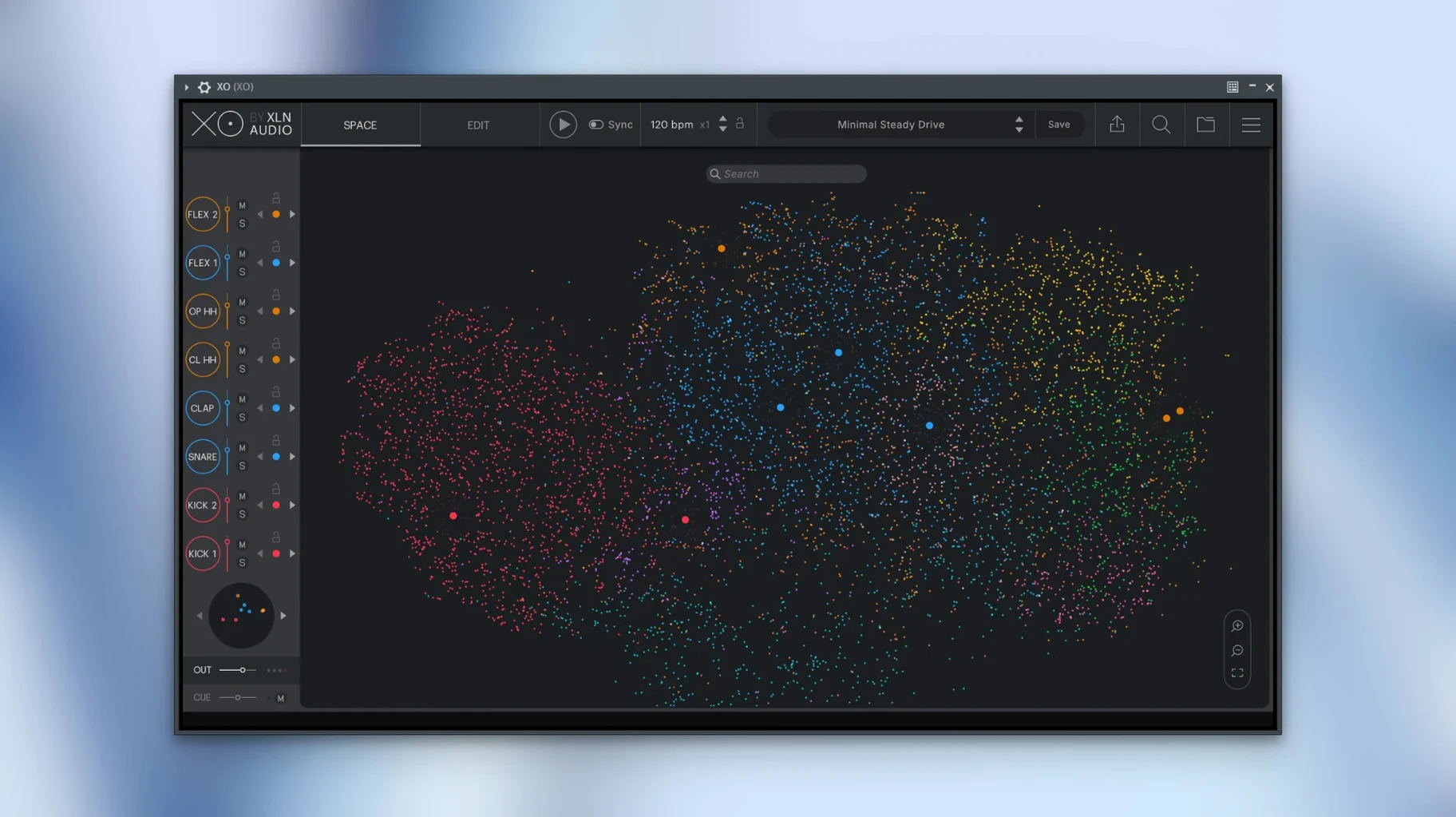
XO 1.8.10-2026.09.04-Complete brings over 8,700 one-shot samples and 240 editable beat presets into a single plugin that works as a standalone app too.
What the main controls do
Similarity sort — XO arranges your drum samples on a map by how they sound, so close snares sit together and you can spot the right one without scrolling through folders.
Hot Swap — swap any sample in your pattern with another from the map, and the beat keeps playing. Good for trying alternatives quickly.
Built-in sequencer — lay down patterns directly in XO, then drag the MIDI out to your host with mute lanes intact (a fix in this version).
Accentuator — adds velocity and timing variations to humanise the groove.
Groove Templates — apply classic feels to your sequence, then tweak the amount to taste.
Runs as both a standalone app and plugin
Does XO work as a standalone app or only inside a DAW?
Both. XO runs as a plugin in VST, AU and AAX hosts, but also opens on its own as a standalone instrument. That means you can browse samples, build patterns and export them without launching Logic or Ableton if you prefer.
Will it run on my older Mac?
The requirement is macOS 10.13 or later, and the build works on both Intel and Apple Silicon. If your system is High Sierra or newer, it should be fine. No need to worry about Rosetta either — the architecture support is there.
How does it handle my own samples?
XO sorts whatever you drop in by similarity. The 8,700+ included samples are a starting point, but you can add your own one-shots and they appear on the same map, mixed in with the factory content. The similarity sort still works on your own sounds.
Can I export just audio, or only MIDI?
Both. You can drag MIDI patterns to your DAW, and the current version fixed audio export while playing in the host — so that workflow is reliable now. Muted lanes also export correctly in MIDI after the 1.8.10 fix.
Building a beat from scratch in XO Space
Open XO as a standalone app. The XO Space shows you all the one-shot samples arranged by similarity. Start with a kick — hover over the cluster of low sounds and click one that feels right. It loads into the sequencer on the first pad.
Now pick a snare. The map groups snares and claps together, so move your cursor to that area. Hot Swap is useful here: if the first snare doesn't sit well with the kick, click another from the map while the pattern plays and you hear the swap instantly.
Add hi-hats the same way. The built-in sequencer lets you draw a basic eight-bar pattern. Once you have a loop going, open the Accentuator to add slight velocity changes — it stops the hats from sounding mechanical. Then pick a Groove Template, maybe a half-shuffle, and dial the amount until the kick pushes a little more.
When the pattern feels right, export the MIDI to your DAW. The mute lanes are preserved, so any pads you silenced stay silent. If you want audio instead, export while the host is playing — that was fixed in 1.8.10.
Playground mode and Hot Swap features
- Playground mode — a less structured view where you can trigger samples freely, almost like a performance pad. Useful for sketching ideas without committing to a grid.
- Hot Swap keeps the velocity and timing of the original sample. Swap a quiet rimshot for a loud one and the pattern doesn't lose its dynamics.
- Groove Templates apply to the whole pattern, not per sound. That keeps the feel consistent across kick, snare and hats.
- The Accentuator works on top of your existing sequence. You don't have to draw every velocity change manually.
- The standalone mode remembers your last session layout. Open it again and the same samples are on the map, the same pattern is in the sequencer.
For anyone searching: xo torrent, xln audio xo torrent, xln audio xo crack, xln audio xo crack mac, xln audio xo free download — these terms sometimes come up, but the version here is 1.8.10-2026.09.04-Complete, ready to run.
All of this runs on macOS 10.13 or later, Intel or Apple Silicon, in English.
- Fixed MIDI export with muted lanes.
- Other minor fixes.
- macOS 10.13 or later
- Intel or Apple Silicon
- Interface language: English
Kit check at a glance
| System | macOS 10.13 or later |
| Chip | Apple Silicon, Intel 64-bit |
| Download | 2.3 GB |
| Older pressings | 7 in the crate |





Chat from the booth
Sign in or grab a free account to leave a comment.
Nobody has said a word in the booth yet. If you played a set with this build, tell the next person how it went.