
- Build in the crate
- 5.4.2.006
- Made by the team at
- Celemony
- Menu languages offered
- English
- How you pay for it
- K'ed by MORiA
- macOS it plays on
- macOS 10.12 or later
- CPU it runs on
- Apple Silicon, Intel 64-bit
Screenshots
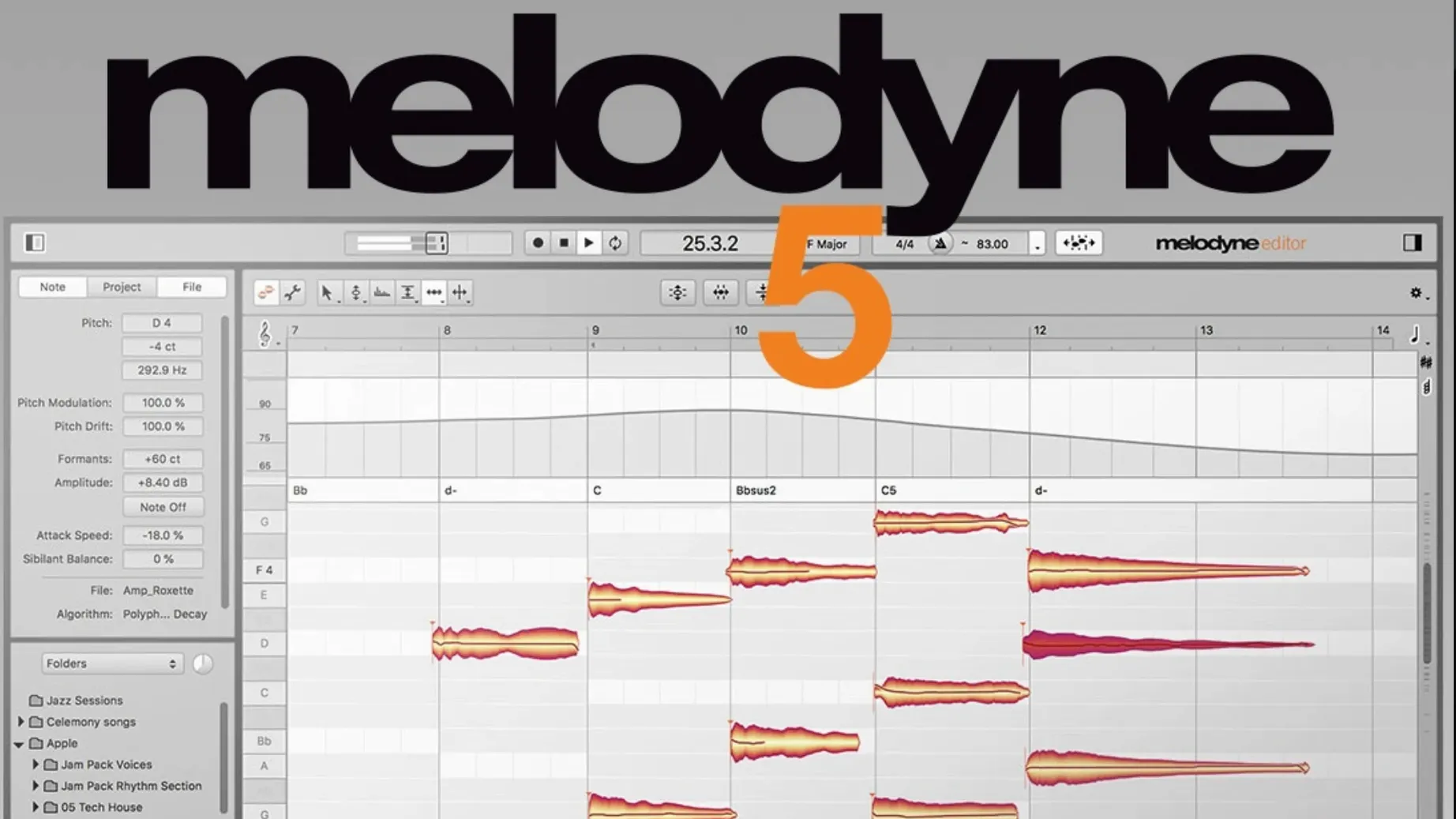
Over 20 years ago, Melodyne showed the world you could edit audio note by note, like editing MIDI. Version 5.4.2 keeps that DNA while adding optimisations, bug fixes and full macOS Sequoia support.
What stays, what’s new
- Native Apple Silicon performance – no Rosetta slowdown
- ARA mode for direct DAW integration
- Note-level editing of pitch, timing, volume, vibrato, sibilants, formants and length
- Chord, key and tempo detection built in
- 5.4.2 fixes a crash when opening Melodyne in certain ARA and plug-in scenarios
- Improved trackpad scrolling
Still the same approach
Melodyne analyses audio and lets you grab individual notes. Drag a vocal syllable to the right pitch, reshape a vibrato tail or tighten a snare hit. It works on vocals, samples, and any monophonic recording. The interface stays English-only, and the minimum macOS is still 10.12. For anyone who needs precise note-by-note control, this version refines the foundation without reinventing it.
First days with Melodyne 5.4.2
After you run the installer and mount the disk image, a few settings make the first sessions smoother. Nothing here is mandatory, but these are the things I wish someone had pointed out on day one.
Audio preferences first
Open Melodyne's preferences before you load any audio. Set your audio device and sample rate to match your project. If you work inside a DAW via ARA, the host handles most of this, but for standalone use, getting the buffer size right early saves you from crackling or latency later.
Turn on note assignment mode
When you first analyse a vocal track, Melodyne guesses the pitch of each note. Sometimes it splits a held note into two or merges two separate syllables. You can adjust this in the note assignment settings. I tend to set it to "eager" for fast material like rap vocals and "conservative" for sustained melodic lines. Try both and see which gives fewer edits.
Learn the Fade Tool early
Version 5.4.2 keeps the Fade Tool, which lets you shape note attacks and releases. Instead of reaching for a separate volume automation lane, you can fade a note's start or end directly on the note blob. It takes a couple of tries to get used to the gesture, but once you do, it speeds up vocal comping noticeably.
Check the Leveling Macro
The Leveling Macro evens out volume differences between notes. Drag it gently at first — too much and the performance loses its dynamics. I use it on backing vocals where I want consistency but still keep some natural variation.
Settings worth changing right away
Melodyne's defaults work fine, but a few tweaks align it better with how most people actually edit.
- Grid snap behaviour – Turn grid snap off when you're tuning pitch. Snap gets in the way of small corrections. Turn it back on when you're moving notes in time.
- Display pitch range – If you edit bass or kick drums, widen the pitch display range so you see the full harmonic content. For vocals, a narrower range keeps the view clean.
- Blend tool sensitivity – The Blend tool mixes corrected and original pitch. Lower sensitivity gives finer control on subtle vibrato adjustments.
- Scroll direction – The 5.4.2 trackpad scrolling fix made vertical scrolling more natural, but you can invert it in preferences if your muscle memory expects the opposite.
Trackpad scrolling finally comfortable
Melodyne vs. Antares Auto-Tune
Auto-Tune focuses on real-time pitch correction. You set a key and scale, and it snaps notes as you sing or play. Melodyne works after the fact, giving you full note-by-note access. If you want automatic tracking during recording, Auto-Tune wins. If you want to edit every detail of a recorded take, Melodyne gives you more control. Auto-Tune also lacks the polyphonic detection that Melodyne's Studio edition offers.
Melodyne vs. Celemony's own DNA tools
This one is internal, but worth noting. Melodyne's Direct Note Access (DNA) lets you edit individual notes inside chords. No other consumer tool does this at the same level. Competitors can separate voices to a degree, but none offer the same granularity on polyphonic material.
Melodyne vs. iZotope Nectar
Nectar is a vocal production suite with pitch correction as one module among many. It includes effects, compression and de-essing. Melodyne is purely an editor — it doesn't process, it edits. For a full vocal chain, Nectar covers more ground. For surgical note work, Melodyne is deeper. Many people use both: Nectar for the mix chain, Melodyne for tuning and timing.
Revised trackpad scrolling in daily use
The update from earlier 5.x versions is not a redesign, but a few things feel different in daily work.
- Trackpad scrolling is finally comfortable. Earlier versions had jumpy or laggy scrolling on MacBooks. 5.4.2 revised it, and it now responds smoothly when you zoom into a note and scroll along the timeline.
- Fewer crashes on open. The fixed crash affected users who opened Melodyne in ARA mode or as a plug-in under specific conditions. If you ever saw Melodyne disappear right after loading, that scenario is patched.
- macOS Sequoia support. If you upgraded your Mac to Sequoia, Melodyne 5.4.2 runs without compatibility warnings. This matters more as Apple pushes OS updates faster.
- General optimisations. Celemony mentions optimisations without listing every one. In practice, the interface feels slightly more responsive on older Intel Macs, though Apple Silicon users will notice the difference most in larger projects with many analysed notes.
None of these changes rewrite how Melodyne works. But for someone who uses it daily, the scrolling fix alone saves a lot of small frustrations. The crash fix removes a rare but annoying failure point. If you already use Melodyne 5, there is no reason to skip 5.4.2 — it just makes the same workflow a little more reliable.
Melodyne lets you edit individual notes in audio, making it ideal for vocal tuning and pitch correction, unlike melodyne crack mac reddit. The full version 5.4.2 is what you want. The installer is straightforward: mount the disk image, run the standard procedure, and you are editing notes within minutes.
- Optimisations and bug fixes for macOS Sequoia
- Trackpad scrolling improved
- Fixed a crash when opening Melodyne in ARA and plug-in use cases
- macOS 10.12 or later
- Intel or Apple Silicon processor
- English interface
Kit check at a glance
| System | macOS 10.12 or later |
| Chip | Apple Silicon, Intel 64-bit |
| Download | 97 MB |
| Older pressings | 1 in the crate |




Chat from the booth
Sign in or grab a free account to leave a comment.
Nobody has said a word in the booth yet. If you played a set with this build, tell the next person how it went.